ADPRO FastTrace by Xtralis Installation and User Manual
Doc 11168_12 9
2.7.3 Configuring the PC for Ethernet Connection
A crossover Category 5 Ethernet cable is supplied for connection between the PC’s network port
and the FastTrace Ethernet (Network) port. This cable must be connected between the PC and
FastTrace prior to powering on the FastTrace.
The (factory) TCP/IP network address for the FastTrace is: 192.168.1.1
The (factory) subnet mask address is 255.255.255.0
For the PC to be able to successfully connect to the FastTrace, the PC IP settings must be
modified to a class C address.
1. Click the Windows Start button.
2. Select Control Panel / Network Connections, right click on Local Area Connection and
select Properties.
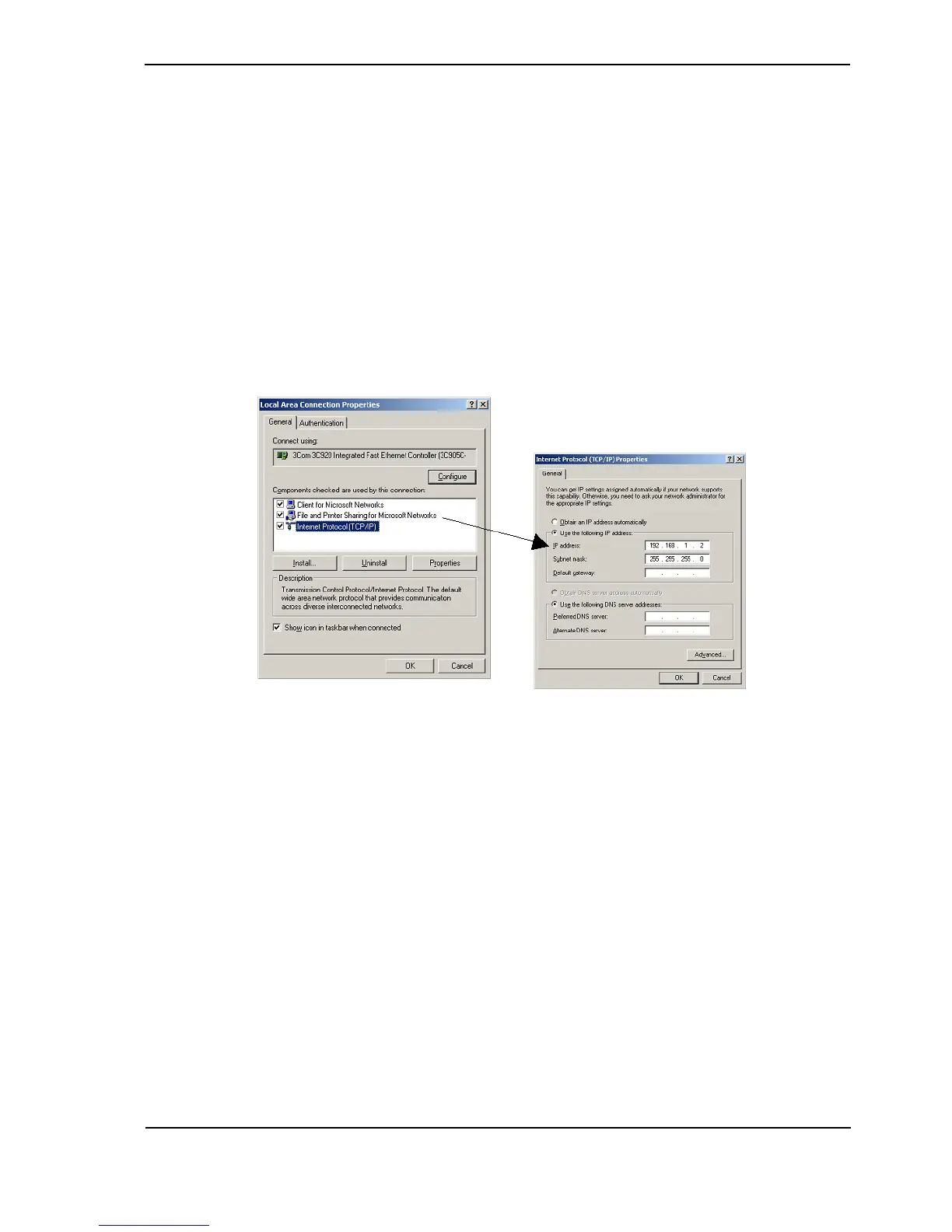
3. Select Internet Protocol (TCP/IP) and click Properties.
Figure 5: Internet Protocol
4. Change the PC IP settings to the following: 192.168.1.2
5. Set the subnet mask address to: 255.255.255.0
6. Click OK, and the Local Area Connection Properties box is displayed again. Click OK and
close the Network and Dial up Connections panel.



 To Next Page