7-8 Calibration Menu Field View Menus
7-18 PN: 10580-00289 Rev. K Vector Network Analyzer MG
7-8 Calibration Menu
To access the Calibration Menu, press the Shift key, then the Calibrate (2) key.
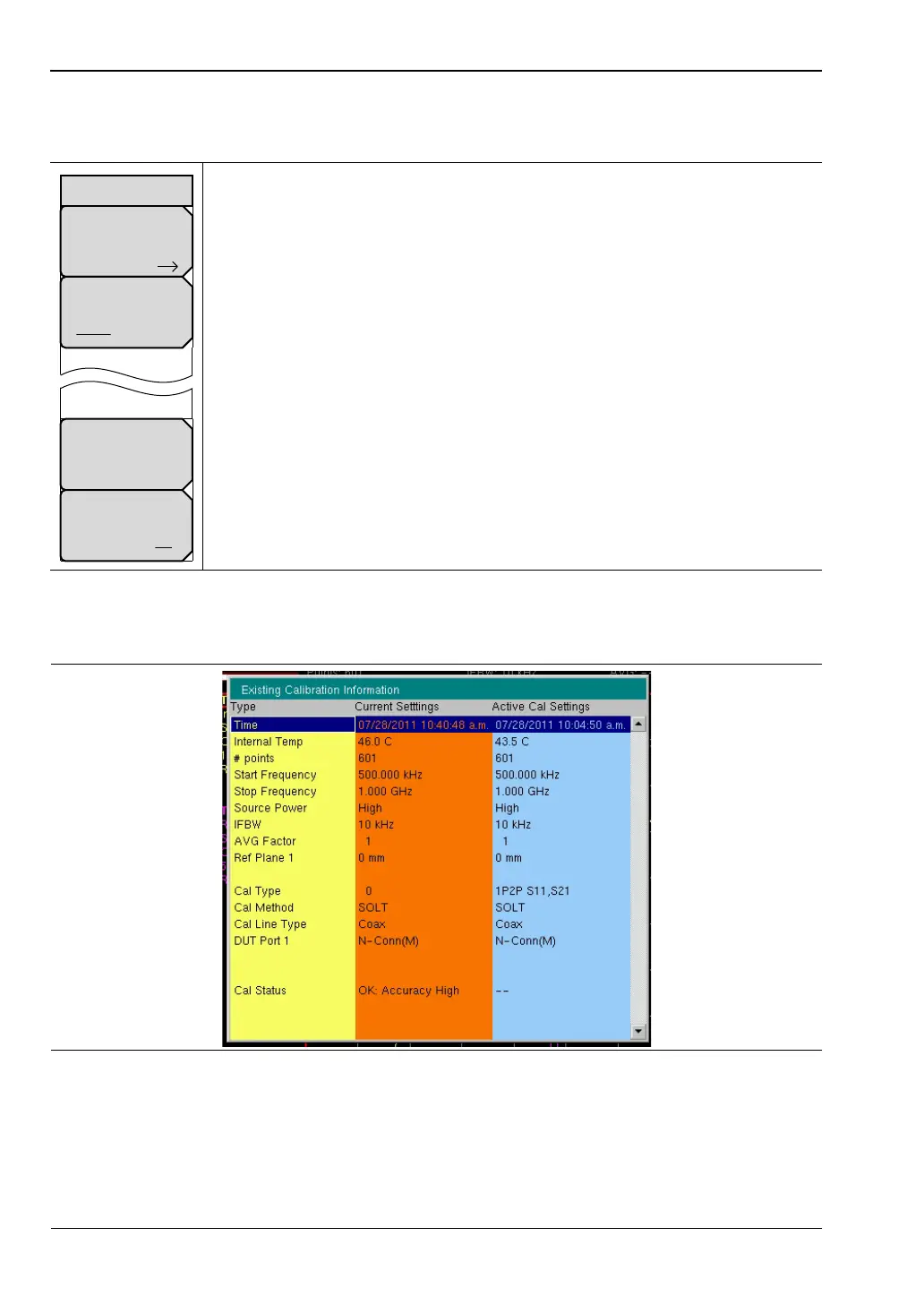
7-9 Existing Calibration Information List Box
The Existing Calibration Information list box shows the various sweep setting types for the
active calibration and compares this information to the current sweep settings. It also
displays the Cal Status information and the associated level of accuracy.
Start Cal: Press this soft key to open the “Next Step” List Box, which contains
the instructions: “Connect cal component, select step, and press Enter to
measure:”
Cal Type
2-Port 1-Port: Press this soft key to toggle the calibration type to 1-Port or
2-Port.
Existing Cal Info: Press this soft key to open the “Existing Calibration
Information List Box” on page 7-18. Press Enter or Esc to close the list box.
Cal Correction
On Off: Press this soft key to toggle calibration correction On and Off.
Figure 7-20. Calibration Menu
Figure 7-21. Existing Calibration Information List Box
Existing Cal Info
Start Cal
Cal Type
2-Port 1-Port
Cal Correction
On Off
Calibration













 To Next Page