8-5 Distance-to-Fault Measurement Example Time Domain, Option 2
8-16 PN: 10580-00289 Rev. K Vector Network Analyzer MG
In the Additional Dist Setup submenu:
(under Freq/Time/Dist Menu)
• DUT Line Type = set to Coax or Waveguide
• Cable List/Waveguide List = pick a cable or waveguide from a list to capture its
propagation velocity and cable loss (if it is coax) or its cutoff frequency and waveguide
loss (if it is waveguide). Alternatively, just enter these parameters directly if the
specific cable or waveguide that you are testing is not in the list. Note that you can add
coax entries into the list via the Master Software Tools program.
• Units = choose between m (meters) or ft (feet)
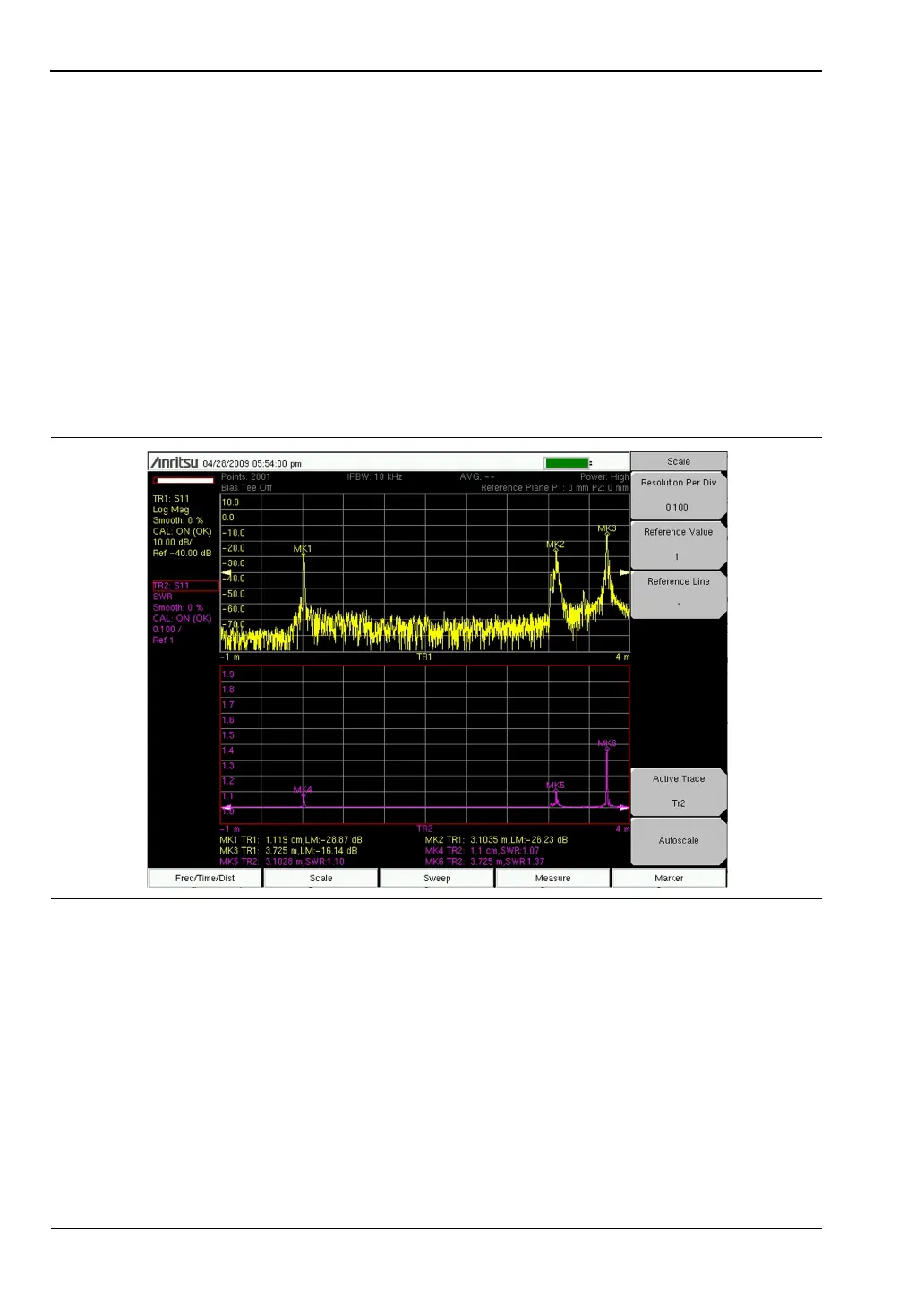
Figure 8-13 shows a typical distance-to-fault measurement result. The device under test is a
3.7 m long cable with a discontinuity close to the end of the cable, at 3.1 m. The display shows
the Log Mag (top) and SWR (bottom) responses. In both results, the ends of the cable and the
discontinuity are all clearly identifiable.
Figure 8-13. Distance Domain Measurements of 3.7 m Cable Showing S
11
(Log Mag and SWR)













 To Next Page