User Manual Synertia® RF Generator 43
The information contained in this manual is subject to change by Comet Yxlon without prior notice.
4.4 Connecting applicable interfaces
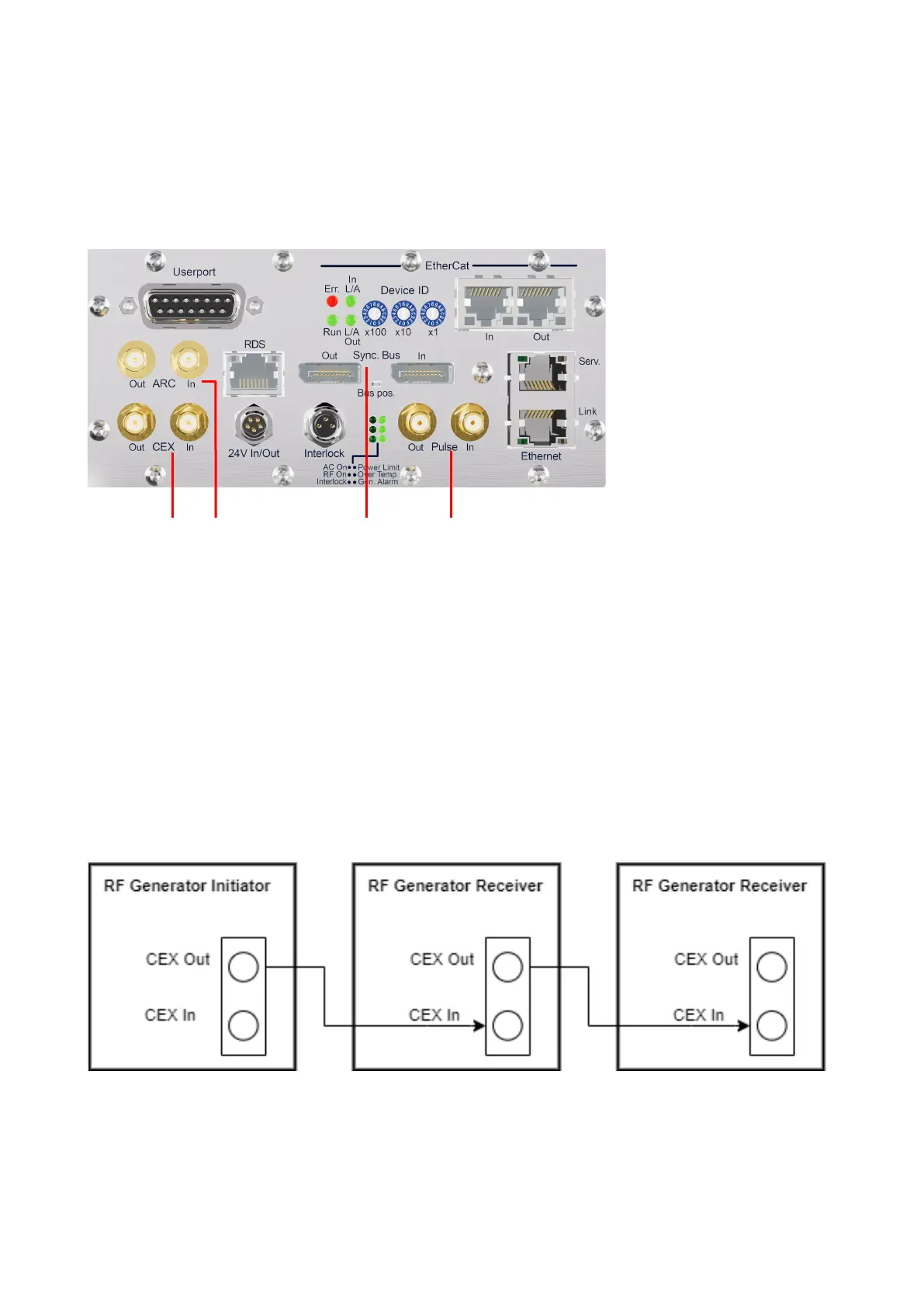
Control interfaces for Synertia® RF generators are on the back panel.
Figure 23: Interfaces on the back of the generator
4.4.1 CEX operation
This feature allows you to connect and synchronize a Synertia® RF generator with other
generators so that all generators produce RF output signals with the same frequency and
a fixed phase relationship. For details, see section 9.3 “CEX interface”.
You can configure the generator as an initiator or a receiver via the wiring of its CEX input
or output.
Figure 24: CEX initiator-receiver configuration
If applicable, connect the CEX input/output according to the desired initiator-receiver
configuration (see the example in Figure 24) using suitable high-quality, double-shielded
coaxial cables. Make sure that the connections between cables and connectors are tight.


 To Next Page