CTERA C-Series User Guide 175
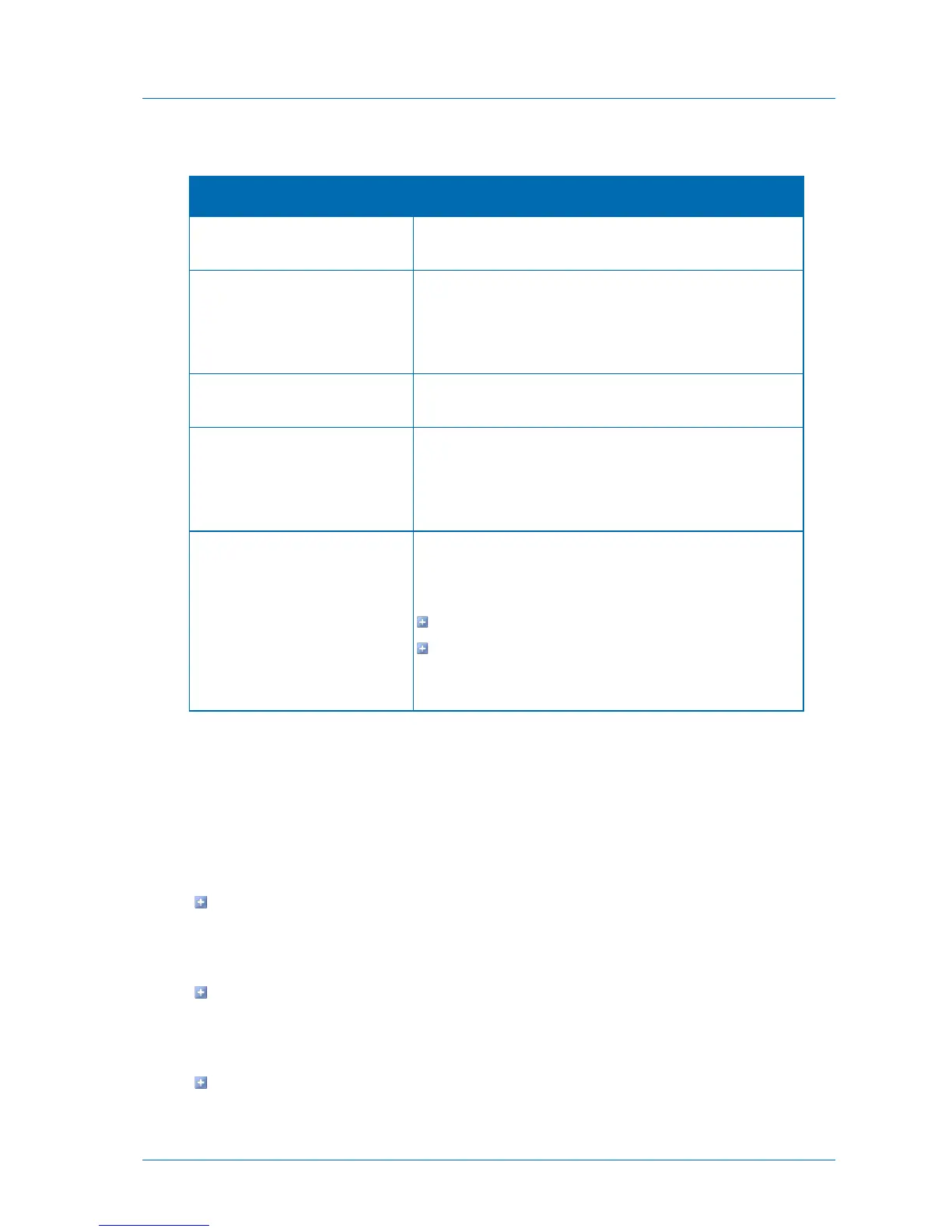
Table 36: Throughput Fields
Choose this option to specify that throughput should not be
restricted.
Throttle the Internet bandwidth
usage
Choose this option to restrict the bandwidth used for cloud
backups.
The rest of the fields on the page are enabled, and you must
complete them.
Limit outgoing bandwidth to
Type the maximum bandwidth to use for cloud backups in
kilobytes per second.
Select this option to specify that the bandwidth used for cloud
backups should be restricted only at specific times of the day.
Then use the drop-down lists to specify the time range during
which the bandwidth should be restricted.
Select to specify that the bandwidth used for cloud backups
should be restricted only on specific days. This can be any of
the following:
One or more specific days
Every Day. Bandwidth used for cloud backup will be
restricted every day.
The default value is Every Day.
Restoring Files from Backup
CTERA appliance provides a number of ways to restore files to previous versions stored on
the cloud, or to recover deleted files from the cloud. Some of the methods can be used by
administrators, while other methods enable end users to restore their own files.
You can restore files and folders to the appliance using any of the following:
The appliance Web interface's Cloud Backup Control Panel
This can be done by administrators only. See Restoring Files and Folders from the Cloud
Backup Control Panel (on page 176).
The CTERA Portal
You can access the CTERA Portal and restore files from there. This can be done by
administrators only.
The Virtual Cloud Drive



 To Next Page