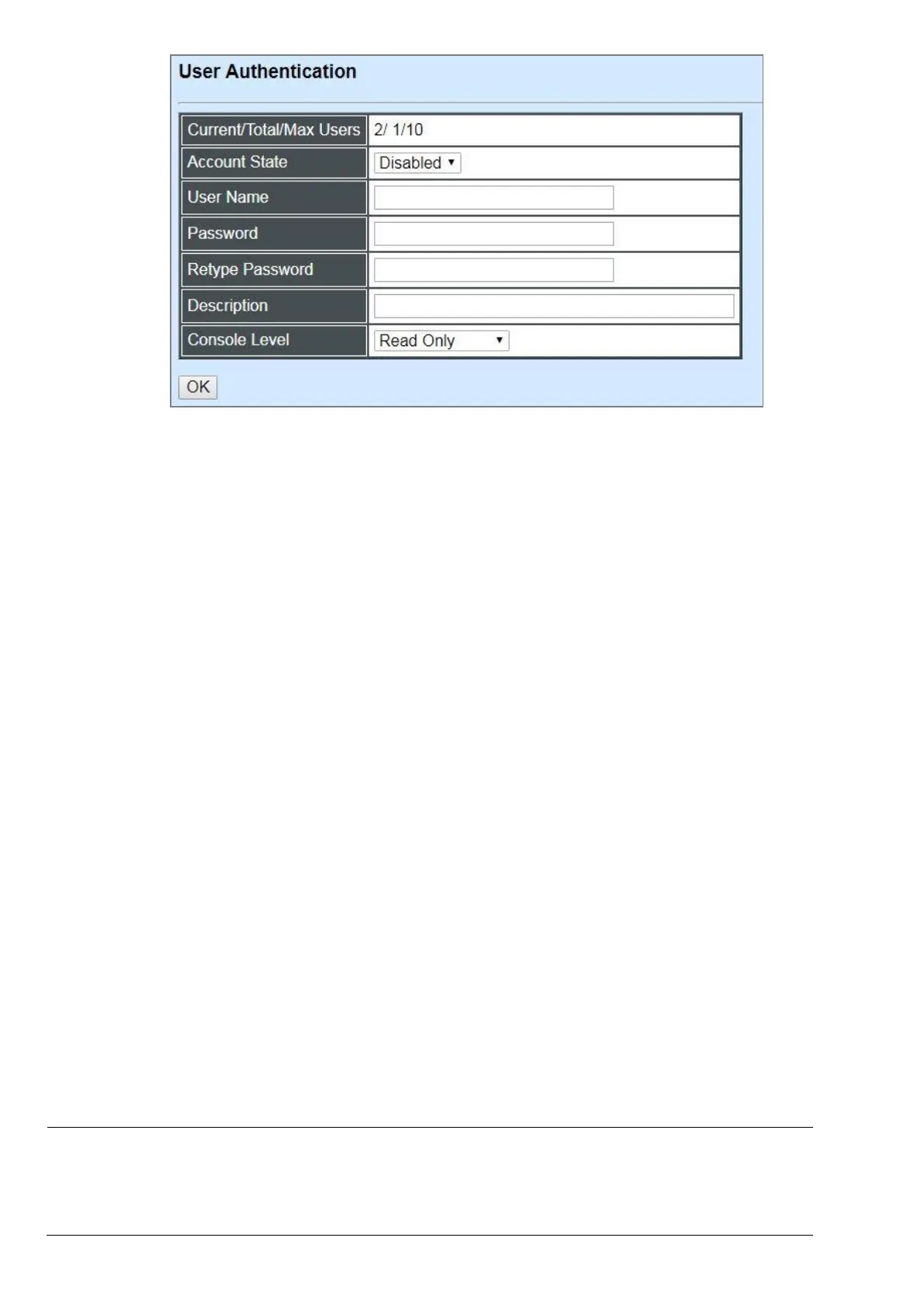
Current/Total/Max Users: View-only field.
Current: This shows the number of current registered user.
Total: This shows the amount of total users who have already registered.
Max: This shows the maximum number available for registration. The maximum number is
10.
Account State: Enable or disable this user account.
User Name: Specify the authorized user login name. Up to 20 alphanumeric characters can be
accepted.
Password: Enter the desired user password. Up to 20 alphanumeric characters can be accepted.
Retype Password: Enter the password again for double-checking.
Description: Enter a unique description for this user. Up to 35 alphanumeric characters can be
accepted. This is mainly used for reference only.
Console Level: Select the desired privilege level for the management operation from the pull-
down menu. Three operation levels of privilege are available in the Managed Switch:
Administrator: Own the full-access right. The user can maintain user account as well as
system information, load the factory default settings, and so on.
Read & Write: Own the partial-access right. The user is unable to modify user account,
system information and items under System Utility menu.
Read Only: Allow to view only.
NOTE:
1. To prevent incautious operations, users cannot delete their own account, modify their
own user name and change their own account state.
2. The acquired hashed password from backup config file is not applicable for user login
on CLI/Web interface.



 To Next Page
 Loading...


