DG-FS4526 User Manual
3-87
3
www.digisol.com
Note:
MAC authentication cannot be configured on trunk ports. Ports configured as trunk
members are indicated on the Network Access Port Configuration page in the
“Trunk” column.
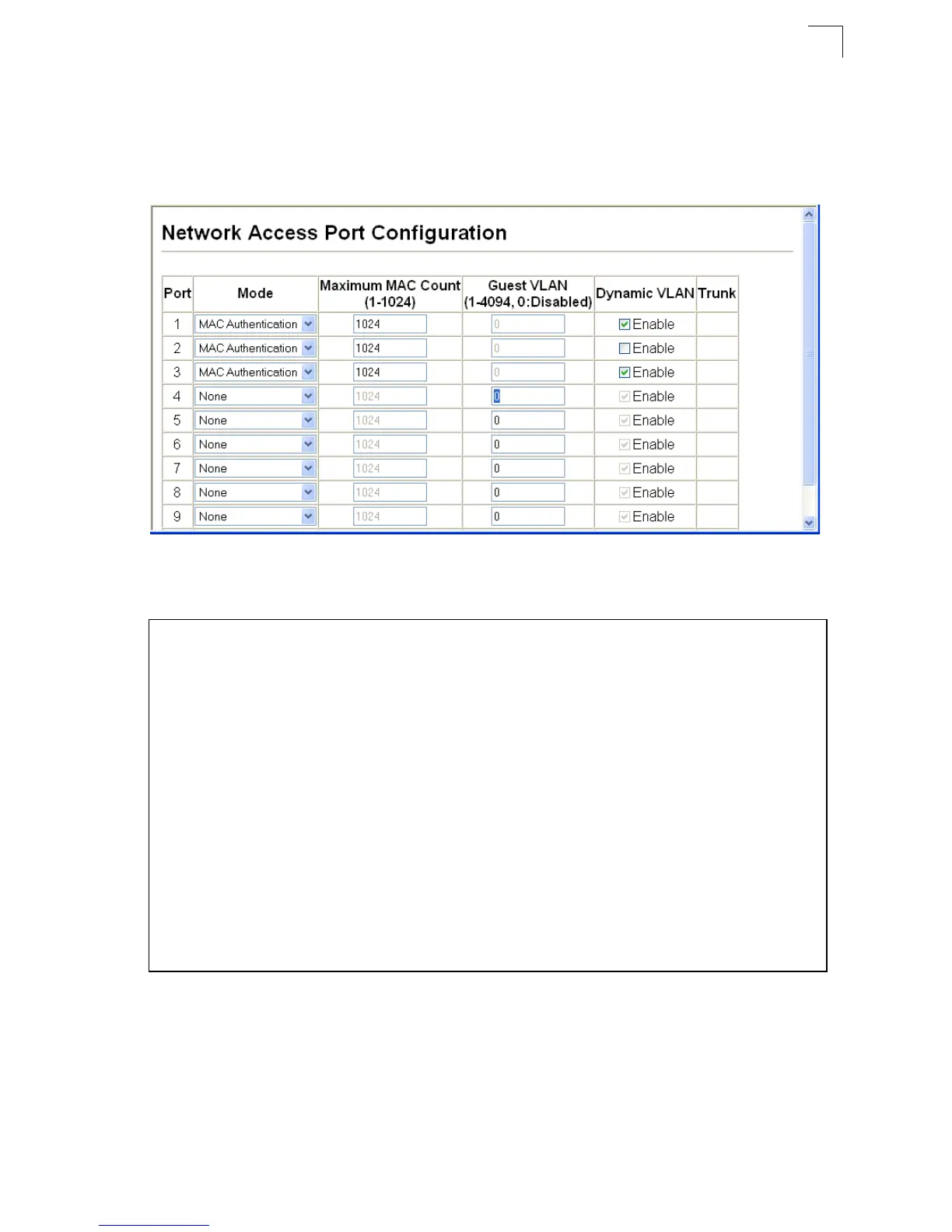
Web – Click Security, Network Access, Port Configuration.
Figure 3-59 Network Access Port Configuration
CLI – This example configures MAC authentication for port 1.
Console(config)#interface ethernet 1/1
Console(config-if)#network-access mode mac-authentication
4-108
Console(config-if)#network-access max-mac-count 10
4-109
Console(config-if)#mac-authentication max-mac-count 24 4-110
Console(config-if)#network-access dynamic-vlan
4-111
Console(config-if)#network-access guest-vlan
4-111
Console(config-if)#end
Console#show network-access interface ethernet 1/1
Global secure port information
Reauthentication Time : 1800
--------------------------------------------------
--------------------------------------------------
Port : 1/1
MAC Authentication : Enabled
MAC Authentication Intrusion action : Block traffic
MAC Authentication Maximum MAC Counts : 1024
Maximum MAC Counts : 2048
Dynamic VLAN Assignment : Enabled
Guest VLAN : Enabled
Console#













 To Next Page