Configuring the Switch
3-218
3
www.digisol.com
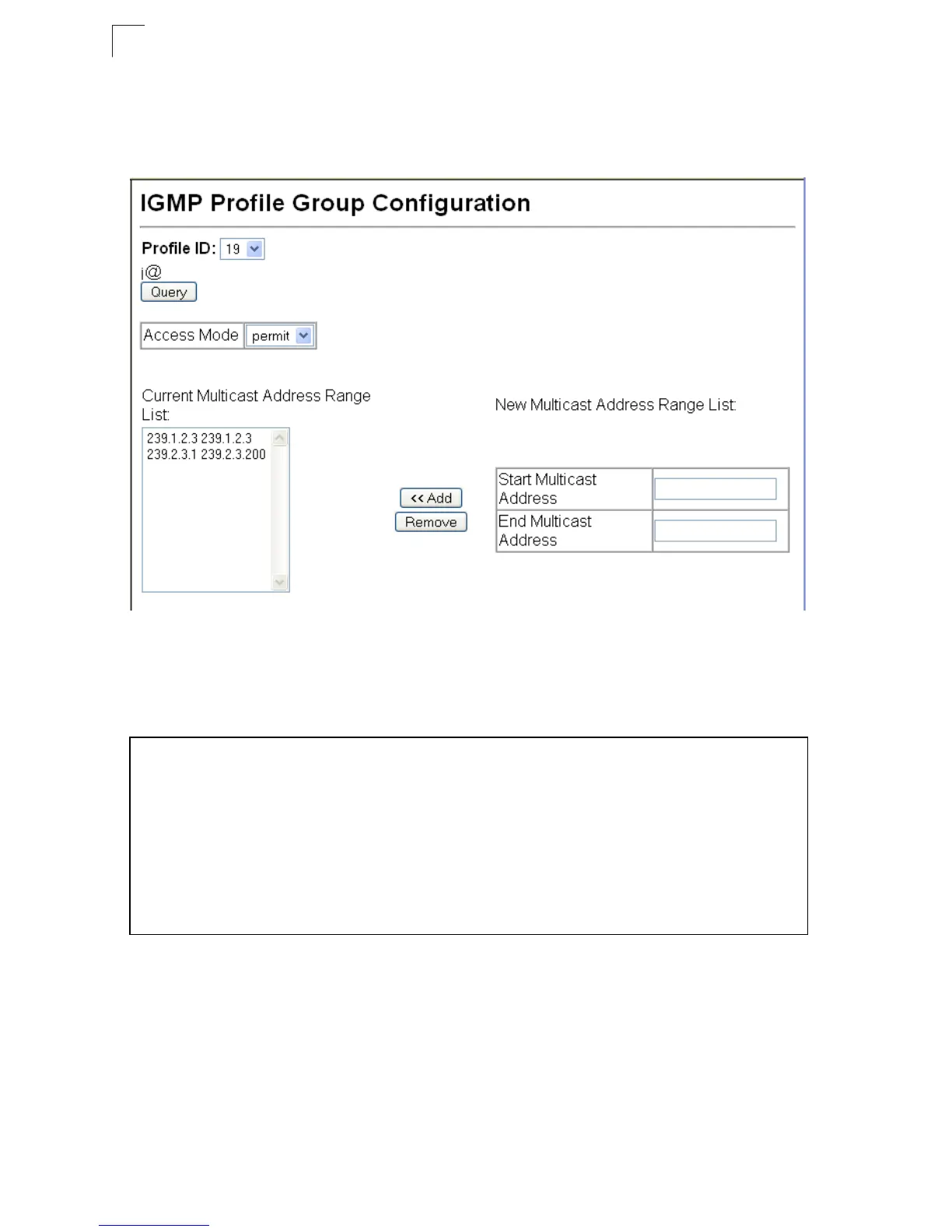
Web – Click IGMP Snooping, IGMP Filter Profile Configuration. Select the profile
number you want to configure; then click Query to display the current settings.
Specify the access mode for the profile and then add multicast groups to the profile
list. Click Apply.
Figure 3-138 IGMP Profile Configuration
CLI – This example configures profile number 19 by setting the access mode to
“permit” and then specifying a range of multicast groups that a user can join. The
current profile configuration is then displayed.
Configuring IGMP Filtering and Throttling for Interfaces
Once you have configured IGMP profiles, you can assign them to interfaces on the
switch. Also you can set the IGMP throttling number to limit the number of multicast
groups an interface can join at the same time.
Command Usage
• Only one profile can be assigned to an interface.
Console(config)#ip igmp profile 19 4-287
Console(config-igmp-profile)#permit 4-288
Console(config-igmp-profile)#range 239.1.2.3 4-288
Console(config-igmp-profile)#range 239.2.3.1 239.2.3.200
Console(config-igmp-profile)#end
Console#show ip igmp profile 19 4-291
IGMP Profile 19
permit
range 239.1.2.3 239.1.2.3
range 239.2.3.1 239.2.3.200
Console#













 To Next Page