CHAPTER 35
Network connection
405.1200.037.2 - Rel.: 2.21 of 25/02/2008
35-22
ETHERNET:
Connections
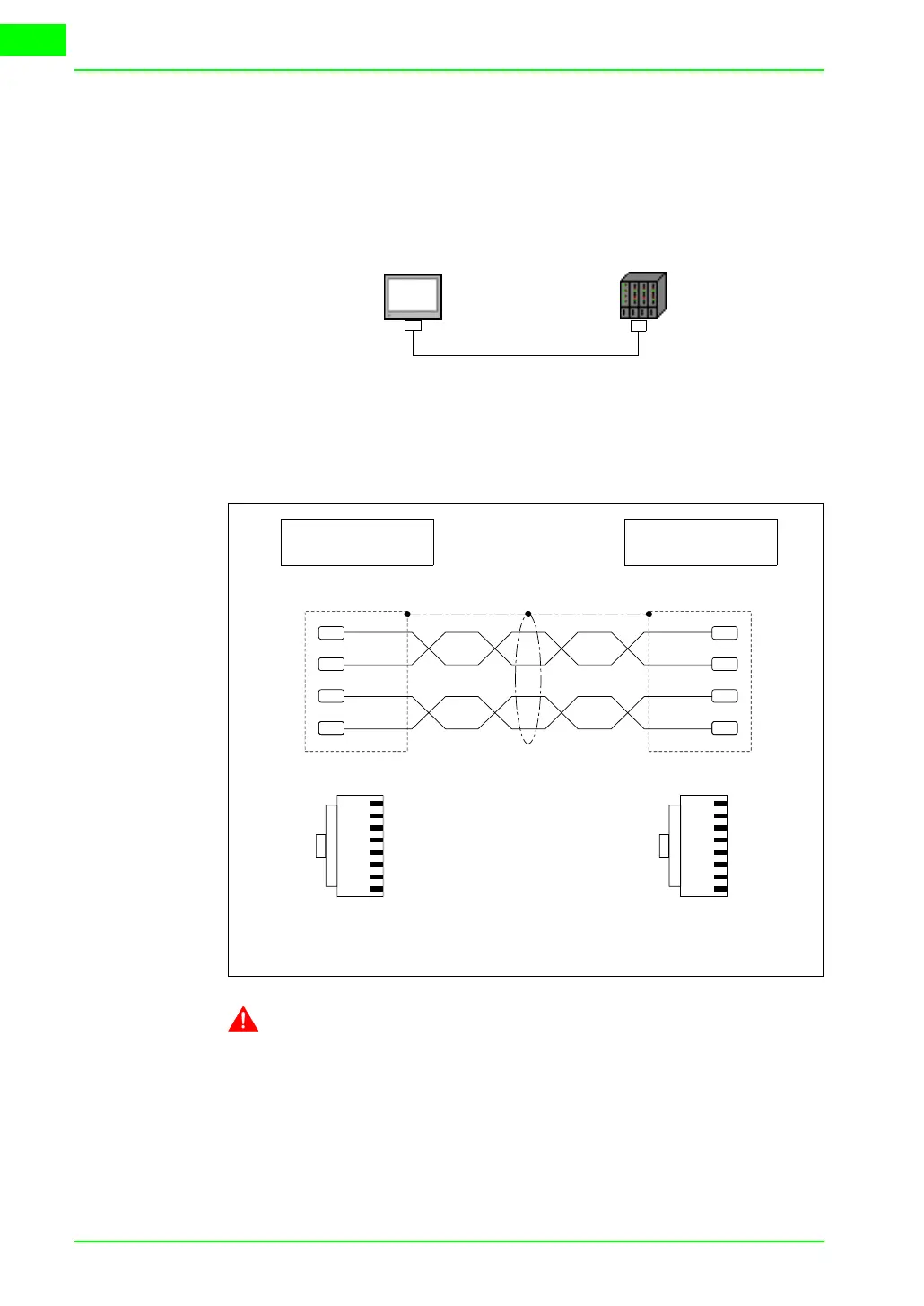
The figure below shows two examples of connections: the first example
shows a connection between a VT and a device using a direct connection,
while the second example shows a connection between VT and device
using a company network.
Example of direct connection between VT and Device.
The layout in the diagram shows a crossed Ethernet network cable to be
used for direct connection between the VT and the device without using a
company network connection.
NOTE: In this example we are not in a network context with other
devices so the IP address can be arbitrary.
The first three numbers of the IP address assigned must be the same as
those of the device with which it is to be connected, the fourth number must
be different. Example VT - 192.168.100.1, Device - 192.168.100.5
The other parameters remain those preset.
Crossed Ethernet cable
VT Device
Direct connection
1
2
3
4
5
6
7
8
1
3
2
6
Tx+
Rx+
Tx-
Rx-
1
3
6
2
Tx+
Rx+
Rx-
Tx-
1
2
3
4
5
6
7
8
VT Side
RJ45 8 pin
DEVICE Side
RJ45 8 pin
Front
View
Front
View



 To Next Page