4-19
Chapter 4 Connection to the External Devices Setup for the External Device Connection
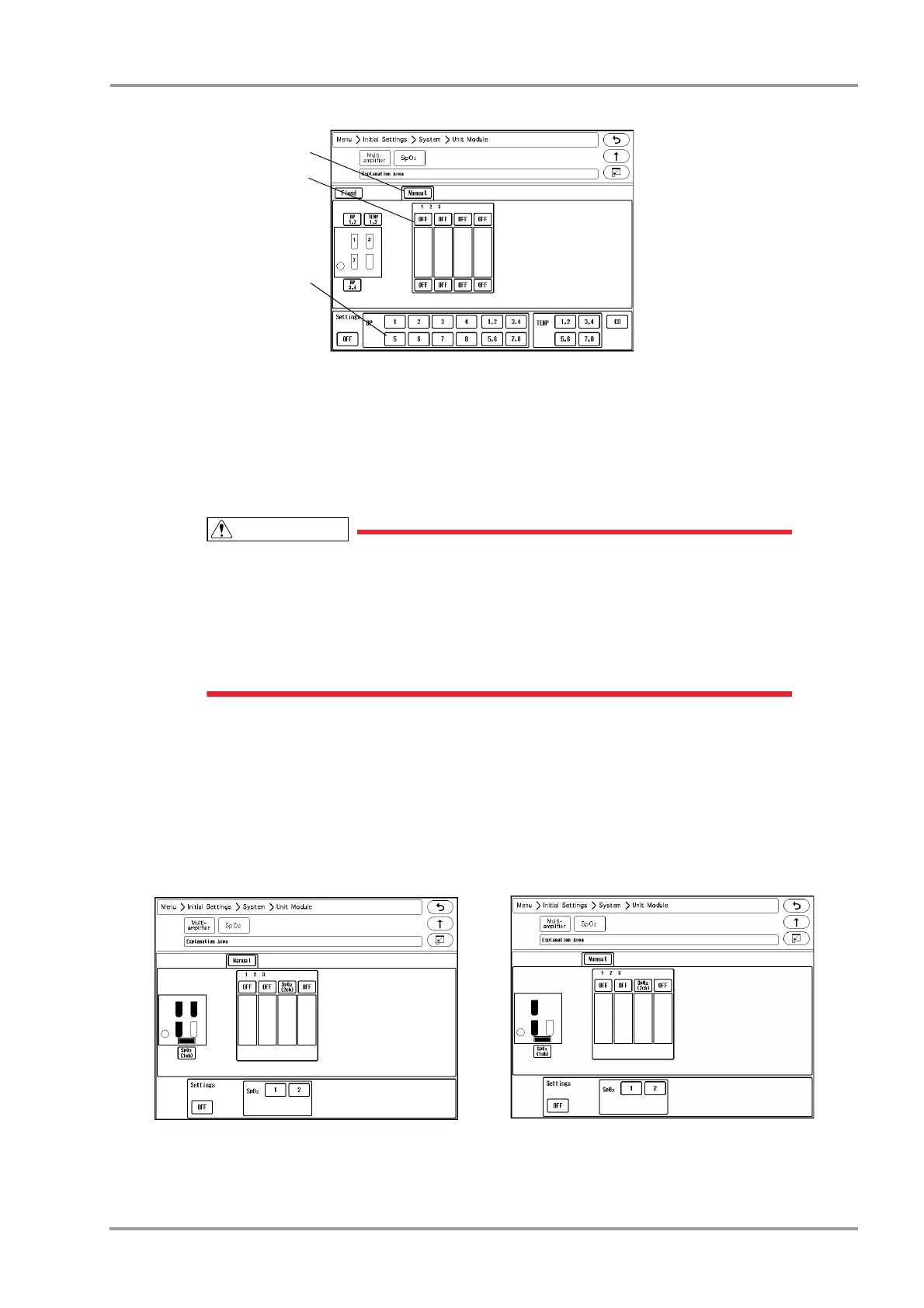
1 Press the [Manual] key.
2 Select the multiparameter connector location. The selected location will be displayed in blue.
3 Assign the parameter to the selected location. In this case, select [5] for "BP".
The parameter will be assigned to the selected connector.
The same parameter cannot be set to more than one connectors.
By setting [OFF] for the unused connector, the parameter will become selectable on another
connector.
If the parameter assigned to the multiparameter connector and the connected relay cable
does not match, the connector location will be displayed in red and the connected relay
cable type will be displayed.
SpO
2
Connector Setup
When using the SpO
2
Module (HG-810/HG-820), it is necessary to set the SpO
2
channel manually.
1Press the [Menu], [Initial Settings], [System], [Unit Module], [SpO
2
] keys.
The SpO
2
setup window will be displayed.
When the HS-8000 is used
When the DS-8007 is used



 To Next Page