145
8.3.7.6 Shutdown Targets
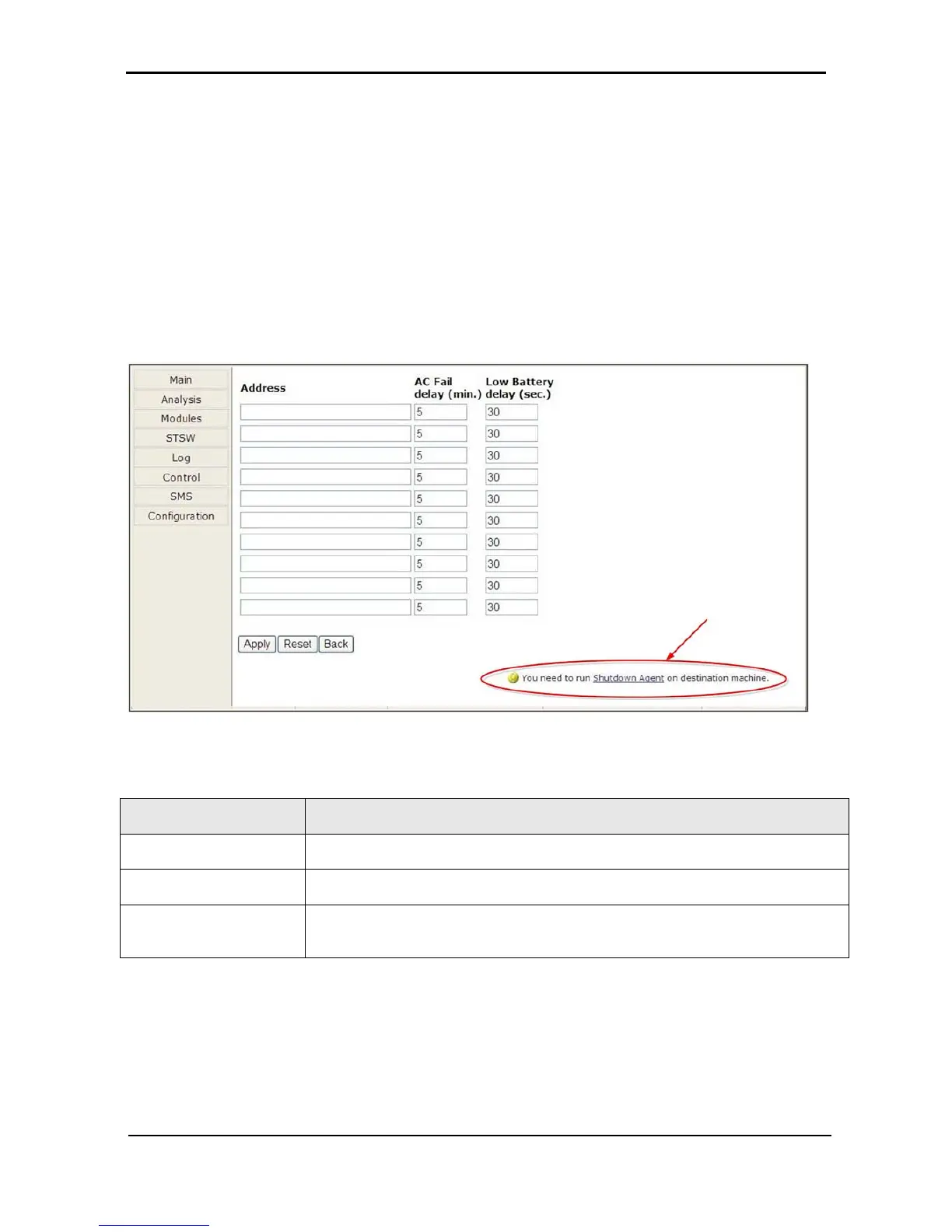
The “Shutdown Targets” option of the Configuration menu is where you record the IP address of the
computers that you want to perform an orderly shutdown in the event of an ac mains power outage.
To use this option, the computer in question must have a Shutdown Agent installed on it. The Shutdown
Agent is available as a self-installing “setup.exe” file intended to be run on the target computer. The install
file can be downloaded from the Internet by clicking on the “Shutdown Agent” link in the bottom right of the
screen as shown in Figure
302.
Note: The built-in Web interface supports a maximum of 15 shutdown targets. Customers requiring a larger
number of shutdown targets should inquire about the PSM-AC for Power+ software product (see
section 9 on page 149).
Figure
302: Define computers for auto-shutdown
Table 16: Defining computers for auto-shutdown
FIELD DESCRIPTION
Address
IP address of the computer to be automatically shut down in the event of a power failure.
Ac Fail delay (minutes)
Delay in minutes between ac failure and initiation of the automatic shutdown.
Low Battery delay
(seconds)
Delay in seconds between low-battery alarm and initiation of the automatic shutdown.











 To Next Page