EasyManua.ls Logo

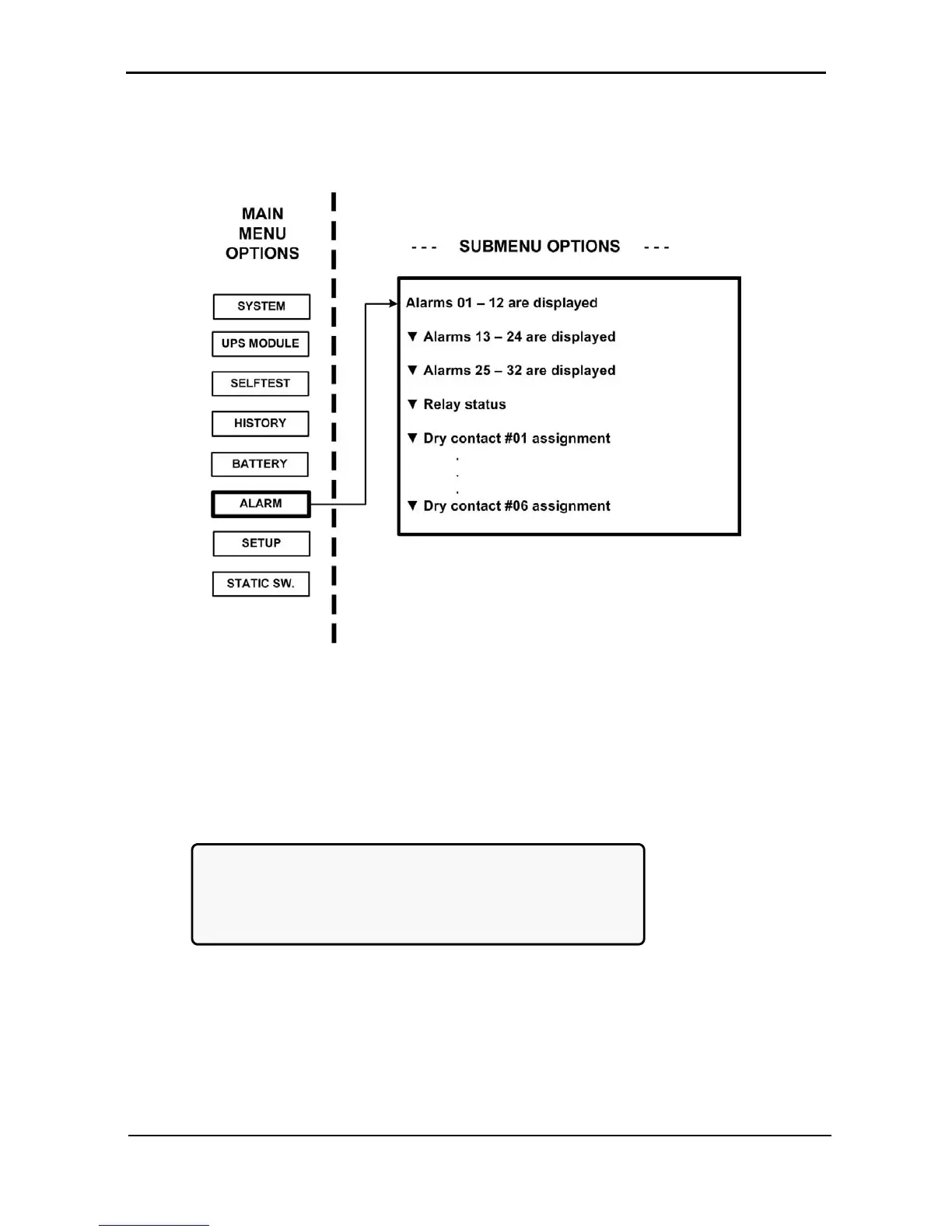
Gamatronic Power+ - Alarm Option; Figure 112: Main Menu Option 6 (Alarm); Figure 113: Alarms 01-12

Gamatronic Power+
176 pages
Print Icon
To Next Page IconTo Next Page
To Previous Page IconTo Previous Page
Loading...
GAMATRONIC ELECTRONIC INDUSTRIES LTD.
76
POWER
+
PARALLEL
UPS,
USER GUIDE
,
REL
.
2.0
7.7 “Alarm” Option
Alarms are displayedthere are 32 in all. In addition, there are some screens for use by a technician.
Figure 112: Main Menu option 6 (“Alarm”)
1. View alarms 01-12:
A + or before an alarm name indicates the alarm is enabled or disabled, respectively.
An asterisk (*) after an alarm name indicates that the alarm is active.
[Main Menu > ALARM]
01 – 03 +UPSMAJ:* +UPSMIN: +MSTR>1:
04 – 06 +DCRPCY: +LOADBP: -VIBRA-:
07 – 09 +OVTEMP: +OUTFLT: +BAT-HI:
10 – 12 +------: +BATEND: +BATLOW:
Figure 113: Alarms 01-12

Table of Contents

Related product manuals