GAMATRONIC ELECTRONIC INDUSTRIES LTD.
52
If instead of the STSW status being “OK, INV” it continues to be “OK, BYP”, check the Static Switch panel
to verify that the inverter is running.
If the inverter indicator on the Static Switch panel is OFF:
• Press the Inv/Byp button on the static switch panel to switch the inverter ON and wait for
the indicator to light.
• Press the Inv/Byp button on the lower right of the control panel.
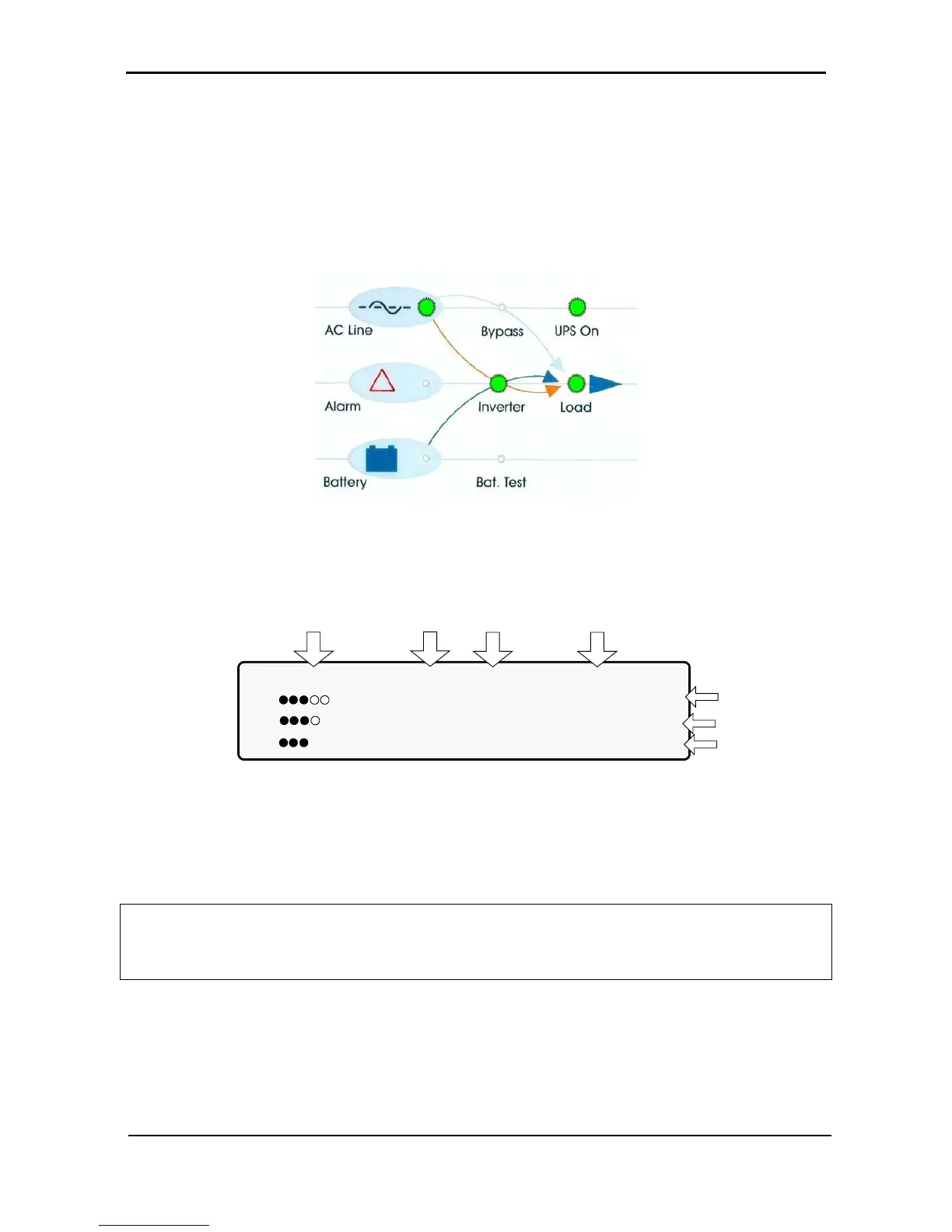
Figure 63: Normal operation indication
2. Connect the load and observe the results on the display.
LOAD LEVEL ---11:20:25---
L1: _____ 015A, 230V BATTERY: 864V
L2: ______ 012A, 230V UPS OK (ON)
L3: _______ 011A, 230V STSW OK (INV)
Load level
bar graph
Output
current
Output
voltage
Current
time
Battery
voltage
Status
indications
Figure 64: Main screen results
3. Observe that the “dot” bar graph now indicates the load presence and relative power consumption.
Filled dots indicate kW; filled dots plus empty dots indicate apparent power in kVA.
POWER
+
start-up is now complete.











 To Next Page