Microlab
®
STAR Service Manual
6-31
Adjustment: (Pipetting Arm with Channels XY Manual)
• Adjustment must performed if difference criteria are not met.
Interpretion of Results from Adjustment procedure:
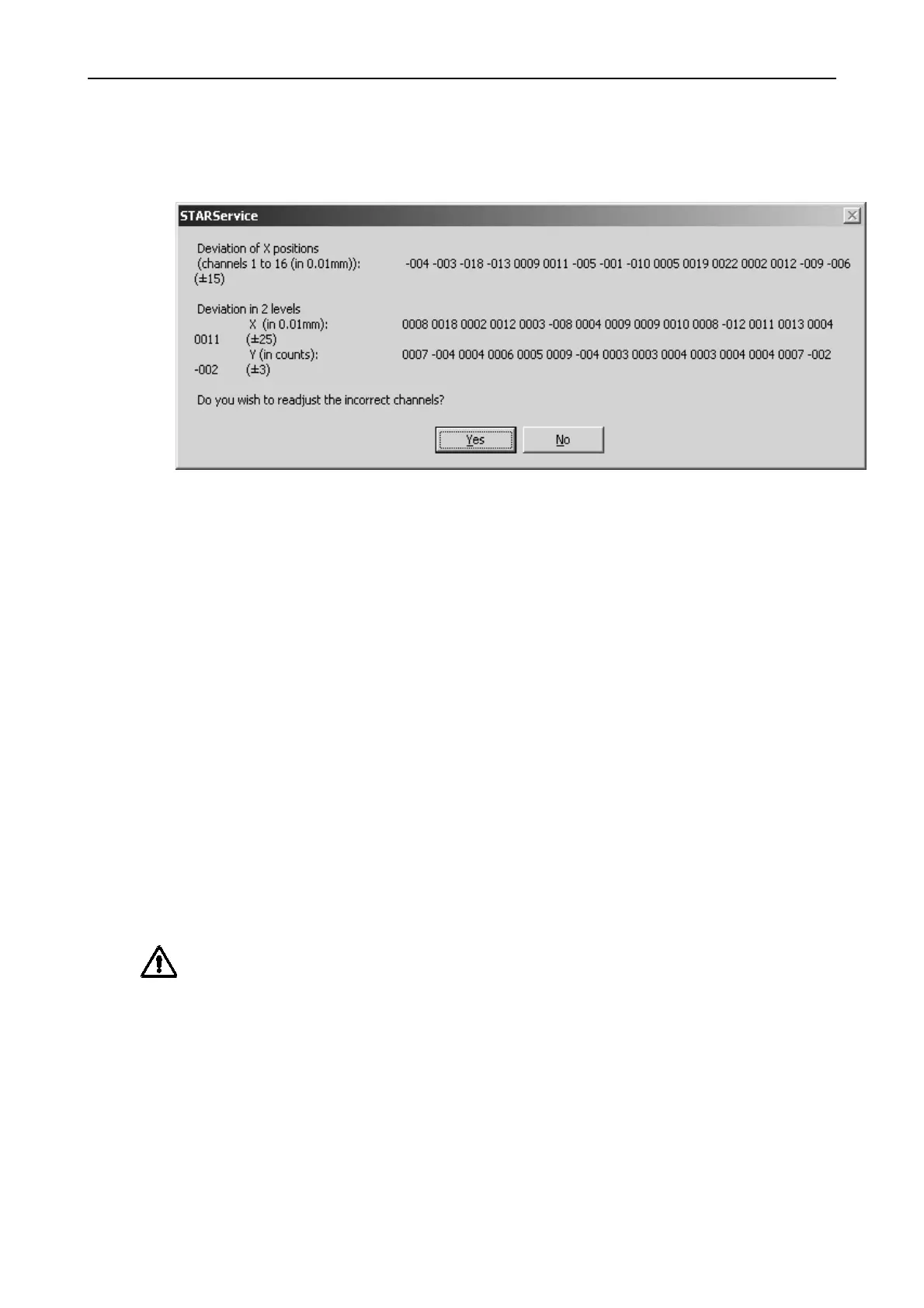
Adjusting Pipetting Channels 3, 11 and 12 in X-Direction (which would be
necessary in the result window shown above).
The Y Deviation is given by the straightness of the Channel and by the quality of
adjustment with the Channel Adjustment Tool P/N 173952, therefore no action can
be taken here to improve these values - they are for recognition only.
If the Y Deviation Values are bad or out of Range, start adjusting according to
section 6.3 Adjusting Pipetting Channel on page 6-14
Corrective Actions
Focus only on the Channel with the most deviation, resp. the Channel which is out
of range in X-Axis. In this example, this would be Channel 12.
Turn the Channel counterclockwise around its Y Axis to improve the alignment and
lower the deviation and run the Adjustment Program again.
Attention: corrective actions take place within the macro adjustment procedure.
Therefore focus on Pipetting channel to be corrected. Do not switch off instrument,
do not shift Pipetting Arm, etc. The macro will continue after you have corrected the
Pipetting channel.



 To Next Page