48
────────────────────────────────────────────────────
5.2 Floppy Disk
────────────────────────────────────────────────────
5.2.1 Saving the Settings
NOTE
5.2 Floppy Disk
Settings can be saved to and later reloaded from a floppy
disk. Files can also be deleted and directories created.
The floppy drive uses MS-DOS* formatting.
*MS-DOS is a registered trademark of Microsoft
Corporation.
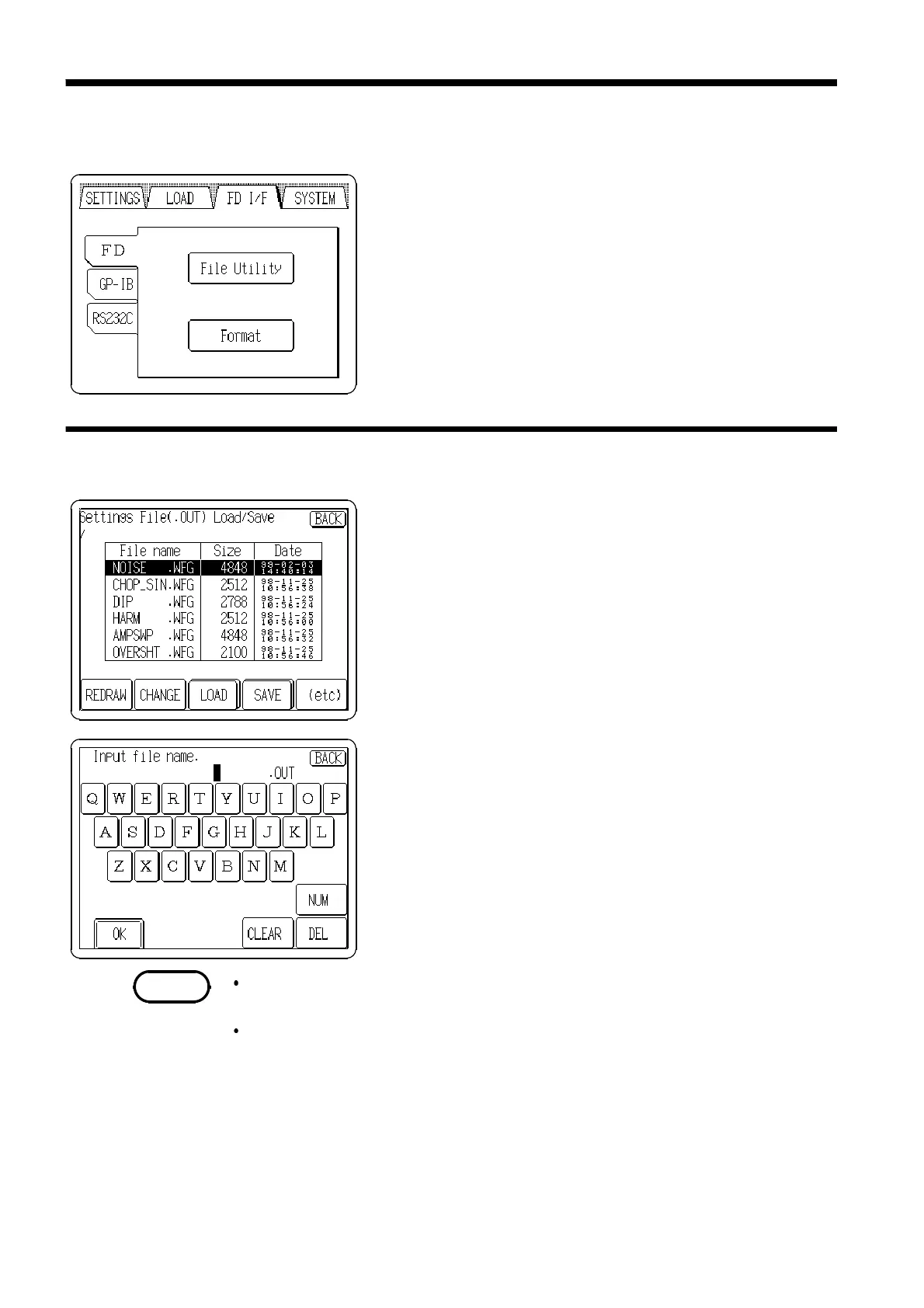
1. Insert the floppy disk and press the
File Utility
button on
the FD I/F screen.
2. Press the
SAVE
button. If the button is not displayed,
press the
(etc)
button to display the
SAVE
button.
3. Enter a file name and after that press the
OK
button.
Before inserting the floppy disk, release the write-protect of the floppy to
save the settings.
When there is no entry or when the
OK
button is pressed after pressing
CLEAR, the file is automatically named TEMPDATA.OUT.



 To Next Page