39
────────────────────────────────────────────────────
3.8 Marker Output Function
────────────────────────────────────────────────────
3.8.2 Setting the Output Value Marker
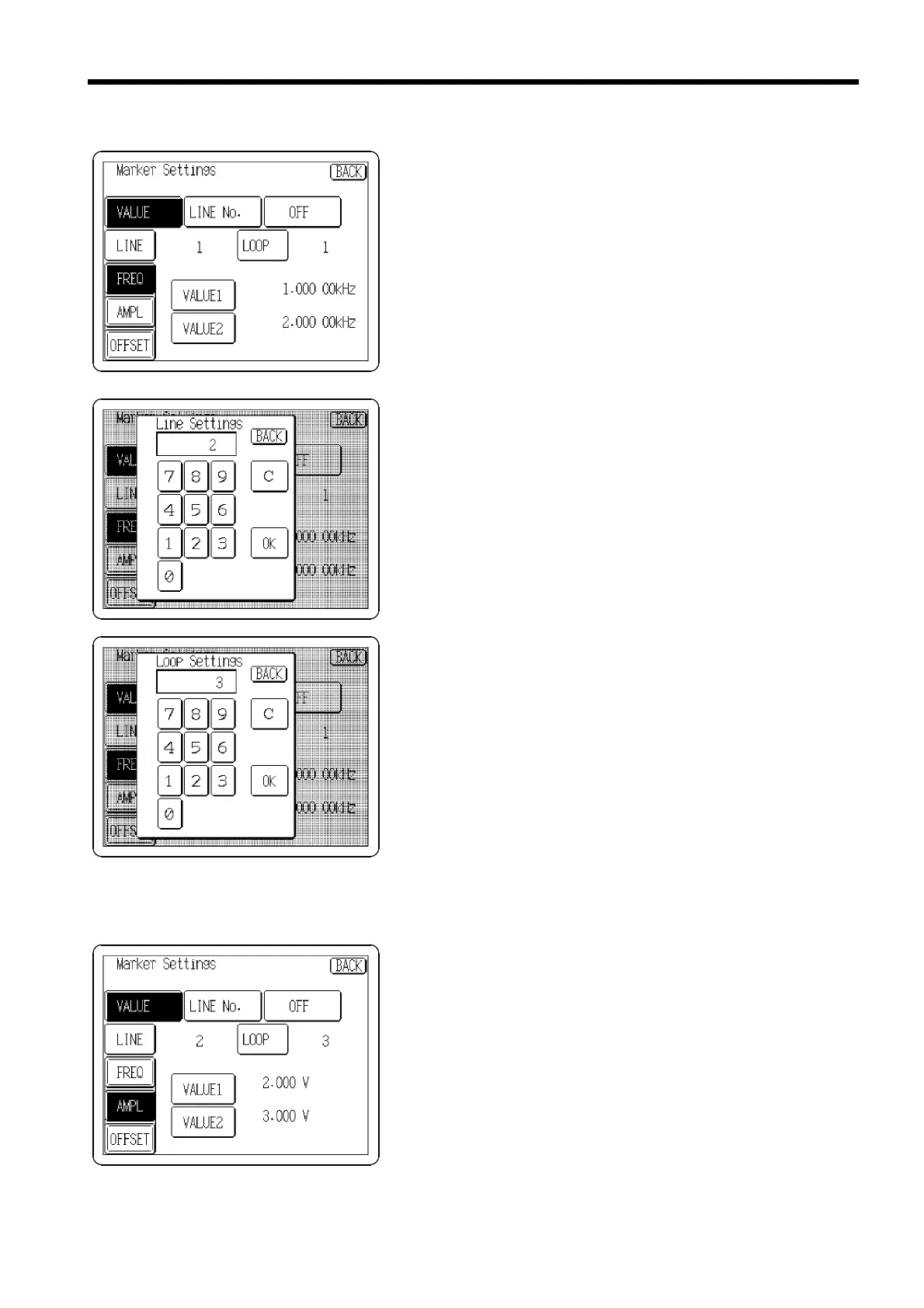
Press the
VALUE
button on the Marker Settings screen so
that it displays in reverse. The screen shown on the left is
displayed.
Specify the following output items.
Example
When the second item (second line) on the SWEEP Editor
screen in Section 3.8.1 is output by the following marker
settings
Output line: 002
Number of loops before outputting: third loop
Amplitude: 2.4 V to 2.8V
(1) Setting the output line
Specify the line number to be output.
1. Press the
LINE
button to open the Line Setting window.
2. Specify the output number "2" (second line in this
example) using the tenkeys.(up to 128) You cannot
specify numbers you are not using.
3. Press the
OK
button to return to the Marker Settings
screen. The specified number is displayed.
(The default setting is 1.)
(2) Setting the output loop.
Specify the number of loops required before outputting the
line.
1. Press the
LOOP
button to open the Loop setting window.
2. Specify the number of number of loops before output "3"
using the tenkeys.
3. Press the
OK
button to return to the Marker Settings
screen. The specified number of loops until output is
displayed.
This setting is disable when the setting value exceeds the
number of loops set in "3.7.11 Setting the number of
loops." (The default setting is 1.)
(3) Selecting a marker output item
Select the item you wish to output [frequency, amplitude,
offset, or duty(pulse waveform only)]. Only one item can
be selected for the output marker on the screen and it is
highlighted.
Press the
AMPL
button.
Only the items set in "3.7.3 Selecting Items to Sweep" and
"3.7.4 Sweep Settings (Pulse Waveforms)" are effective.



 To Next Page