EQUIP
®
Series ACUIX™ IP PTZ Dome Installation and Configuration Guide
Document 800-04194V1 Rev A 33
07/11
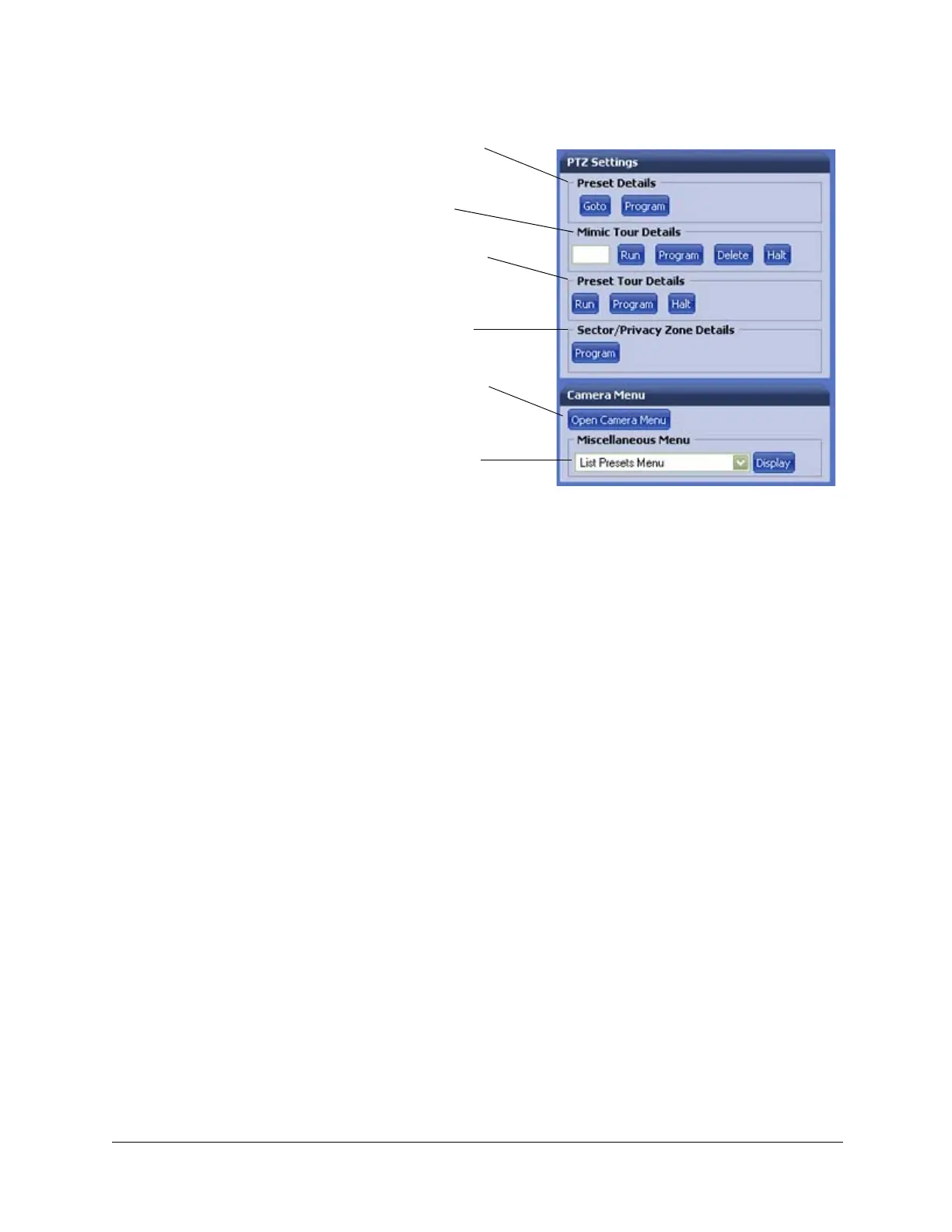
Figure 4-6 PTZ Settings and Camera Menu Panels
Compression Settings
In the Compression Settings tab, you can adjust the following video signal
settings:
• Resolution (4CIF, 2CIF, CIF)
•Frame rate (1 to 30)
•Priority (Quality or Bit Rate)
• Compression ratio (Minimum, Low, Medium, High, or Maximum)
• Target bit rate (if Bit Rate is chosen as the priority)
• Maximum bit rate that the dome will provide across the network
• Group of pictures (GOP)
• Statistics: View the received bit rate and frame rate statistics of the current
image in real time. The Received check box is disabled by default. When
you log off, this check box reverts to the disabled state.
Goto a special or custom preset.
Program up to 150 presets.
Run, Program, Delete, and
Halt up to 16 mimic tours.
Run, Program, and Halt up to 16
preset tours, each with 64 possible
preset positions.
Program up to16 sectors or 32
privacy zones.
Open Camera Menu to configure
various settings. This is the same
as the ACUIX Analog OSD.
Display the details of the preset
tours, mimic tours, sectors and
privacy zones.



 To Next Page
 Loading...





