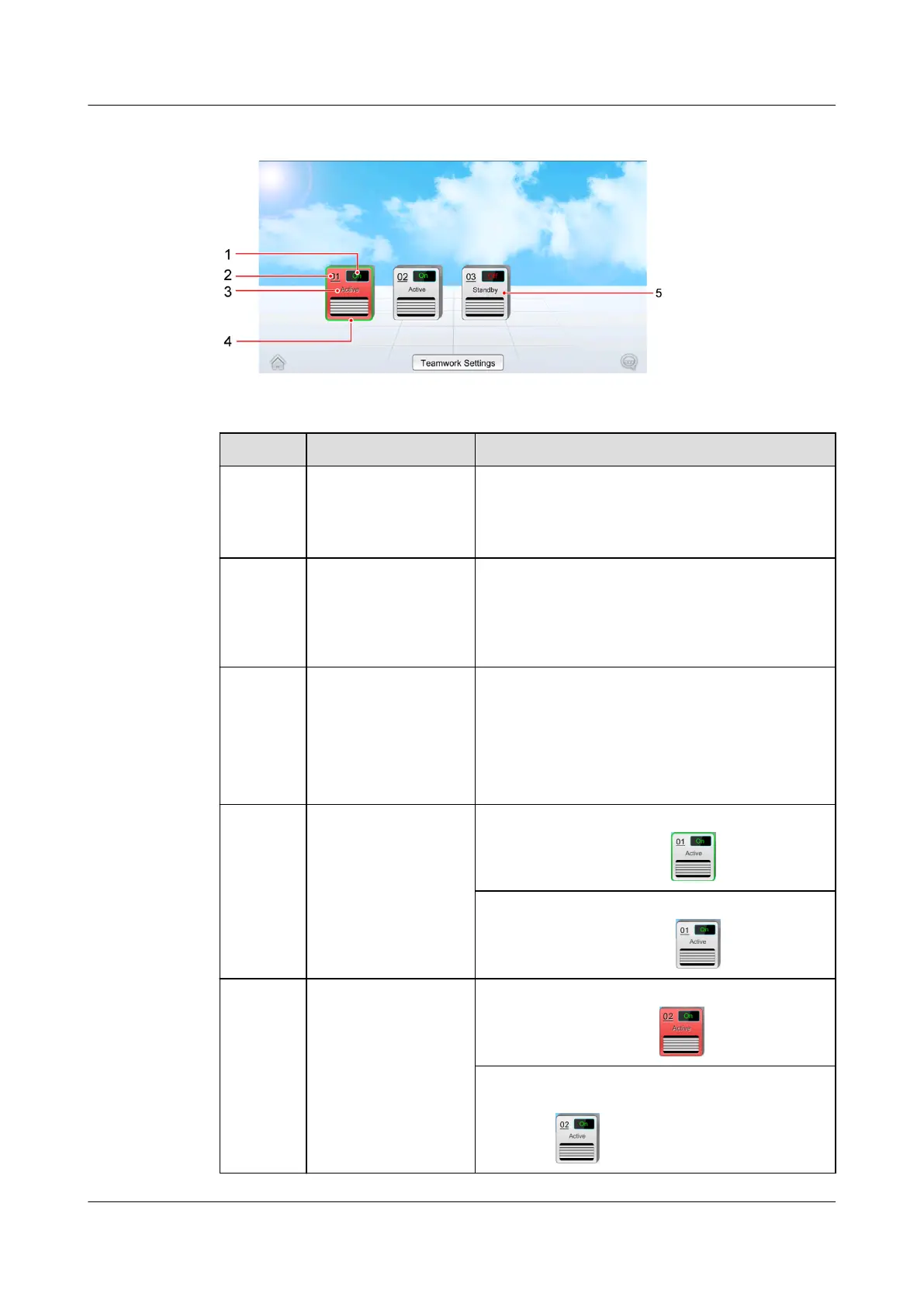
Figure 4-9 Teamwork topology
Table 4-8 Note for the screen
No. Parameters Note
1 ON/OFF/NA On indicates that the smart cooling product is
started and O indicates that the smart
cooling product is shut down. NA indicates
that the smart cooling product is oine.
2 01, 02, 03 Indicates the device address. 01 is the master
one and the rest are all slave ones.
NOTE
If the master one oine, the teamwork networking
failed.
3 Active/Standby Active: properly responds to the requirement
control.
Standby: responds to the requirement control
when Active is faulty (critical alarms,
shutdown, and oine) or Active cannot meet
cooling requirements.
4 Frame: green/non-
green
A device with green frame indicates the
device itself, as shown in
.
A non-green frame indicates the other device
in the group, as shown in .
5 Ground color: red,
bright gray
Red indicates that a critical alarm is
generated, as shown in .
Bright gray indicates that the device is
operating without any critical alarms, as
shown in .
NetCol5000-A025 In-row Air Cooled Smart Cooling
Product
User Manual (300 mm Width) 4 Power-On Commissioning
Issue 15 (2020-12-10) Copyright © Huawei Technologies Co., Ltd. 119







 To Next Page