Procedure
Step 1 Tap Shutdown on the LCD home screen and turn o the switch QF3 and the
smart cooling product switch in the PDC.
● Exercise caution because the NetCol5000-A is still energized when it is being
shut down over the LCD.
● When replacing the compressor, tighten the suction angle valve to a torque of
150 N·m and the discharge angle valve to a torque of 120 N·m.
Step 2 Open the rear door and remove the air lter.
Step 3 Reclaim refrigerant.
Step 4 Remove the electric heating belt.
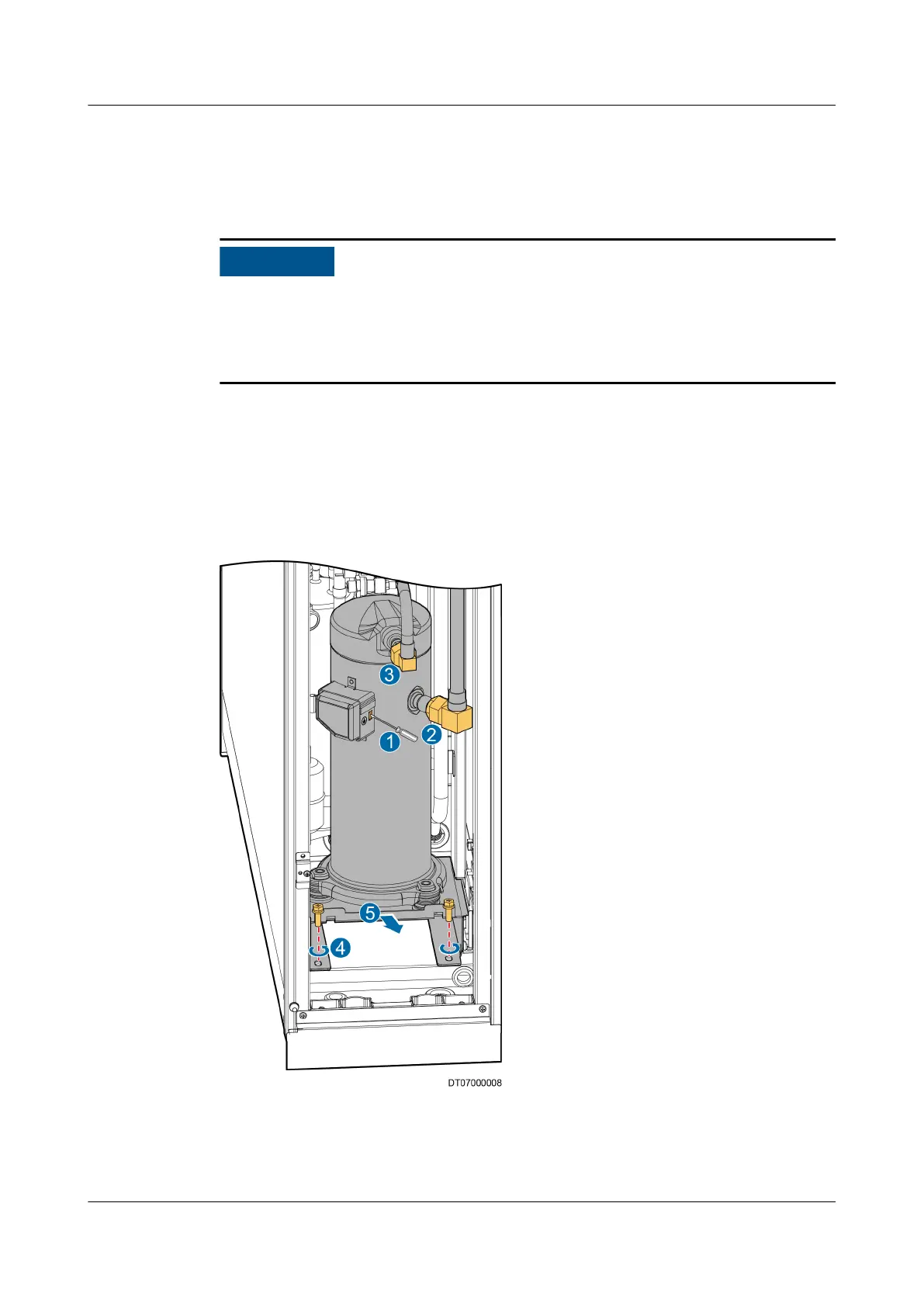
Step 5 Remove the compressor.
Figure 6-8 Removing a compressor
1. Use a at-head screwdriver to clamp the buckle of the compressor connection
box, remove the cover of the connection box, and disconnect cables from the
compressor, as shown by (1) in Figure 6-8.
NetCol5000-A025 In-row Air Cooled Smart Cooling
Product
User Manual (300 mm Width) 6 System Operation and Maintenance
Issue 15 (2020-12-10) Copyright © Huawei Technologies Co., Ltd. 232



 To Next Page