Exercise caution because the NetCol5000-A is still energized when it is being shut
down over the LCD.
Step 2 Open the front door and disconnect cables.
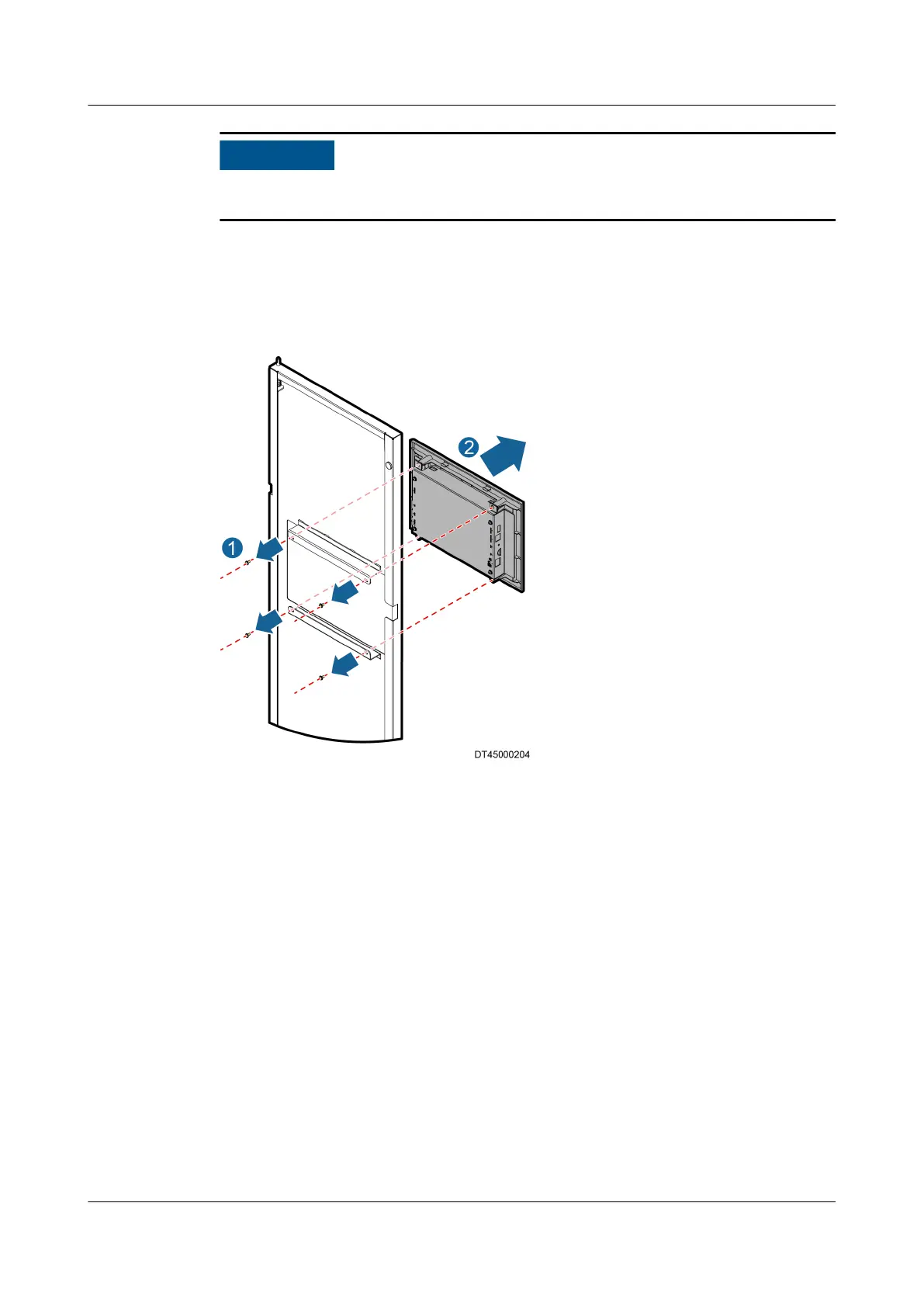
Step 3 Hold the LCD screen from the front, remove the four screws from the screen using
a Phillips screwdriver, and then remove the LCD screen, as shown in Figure 6-38.
Figure 6-38 Replacing an LCD
Step 4 Secure the spare LCD screen to the original position on the front door using a
Phillips screwdriver.
Step 5 Connect the cable to the LCD and close the front door.
----End
NetCol5000-A025 In-row Air Cooled Smart Cooling
Product
User Manual (300 mm Width) 6 System Operation and Maintenance
Issue 15 (2020-12-10) Copyright © Huawei Technologies Co., Ltd. 265


 To Next Page
 Loading...




