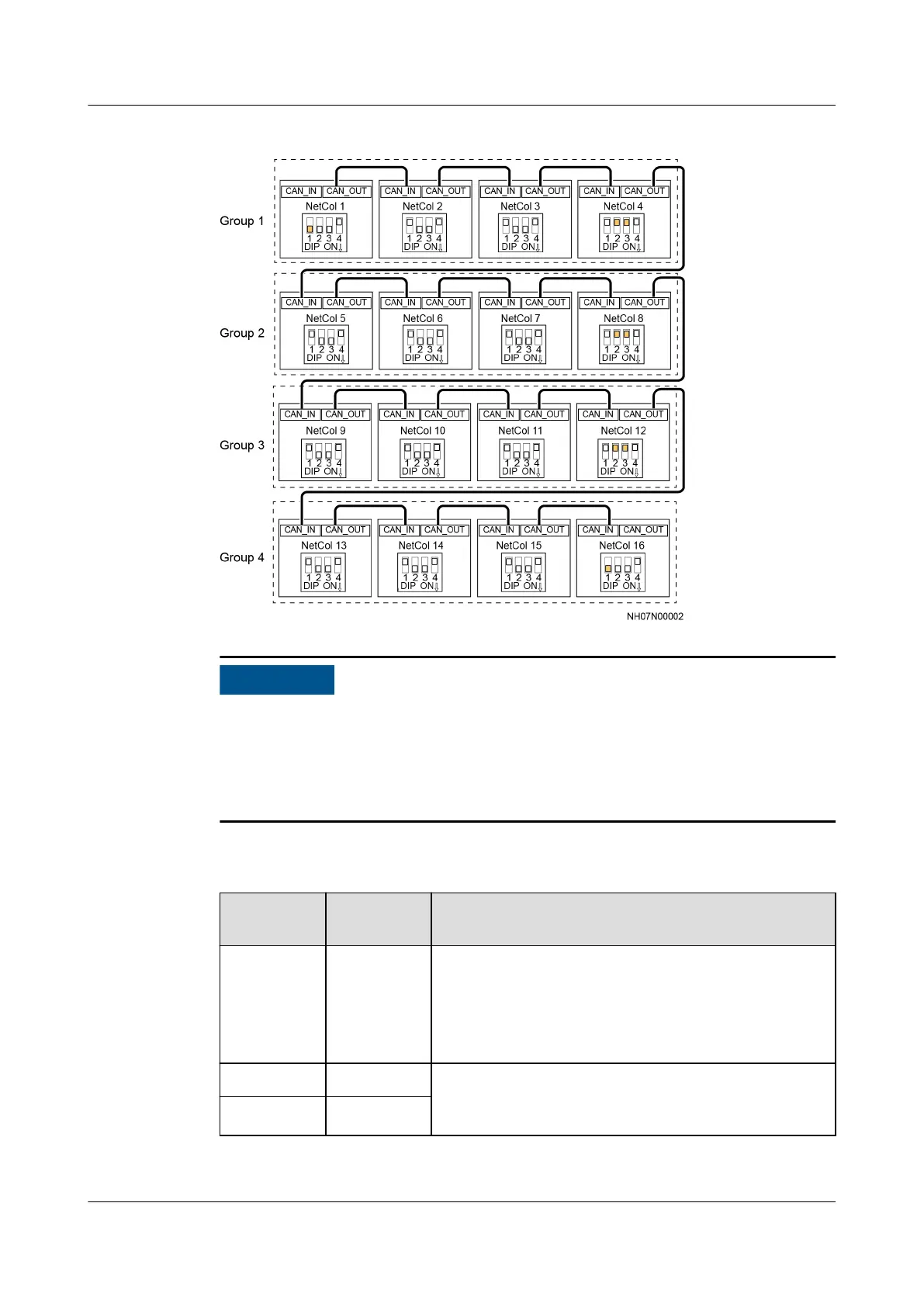
Figure 3-55 Network diagram
● For CAN networking, set the DIP switch on the main control module by
following the instructions in Table 3-15.
● If Restore factory settings? The system will operate with existing settings
30s later. is displayed when the main control module is powered on, click No
and
ip toggle switch 4 on the main control module to OFF (default status).
Table 3-15 Instructions about operating the DIP switch on the main control
module
Toggle
Switch
Default
Value Site Operations
1 OFF ● Non-teamwork control: remaining OFF
● Teamwork control: Flip toggle switch 1 of the
rst and last smart cooling products in the
network to ON, and toggle switch 1 of the other
smart cooling products to OFF.
2 ON Monitoring branch switch. If you need to enable the
monitoring of northbound devices by group, ip
toggle switches 2 and 3 to OFF.
3 ON
NetCol5000-A025 In-row Air Cooled Smart Cooling
Product
User Manual (300 mm Width) 3 Installation Guide
Issue 15 (2020-12-10) Copyright © Huawei Technologies Co., Ltd. 87







 To Next Page