5 Commands and indicator devices
BIESSE S.p.A. © - p704k0003.fm251111
45
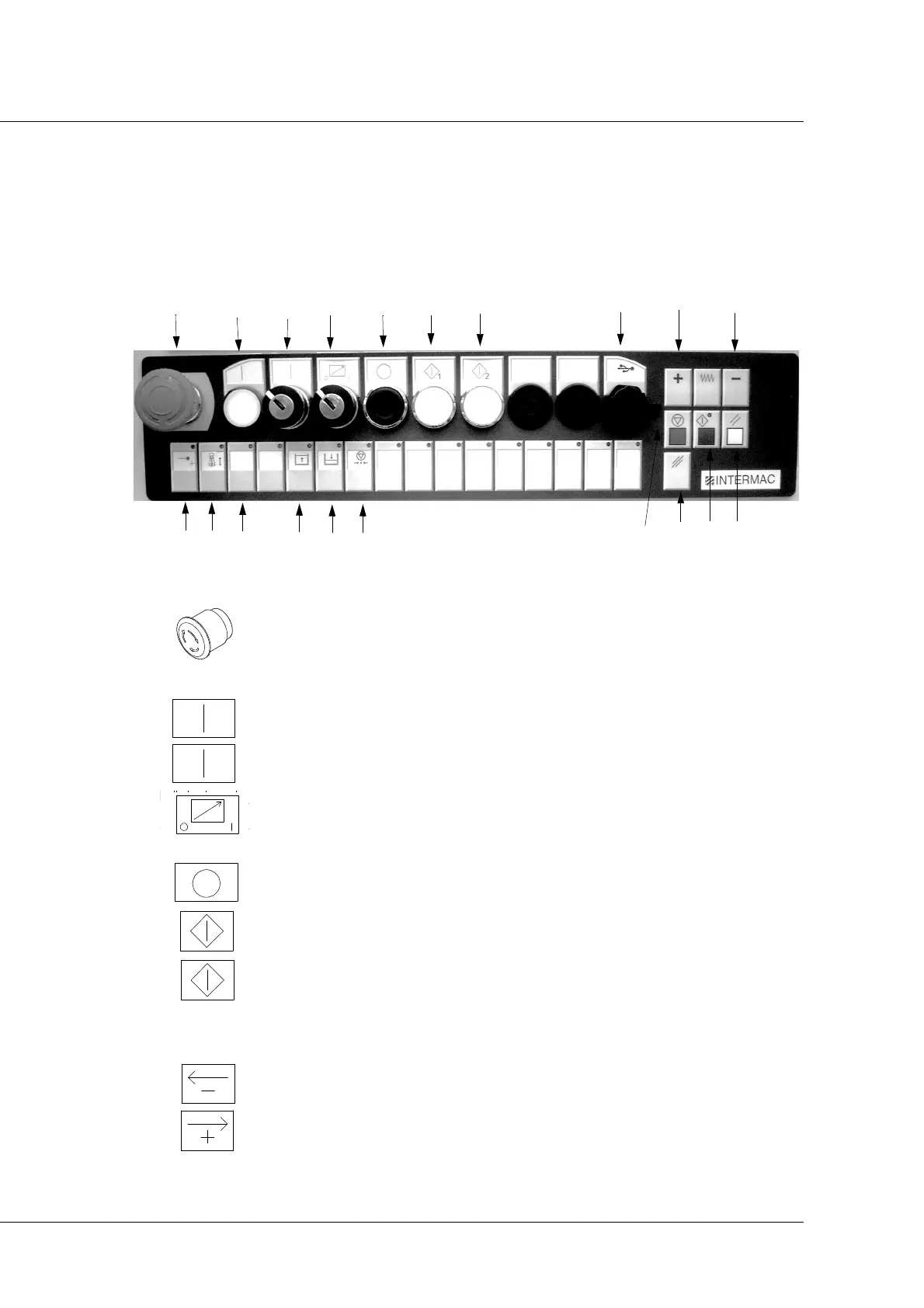
5.2 Main control panel
Primus 184
The button pad contains the following buttons and commands:
A - Emergency (red mushroom head button): used to stop the machine
immediately. To restore the machine to normal operation, turn in the direction
indicated by the arrows.
B -VOLTAGE indicator light - if this is switched on, the panel is powered.
C -POWER ON key selector (machine switch-on)
D - Axis disconnection (key selector): allows the operator to stop axis
movements in order to safely access the machine work area. This function is
enabled via the hand-held button pad (remote command).
E - Tool machine disconnection (switch-off) (black button): used to switch off
the machine.
F - Start station 1: used to activate the machining operation on station 1.
G - Start station 2: used to activate the machining operation on station 2.
H - USB port: input for connecting USB devices.
I - AXIS JOG- button: for moving the selected axis in the negative direction.
J - AXIS JOG+ button: for moving the selected axis in the positive direction.



 To Next Page