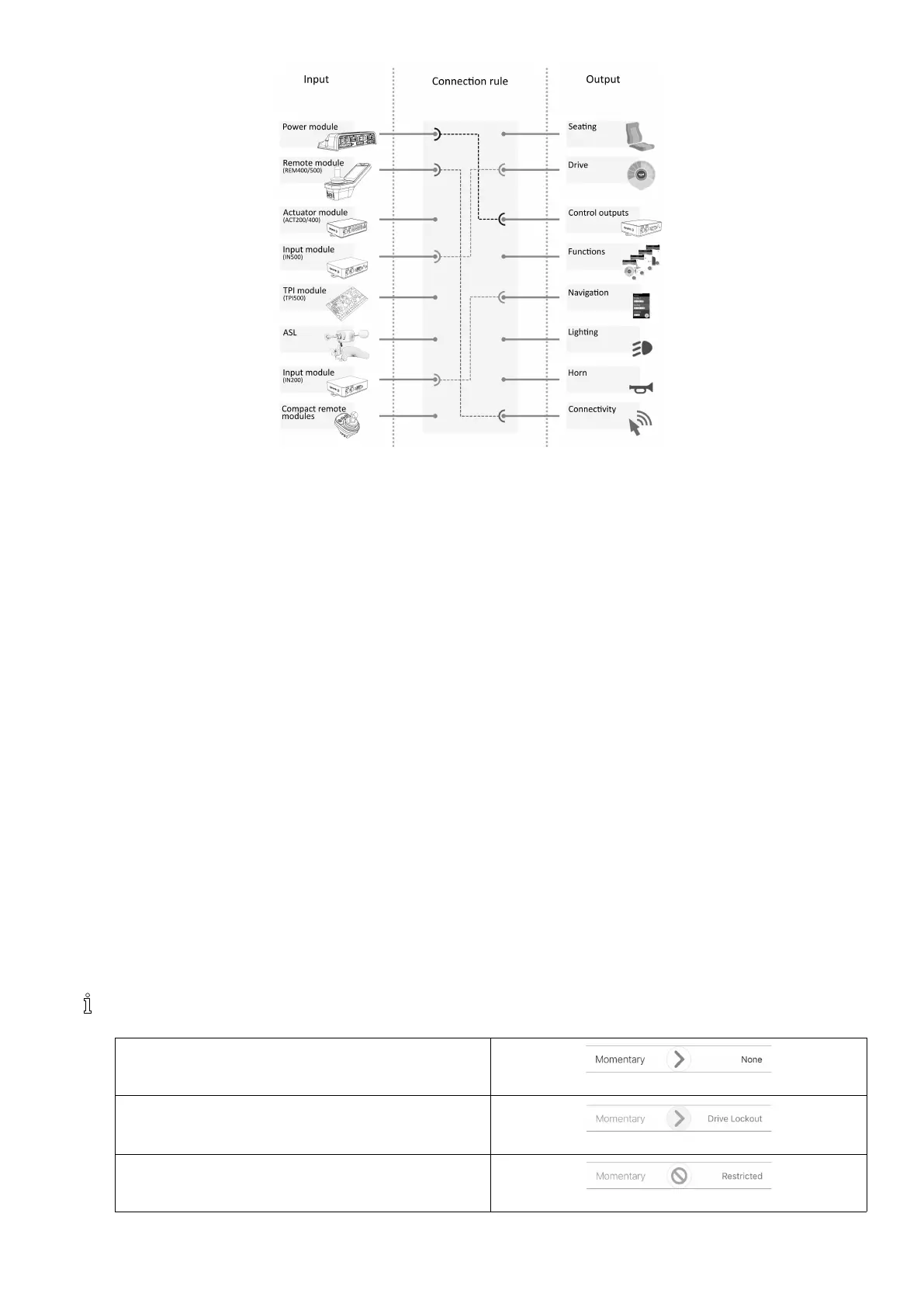
OverviewLiNXAccesstools
Fig.5-3
Connectionruleslinktheinputstotheoutputs.Thesedescribewhichinputsactivatewhichoutputs,includinghowand
when.ConnectionrulesarecreatedusingtheLiNXAccesstools.
CreatingconnectionrulesforcontrolIO:
1.Selectandcongureacontrolinput,forexamplepowermodule,ControlInput1,10–wayswitchorSwitch5.
2.Assignanoutputandactions,forexampleseating,tiltortoggle.
3.Congureadvancedsettings(optional),forexampleInputPortDebounceormonitored.
FormoredetailedinformationaboutusingtheLiNXAccessiOStool,referto8.13ConguringControlInput/Output(Control
IO),page99andfortheLiNXAccessPCtool,referto10.11ConguringControlInput/Output(ControlIO),page133 .
ControlInputs
Supportedmodulesandtheircontrolinputsare:
•Powermodule:CIpinsonAuxportviaAccessoryloom
•Remotemodule:multipurposebuttons,toggles,jacksockets
•Actuatormodules:CIpins
•Inputmodule:CIpinsonDB9,jacksocket
•TPI/ASLmodule:CIpins
•Compactremotemodule:modebutton
PowermodulesoffercontrolinputsthroughtheutilityportCIpins.TheLiNX100seriespowermodulesprovidethree
inputs,theLiNX200seriespowermodulesprovidefourinputs.
TheREM400andREM500remotemodulesprovidecontrolinputsthroughthemultipurposebuttons,toggles(REM400only)
andjacksockets.Theleftjacksocketinbothmodulescanbeusedforapowerswitch.
Actuatormodules,ACT200andACT400,providefourcontrolinputseachthroughtheCIport.
TheIN500inputmoduleprovidestwocontrolinputsthroughtheDB9connectorandtwothroughthejacksocket.The
IN200inputmoduleprovidessixcontrolinputsthroughtheDB9connectorandtwothroughthejacksocket.
Toseethecontrolinputsforeachmoduleinmoredetailreferto5.2.4ControlInputTypesandOptions,page68.
Complexcongurations,whichhavebeenpre-conguredforthemanufacturer,arenotaccessibleandaremarked
withthefollowingicons:
Congurable:Ifcongured,theslotcandisplaythe
congurationsummary.
Fig.5-4
Notcongurable:Theslotcandisplaytheconguration
summary.
Fig.5-5
Restricted:Theslotcannotshowtheconguration
summarybecauseofitscomplexity.
Fig.5-6
1605129-G65












 To Next Page