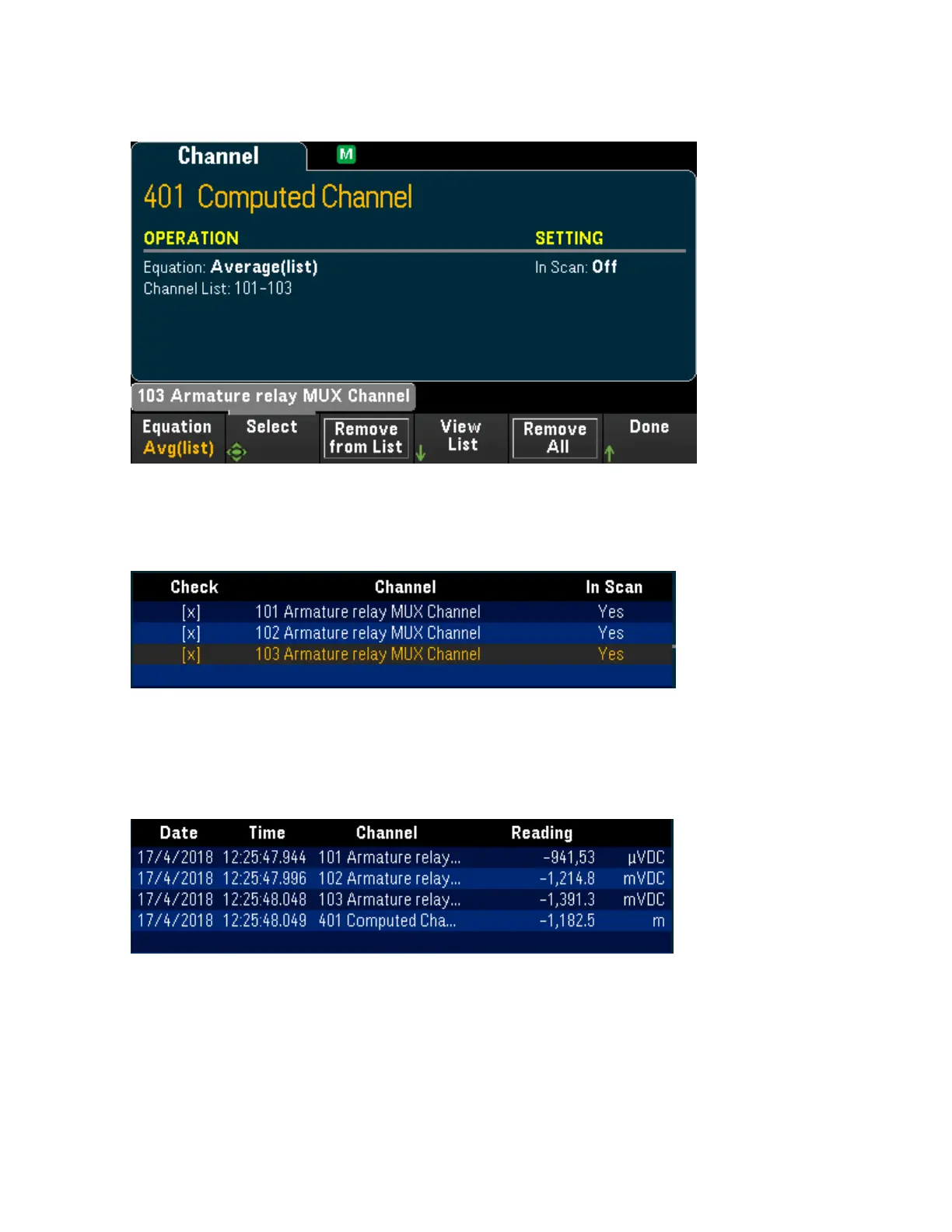
2. When the number of operand channel added is reached, Remove from List softkey will display. Press
this key to remove the previous selected operand channel from the operand channel list.
3. Press View List to display a list of available measurement channels. Currently selected operand chan-
nels are marked with an "X". Press Clear to remove all selected operand channel from the operand
channel list.
4. Press once on the [Scan] key to initiate a scan. You can view the scanned memory readings by pressing
[View] key. The result of Average operation will display as below:
Channel 401 = (Channel 101+102+103)/3
Note: The format for numbers displayed here are Comma as decimal point separator, and thousand
separator set to On where period is inserted between every three digits. See Number Format for details.
You can also include the computed channel as a operand channel in the computed channel list. For
example, to include the computed channel 401 from above example to other computed channel (channel
402):
Keysight DAQ970A User's Guide 131
[Channel] Menu Overview



 To Next Page