88
The internal units of the new clock model’s three states (offset, drift and GM state) are metres, metres per second and metres. When
scaled to time units for the output log, these become seconds, seconds per second and seconds, respectively. Note that the old units of
the third clock state (drift rate) were metres per second per second.
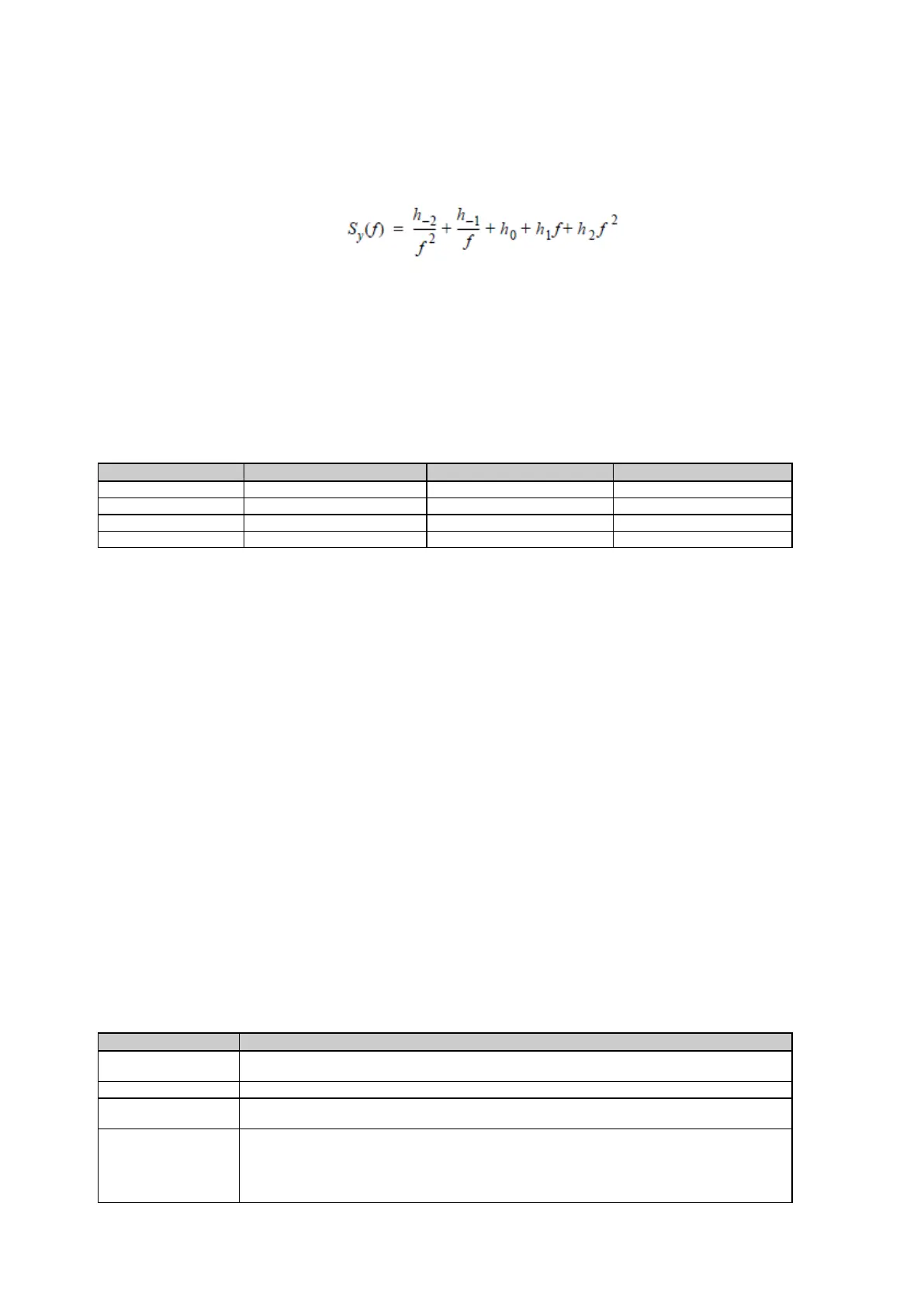
The user has control over 3 process noise elements of the linear portion of the clock model. These are the h
0
, h
-1
and h
-2
elements of the
power law spectral density model used to describe the frequency noise characteristics of oscillators:
with f being the sampling frequency and Sy(f) the clock’s power spectrum. Typically only h, and h
-2
affect the clock’s Allan variance and
the clock model’s process noise elements.
Before you use an optional external oscillator, several clock model parameters must be set. There are default settings for a
Temperature-Compensated Crystal Oscillator (TCXO), ovenized crystal oscillator (OCXO), Rubidium and Cesium standard. When using
a Hydrogen-Maser you can either use the default values of the clock parameters or choose to use customized settings
Clock parameters - Default values
Related topics
GNSS management: Tracking GPS
GNSS management: Tracking GLONASS
GNSS management: Tracking GALILEO
GNSS management: Tracking BEIDOU
GNSS management: Tracking QZSS
Configure tracking settings step-by-step
GNSS management: Tracking GPS
Background information
Tracking GPS options, may be used to control which health settings are used for each GPS satellite tracked by the receiver.
Setting Descriptions
The table below describes the settings that can be configured on the Tracking GPS tab.
For each tracked satellite it is possible to set the health as Auto, Healthy or Bad. Use the drop
down list to change the satellite health for all satellites to the same value.
The PRN satellite number.
Shows the health setting for this satellite as received from the broadcast navigation
message. NA, is shown for satellites where no health information is available in the ephemeris.
Shows the configured health setting for each satellite. Either Auto, Healthy or Bad. This field
can be edited via the list box.
If the setting is set to Auto, the satellite is used with the health received from the ephemeris. If
the setting is different from Auto, the user defined health setting is used.


 To Next Page