54
The SD card must not be removed while the instrument is writing data to the card. To remove the SD
card safely, turn off the instrument beforehand.
• Ensure that the instrument is off before inserting the SD card. Switching on the instrument will ensure
the necessary folder structure is available on the SD card.
Failure to follow these instructions could result in data loss and/or permanent damage to the card.
Related topics
Insert and remove an SD card into instrument step-by-step
Directory structure of the memory device
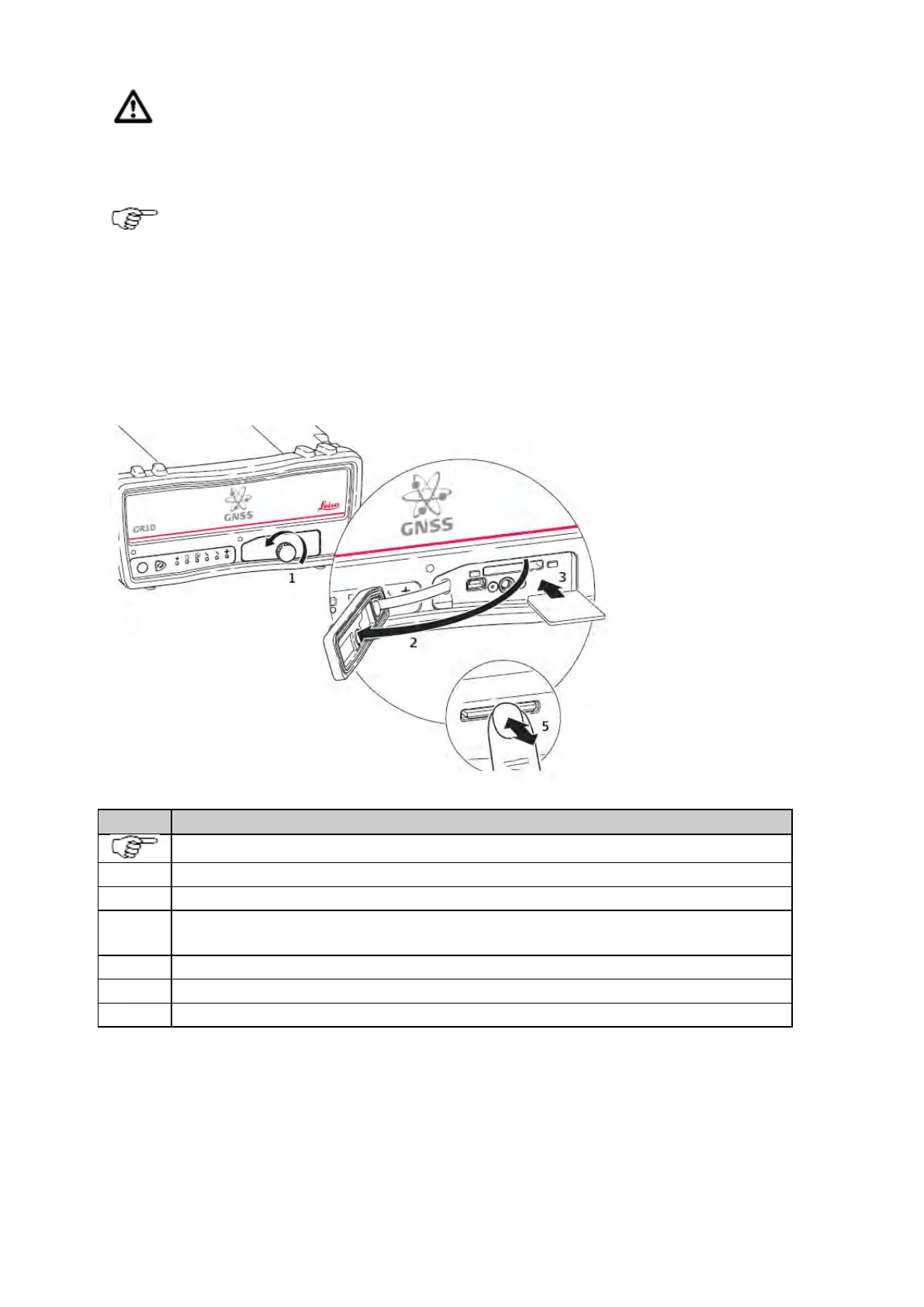
Insert and remove an SD card into the instrument step-by-step
The SD card is inserted into a slot inside the SD card/USB port cover on the front of the instrument.
Loosen the screw on the SD card/USB port cover.
Open the SD card/USB port cover.
Place the SD card into the slot. The card should be held with the contacts downwards and facing the slot.
Do not touch the contacts.
Slide the card firmly into the slot until it clicks into position.
To remove the SD card, gently press inwards on the card to release it from the slot.
Place the SD card/USB port cover back over the slot and tighten the cover screw.
Related topics
Directory structure of the memory device
Use DHCP to automatically assign an IP address and all network parameters to a GR/GM receiver



 To Next Page