11. Safety-related functions and interfaces
MiR250 Hook User Guide (en) 01/2023 - v.1.2 ©Copyright 2021-2023: Mobile Industrial Robots A/S. 122
• MiR Hook 250 safety functions
MiR Hook 250 monitors the motor encoder data from the hook motors to ensure that the hook
operates correctly. If the hook computer detects any discrepancies or errors in the hook
components, it reports an error to the robot computer.
These functions are described in further detail in the following sections.
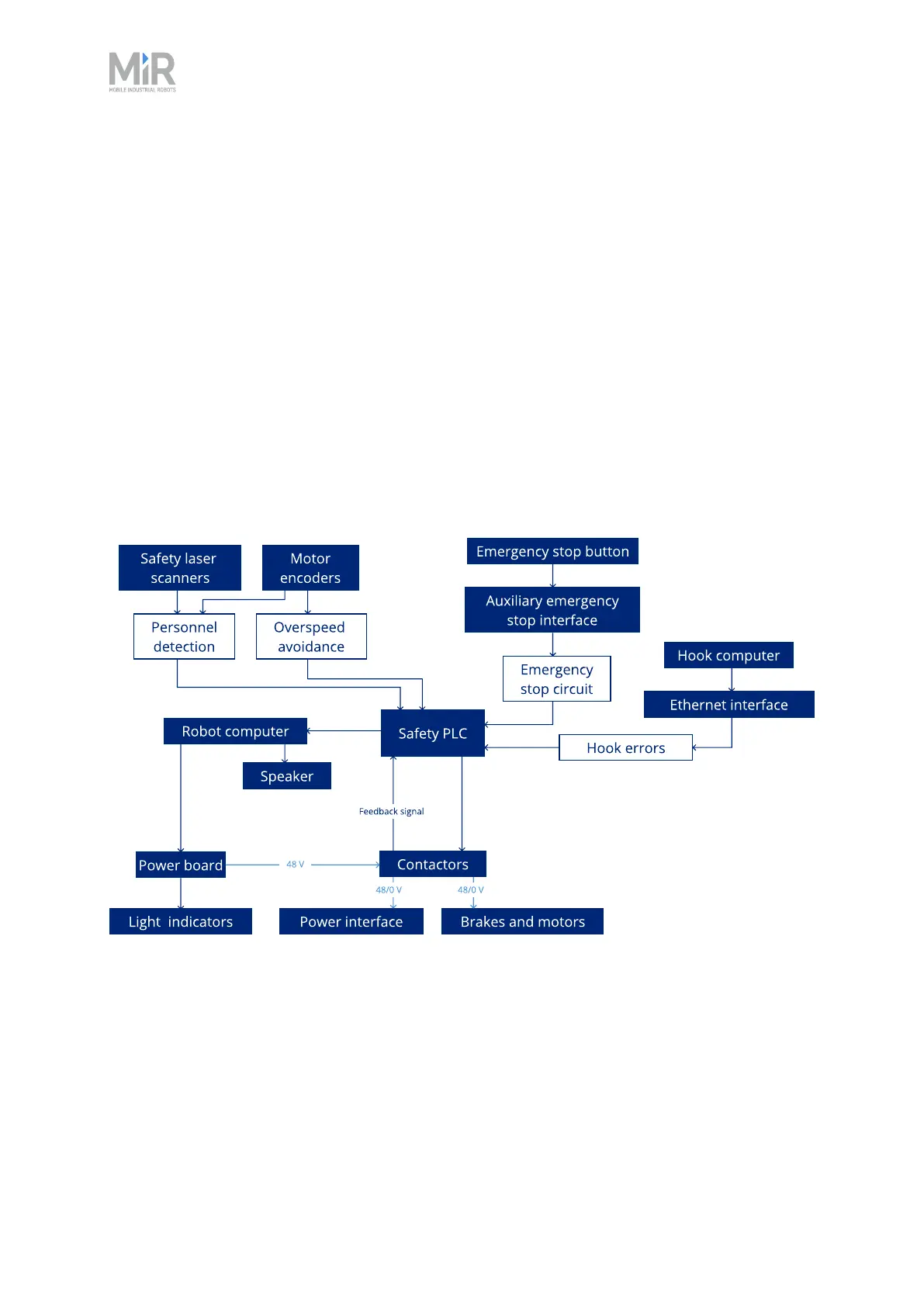
The diagram in Figure 11.3 shows the inputs to these functions and how they are all connected
and monitored in the safety PLC. The safety PLCis able to switch the safety contactors to cut off
power to the robot motors and the top module whenever a Protective or Emergency stop is
triggered. Also, the safety PLCsends information to the robot computer to be displayed in the
robot interface (go to Monitoring > Hardware health) and to indicate the robot's status through
the status lights and the speaker.
Figure 11.3 Overview of components involved in each safety function and interface. When a safety function
is triggered, the safety PLCswitches the STO contactors so the motors and power supply to the top module
no longer receive power.



 To Next Page