Installation
131
Mitel 415/430 as of R4.1
syd-0580/1.2 – R4.1 – 08.2016
In the switch group configuration in ( =xb) the ports are assigned to the control inputs
of a switch group. To be able to control all 3 switch positions of a switch group, you
need 2 control inputs which switch the switch position of the switch group depending
on the status.
Tab. 62 Switch group control via the control inputs
Other conditions:
• The same control inputs can control one or more switch groups.
• The same switch group can only be switched by the 2 assigned control inputs.
• Control of the switch groups using the control inputs takes priority over control using
function codes.
See also
The control inputs of ODAB cards can also be used to control switch groups (see "Equipment
on the ODAB options card", page 138).
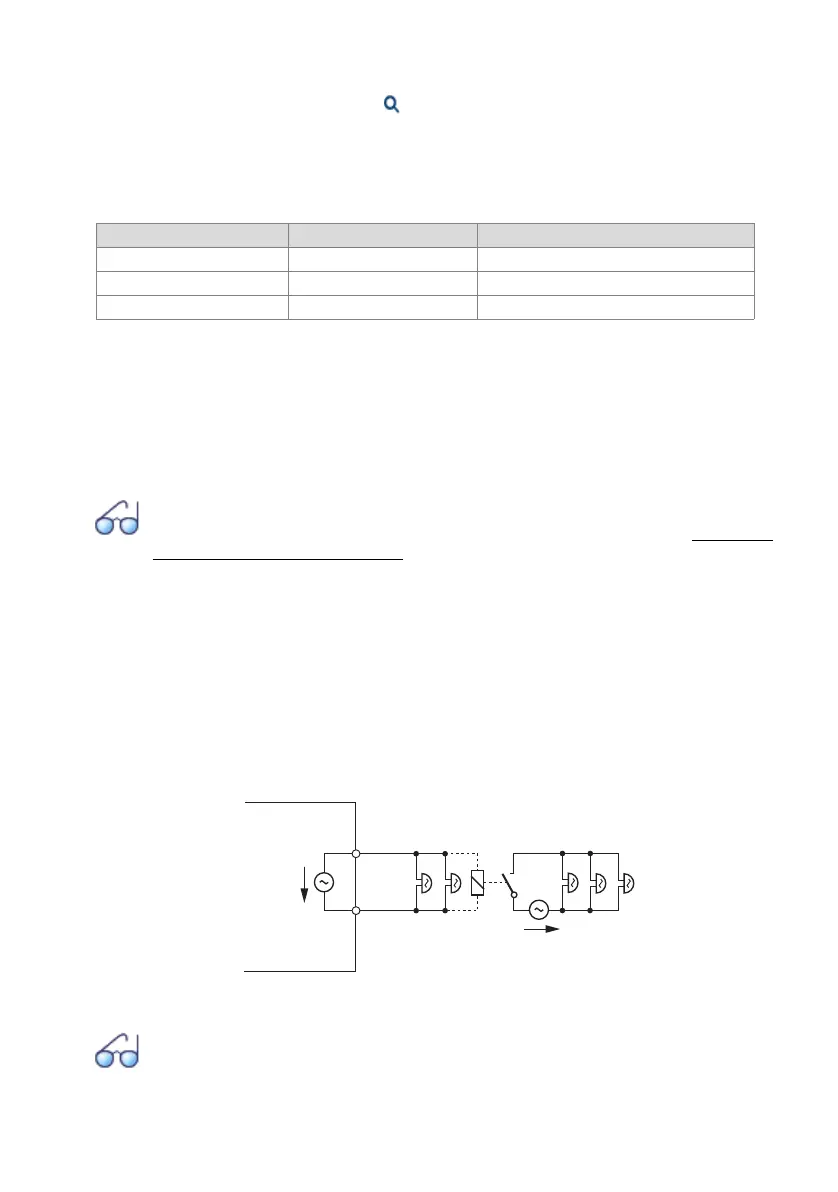
FXS mode: General bell
One FXS interface per communication server can be configured for the connection of a
general bell. It is possible to use commercial auxiliary bells designed for connection in
parallel to analogue terminals as a general bell. However the impedance of the con-
nected general bell (or total impedance in the case of several devices connected in
parallel) must not fall below 1 kΩ. The ringing voltage is 48 VAC. A 48 V relay must be
interposed when connecting a large number of auxiliary bells.
Fig. 57 Connection for FXS mode: General bell
See also
"General bell on FXS interface" in the "System Functions and Features" System Manual.
FXS control input 1 FXS control input 2 Switch positions of the switch group
Off Off Position 1
On Off Position 2
any On Position 3
48 VAC
48 VAC
a
b
FXS interface



 To Next Page