179
Rev. 2.0
07/27/2023
MBDV Hardware Manual
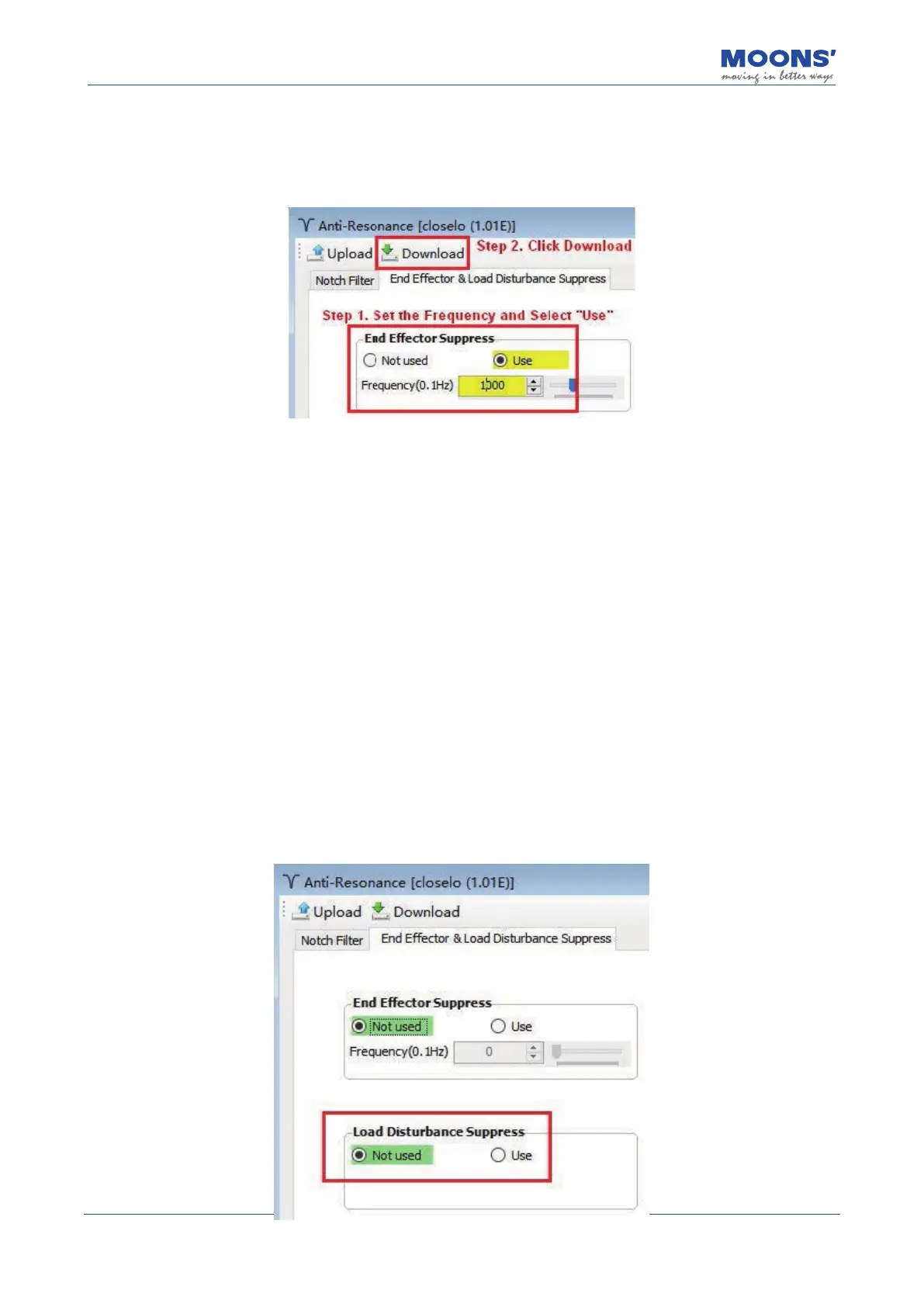
Step 2: Set and enable end vibration suppression
Select the Anti-Resonance interface on Luna Software. Select the End Eector Suppression Tab,
enter teh vibration frequency as measured in Step 1.
Note:
◆
Wrong vibration frequency will cause the end vibration suppression eect to become worse or
even increase the vibration
◆
Only the vibration frequency within 1-300Hz can be well suppressed
◆
This function may not work for vibrations due to reasons other than those related to reaching the
mechanical end of a mechanism.
10.7 External Vibration Suppression
Servo Systems can disturbed by external factors, such as sudden changes in load or sudden
changes in external forces such as friction caused by mechanical problems, resulting in system
instability and abnormal vibration.
Suppression of these disturbances can signicantly improve system response.
To use Select the " Anti-Resonance " function in the tree menu on the left side of the Luna
software, click " End eector & Load Disturbance Suppression ", and check " Use " in the Load
Disturbance Suppression. After downloading to the driver, the end disturbance suppression will
take eect.













 To Next Page