85
Rev. 2.0
07/27/2023
MBDV Hardware Manual
7.4.3 Speed limit in torque mode
It is recommended that users set the maximum speed of the motor prior to conguring the drive for
torque control mode. The motor will run at this maximum set speed when it is used in torque control
mode which, depending on the application, could cause damage to the load if left at a high value.
◆
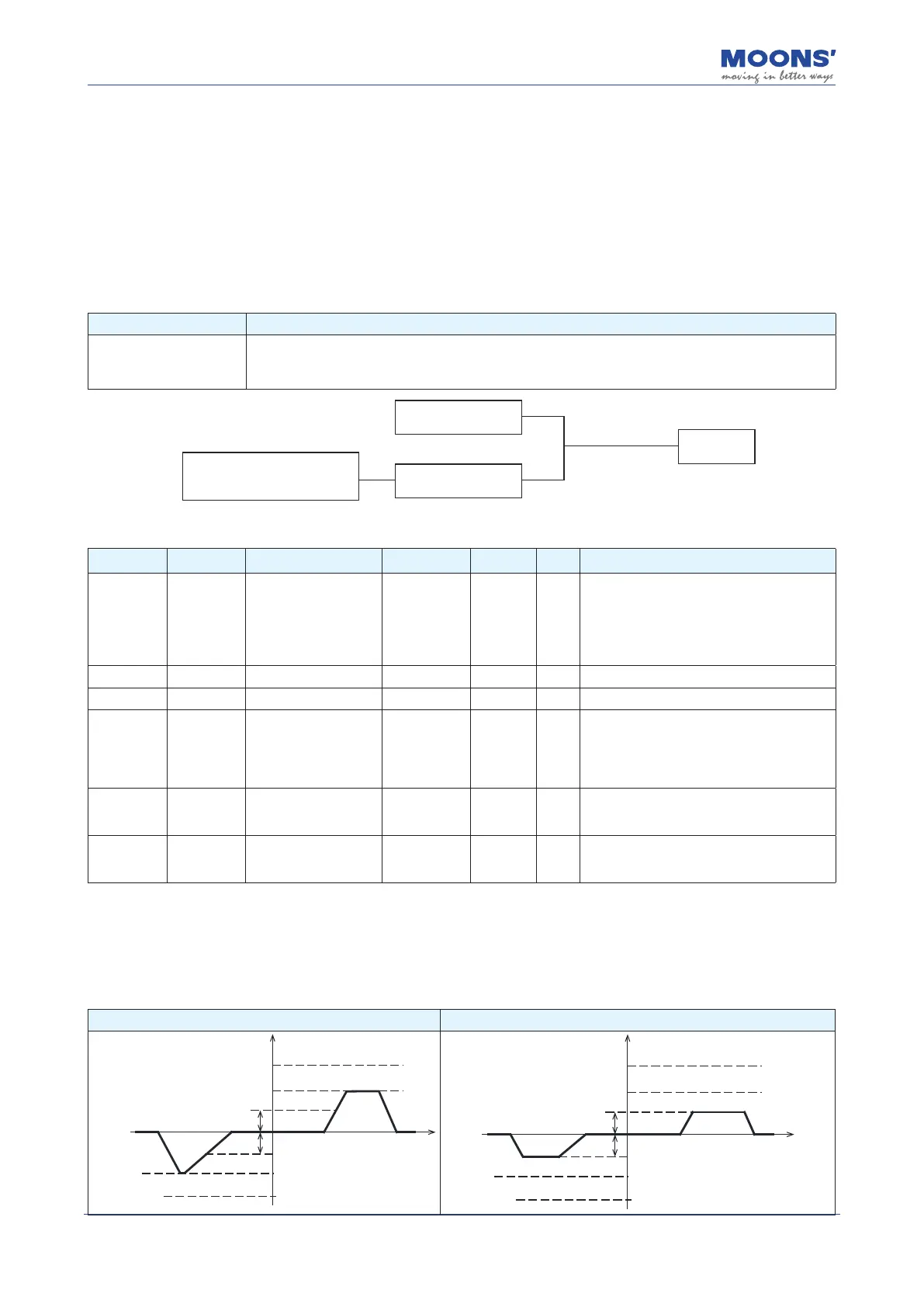
In torque control mode, the set jog speed (P2-02) can be used as the speed limit for the motor.
After the speed limiting function is enabled, the motor will accelerate and be limited to the set value.
The maximum speed setting should be based on application requirements. This limit can be
congured in two ways. See the following:
Speed limit source Describe
Internal Limits
1. Directly limited by parameter P2-30(VT)
2. Limited by parameter P2-02 (JS). To select this speed limit, a digital input must be assigned the velocity
limit function (V-LMT). Once the desired input logic is satised, this speed limit will take eect.
Speed limit set by P2-30
Speed Limit set by P2-02
Any input (P5-00-P5-03) assigned the
V-LMT function (code 37 or 38)
V-LMT Input
Speed limiting
function enabled
Related parameters
Parameter Instruction Name Value range Defaults Unit Describe
P2-02 JS Jog Speed -100 ~ 100 10 rps
In torque control, the jog speed can be used
the speed limit of the motor. A digital input
must be assigned the V-LMT function. Once
the desired input logic is satised, V-LMT is
enabled and the Jog Speed value behaves
as the speed limit.
P2-03 JA Jog Acceleration 0.167~ 5000 100 rps/s Acceleration in torque mode
P2-04 JL Jog Deceleration 0.167~ 5000 100 rps/s Deceleration in torque mode
P2-30 VT
Speed limit in torque
mode
0 ~ 100 80 rps
In torque control mode, this parameter can
be used as the direct speed limit. No input is
required to enable this speed limit. It will be
enabled as soon as torque control mode is
enabled at the drive.
P5-00-
P5-03
MU1~MU4
Digital Input (X1-X4)
function assignment
37 ~ 38
—— ——
Assigning a value of 37 or 38 to an input
(P5-00 - P5-03) will assign the V-LMT
function to that input.
P5-12-
P5-13
MO1~MO2
Digital Output (Y1-Y2)
function assignment
21 ~ 22
—— ——
Assigning a value of 21or 21 to an output
(P5-12 - P5-13) will assign the "Velocity
Limit Reached" function to that output.
◆
V-LMT function
When a digital input is assigned the V-LMT function, the drive will in essence have two speed limits
when operating in Torque Control. The primary one is set by P2-30. However, once the desired
V-LMT input logic is satised, the speed limit set by P2-02 will be enabled and will take higher
priority than the limit set by P2-30.
V-LMT input is invalid V-LMT input is valid
Speed
Motor Maximum Speed
P2-02 Limit Value
-P2-02 Limit Value
Motor Maximum Speed
Time
P2-30 Limit Value
-P2-30 Limit Value
P2-02 Limit Value
-P2-02 Limit Value
Time
P2-30 Limit Value
-P2-30 Limit Value
Speed
Motor Maximum Speed
Motor Maximum Speed













 To Next Page