67
Rev. 2.0
07/27/2023
MBDV Hardware Manual
7.1.10 Motor brake control
In order to maintain a xed position when the drive power is OFF or the motor is disabled, a servo
motor with a brake needs to be used to ensure that the mechanical mechanism driven by the motor
will not move due to its own weight or external force.
When using a servo motor with a brake, one of the digital outputs of the servo drive must be
congured for the BRK function.
Type Signal Symbol Setup Value Signal Logic Function
Output BRK 5
Closed
When the servo is enabled, the BRK signal is output, and
the output state is CLOSED
Open
When the servo is disabled, the BRK signal is not output,
and the output status is OPEN.
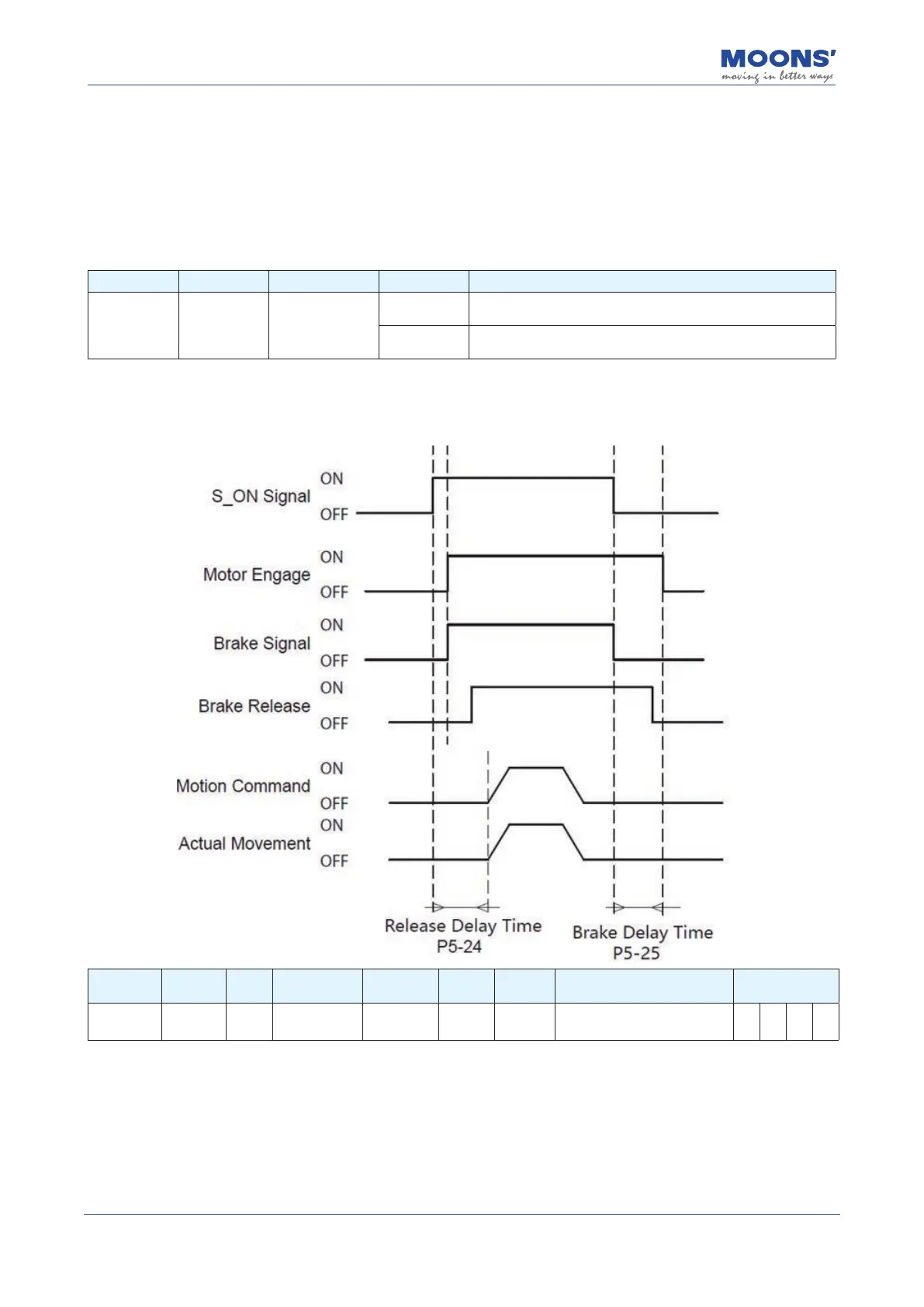
Since the brake has an action delay when it works (brake or release), the timing sequence should
be calculated to avoid damage to brake.
Signal
Symbol
Output
NO.
PIN
NO.
Parameter Command
Setup
Value
Signal
Logic
Description Support mode
BRK BRK BRK P5-14 MO3 5 Closed
When the servo is enabled,
the BRK signal is output
P V T
Note: For wiring instructions and precautions when using electromagnetic brake, please refer to
4.6 Using an electromagnetic brake













 To Next Page