PTS 400.3 PLUS Operation Manual_R02 Page 64/306
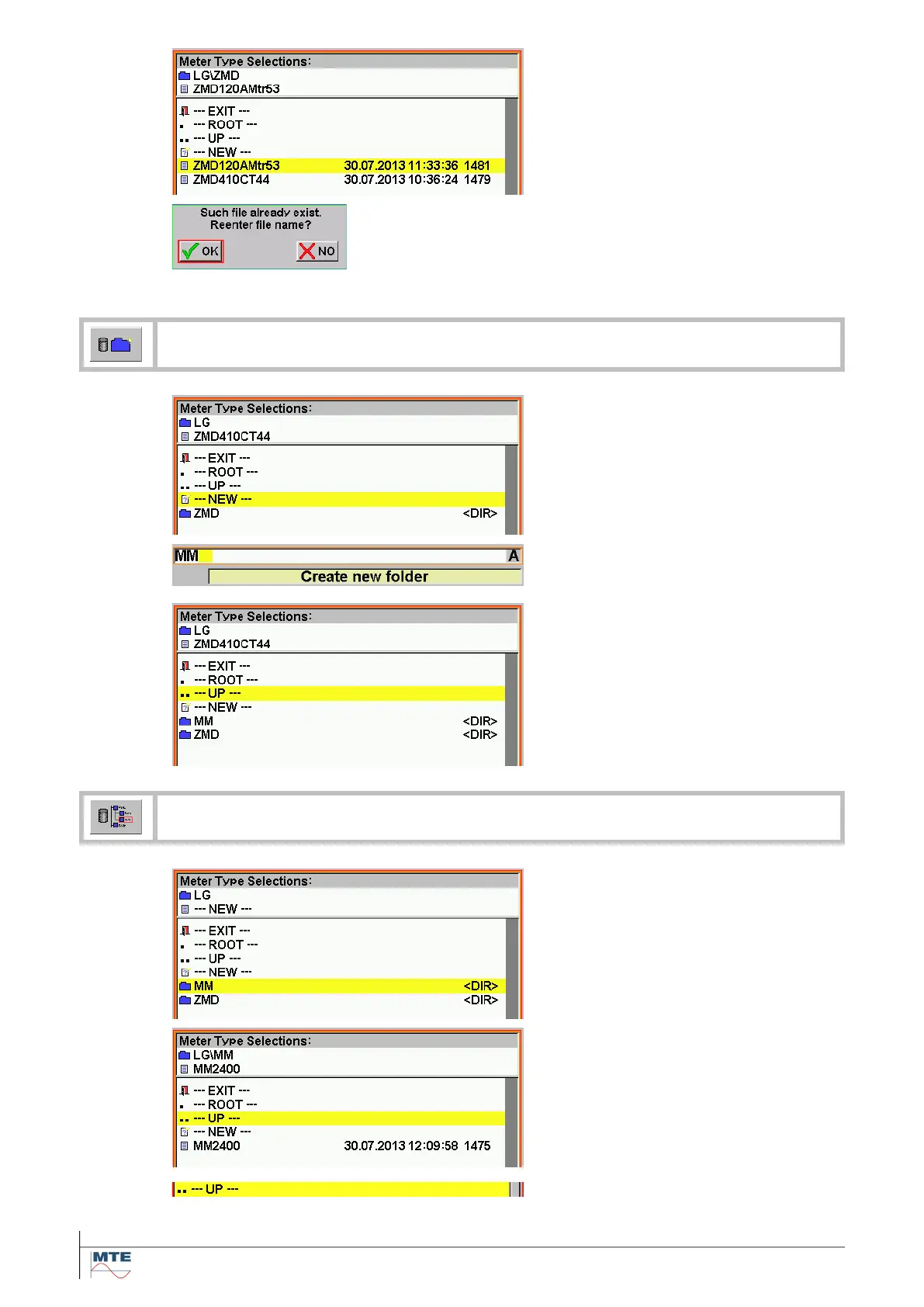
Terminate rename
Press Enter on the virtual keyboard
to terminate the function.
If the name was not changed a warn-
ing appears.
Warning file exists, reenter name?
OK: Reenter different file name and
press Enter again to terminate.
NO: The rename function is can-
celled.
Create new folder/subfolder
Select / activate new
Select line ---NEW--- in the root di-
rectory or sub directory where the
new folder/subfolder shall be created,
and enter the name with the virtual
keyboard.
Enter folder name
Enter name of folder (MM) with the
virtual keyboard.
Terminate function
Press Enter on the virtual keyboard
and new folder is created (MM). The
function is terminated.
Browse folders/subfolders
Select folder
Select folder (MM) in actual path (LG)
by pressing on name.
Change to subfolder
The subfolder content is shown. The
second header line shows the new
path (LG\MM).
Change to upper folder
Select --- UP --- to change to next
higher level.



 To Next Page