MultiSmart Installation & Operation Manual
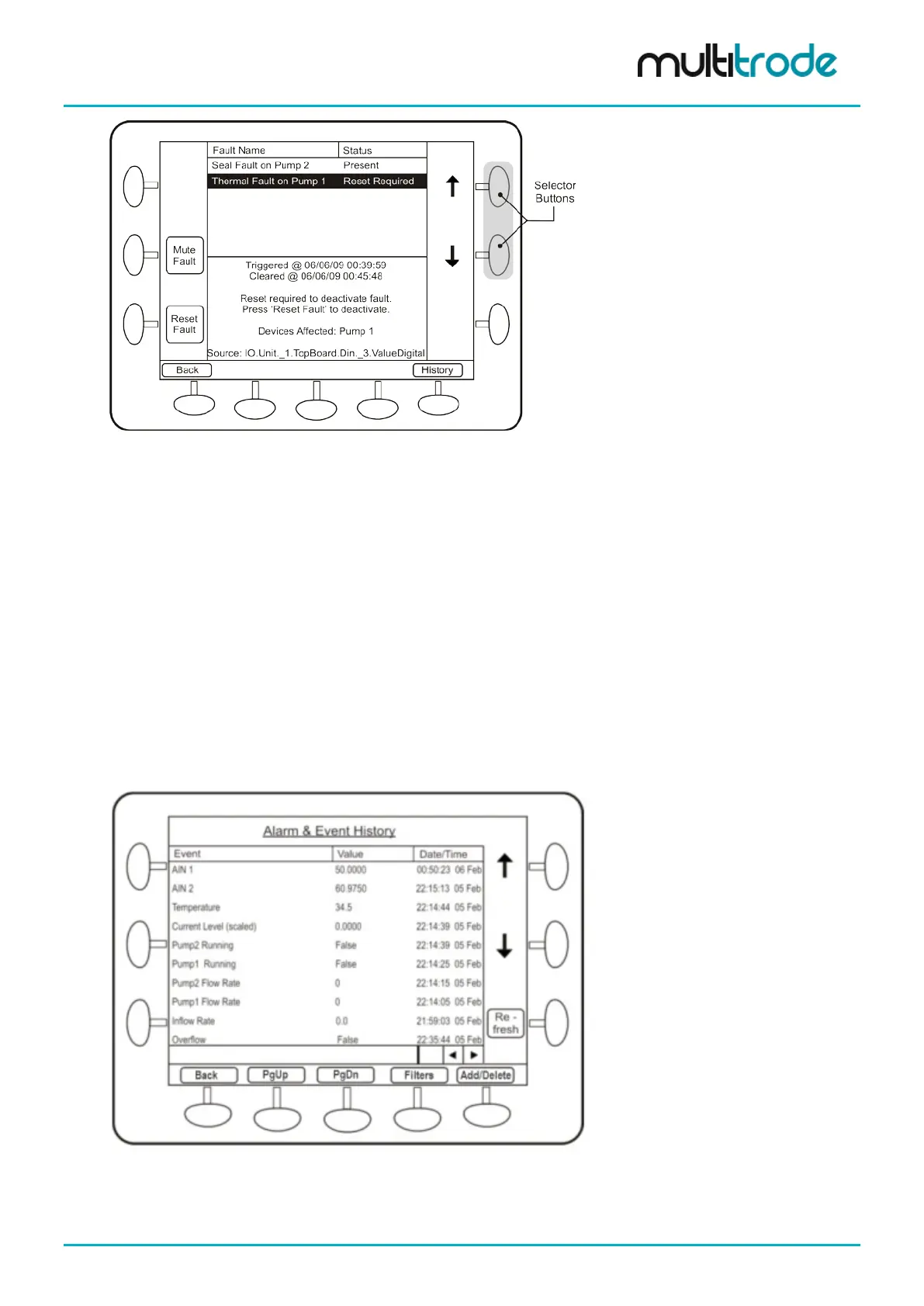
Figure 5 – Fault Reset Screen
Use the selector buttons to select each fault in turn.
From this screen the operator can reset the fault if the fault condition is no longer present. If the fault is still
present, the Reset Fault button does not appear.
A Mute Fault button appears for faults that can be muted. It is used to stop sirens or flashing lights that may
have been activated by the fault.
A Reboot Unit button appears for a Config Changed - Reboot Required fault. Pressing this button will save
current values and then reboot the unit. Press the Yes button to confirm a restart of the controller. This
process takes one to two minutes to complete.
By default, digital output 4 (DO4) is linked to the high-level alarm and can be muted. The digital output can
be configured for Pulsed or Steady operation and is typically connected to an external warning light or alarm.
• The Mute button is only available for other faults if the user has configured them to be mutable.
• Pressing the History button displays the entire fault & event history log.
• Pressing the Main button returns the operator to the main status screen.
Figure 6 – Fault History Screen
Section 19.4 explains more about Filters and section 19.7 explains the Add/Delete button.
MultiSmart_IO_Manual_R20 Page 19 of 260



 To Next Page