118 User Manual Version 3.1
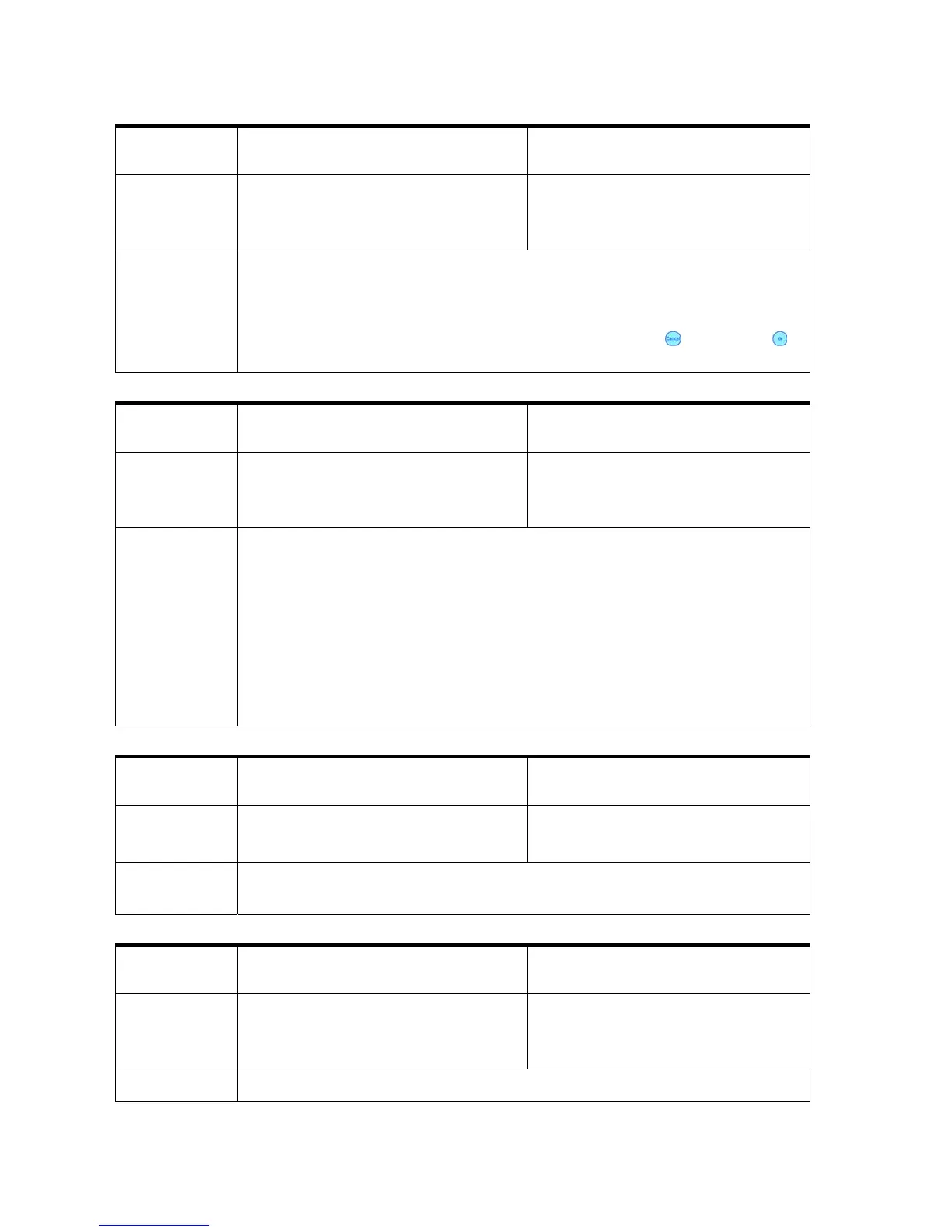
Protocol
code
Display message Cause
053 ERROR: NON-EXISTENT FONT
SELECTED!
CODE: 53
A print job selects a font which
is not available (loaded) in the
printer
Elimination
• Do not repeat pages after a
job has ended
• Do not turn off the printer
during job data transfer
• Unlock the font in the printer
menu
• To interrupt a print job use
the Cancel
and the Ok
keys on the printer
Pos: 79.38 /Bedienungsan leitungen/Gerät e spezifisch/Druc ker/Error Messages/54_E RROR_PRINT_DATA_CH ECK_THE_PRINTOUT @ 2\mod_126 5620692945_912.doc @ 11429 @
Protocol
code
Display message Cause
054 ERROR PRINT DATA CHECK THE
PRINTOUT
CODE: 54
Undefined or faulty data were
detected by the printer
Elimination
• Check if the data cable is
connected correctly at the
printer and at the PC
• Check if you use the official
printer driver
• Try to run the print job from
a different PC
• Set the menu SOFT FONT
ERROR to cont. print.
Attention! This setting can
cause faulty data in the
printouts. Check the
following pages for
garbage characters!
Pos: 79.39 /Bedienungsan leitungen/Gerät e spezifisch/Druc ker/Error Messages/56_E RROR_PEN_CABLE_# @ 2\mo d_1265620747852_9 12.doc @ 11432 @
Protocol
code
Display message Cause
056 ERROR PEN CABLE CHECK CABLE
CODE: 56
Wrong PEN ID read
Elimination
• Check if the head cable is
damage
• Call service
Pos: 79.40 /Bedienungsan leitungen/Gerät e spezifisch/Druc ker/Error Messages/61_ NO_CONFIGURATION_PCB _DETECTED @ 2\mod_126562 0794400_912.doc @ 11435 @
Protocol
code
Display message Cause
061 NO CONFIGURATION PCB
DETECTED!
CODE: 61
No PCB (printed circuit board)
detected
Elimination
• Call service



 To Next Page