Configure System Information
76
S3300 Smart Managed Pro Switch
Device View
For Device View information, see Device View on page 24.
License
Some switch features require a special license in order to be active. If a license is not active,
the feature associated with the license is not available and cannot be configured.
To view information about the license key, click System > Licen
se > License Key.
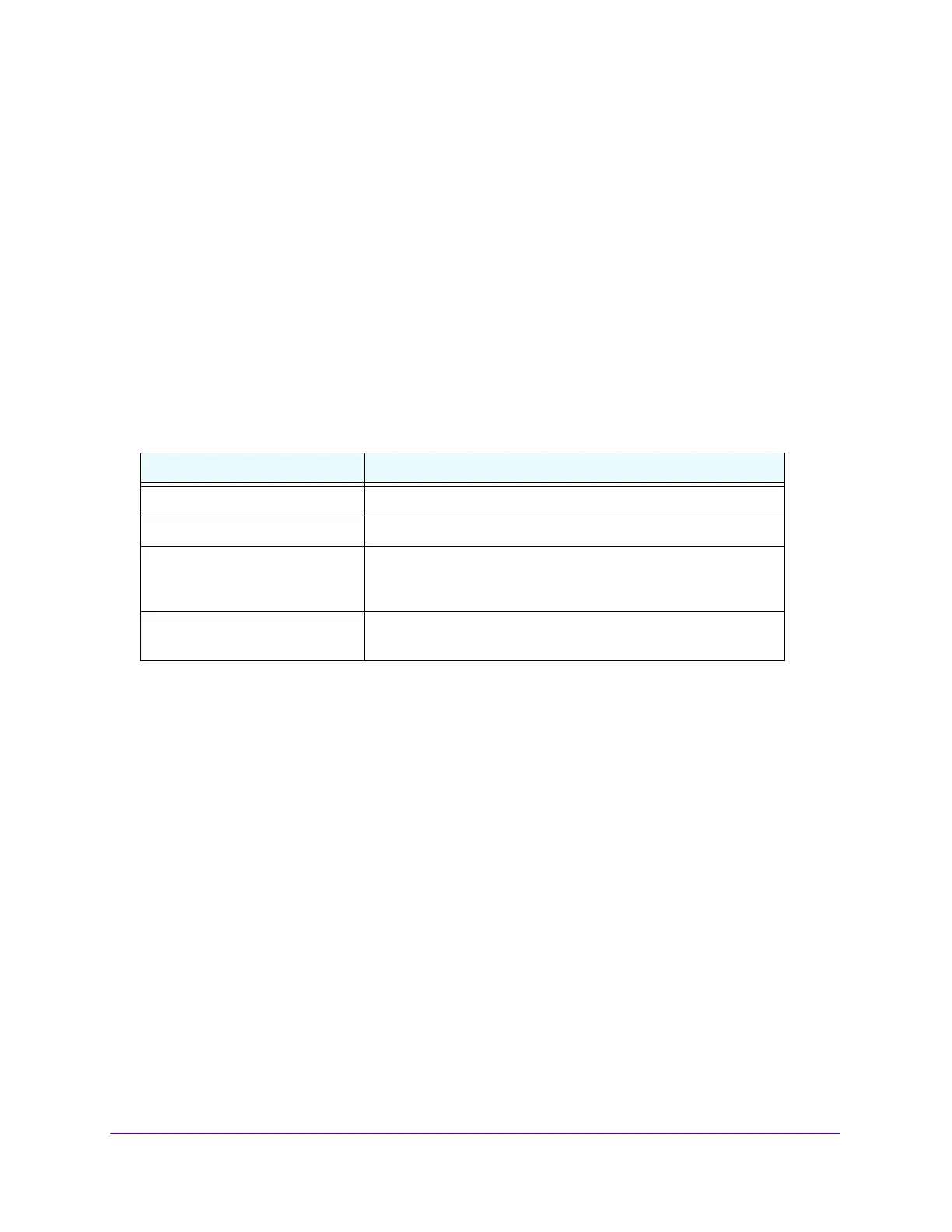
The following table describes the non-configurab
le fields on the License Key page.
Table 23. License Key information
Field Description
License Date The date the license is purchased.
License Copy The number of licenses that e
xist on the switch.
License Status Indicates whether the license is active or inactive. If a license is
inactive, a license should be purchased and downloaded to the
switch. The license is not activated until the switch reboots.
Description A description of the license key status. If th
e license is inactive, this
field provides information about why it is inactive.
To view a list of features on the device that require an active license, click System >
License > Licen
se Features.










 To Next Page