Installation
900-0117-01-00 Rev B 21
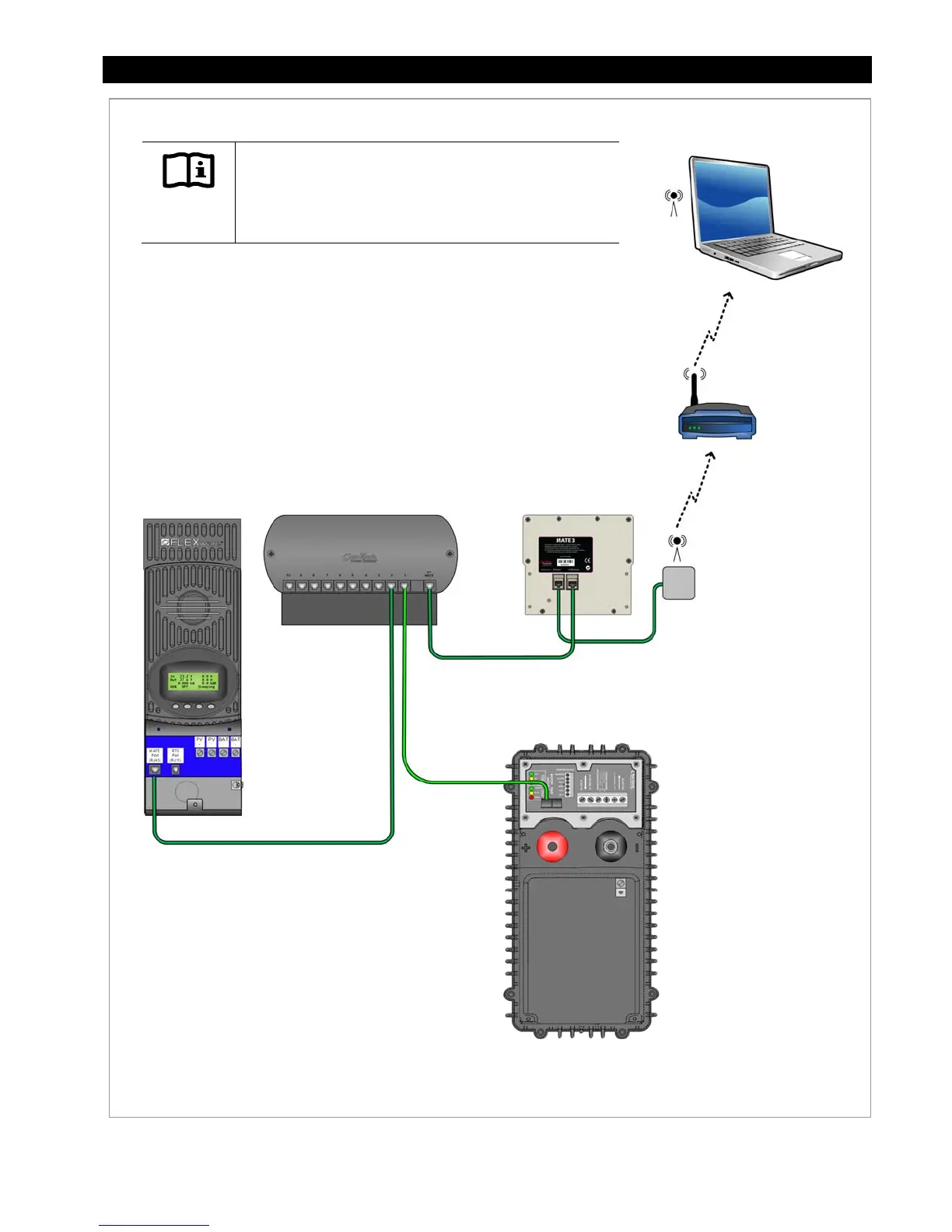
Figure 13 MATE3 Connections to a Computer (Wireless-to-Wireless)
MATE3 (Back View)
FLEXmax Charge
Controller
OutBack HUB
Communication
Manager
OutBack
Inverter/Charger
Network
Router with
Wireless
Capabilities
Wireless
Adapter
IMPORTANT:
Connecting the MATE3 to a computer or network router
requires advanced knowledge of network protocols and
how to manually set IP addresses.
Universal
Wi-Fi Adapter
For instructions on how to setup the MATE3
and router to access the MATE3 web page on
a computer, see page 24.
For an INTERNET Connection:
DHCP must be disabled.
Static IP addresses must be set.
Port Forwarding must be enabled and set.
For an INTRANET Connection:
DHCP must be enabled.
CAT5 Cable
CAT5 Cable
CAT5 Cable
CAT5 Cable
Computer with
Wireless Adapter


 To Next Page