System Manual= lñÑçêÇ=fåëíêìãÉåíë=mä~ëã~=qÉÅÜåçäçÖó= lé^i
Hide events
before selection
button
Displays all events after and including the highlighted event.
Hide events
after selection
button
Displays all events before and including the highlighted event.
Show all events
button:
Displays all previously hidden events.
RKNMKR oÉÅáéÉ=é~ÖÉ=
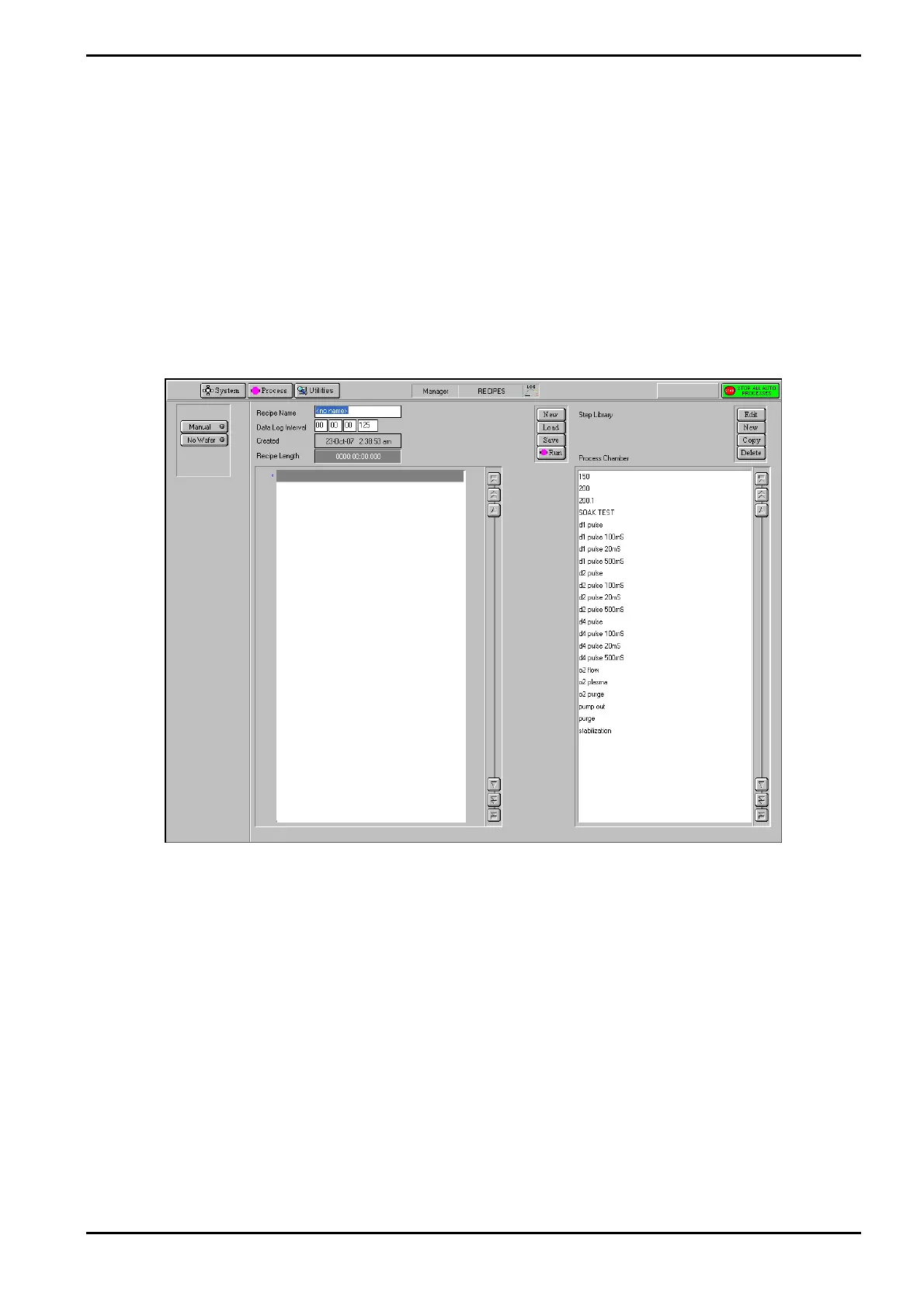
The Recipe page is displayed by selecting the Process button, then the Recipe option.
Fig 5-16: Recipe page
The recipe page is used to create, edit and run recipes. See sub-section 5.7, page 5-23.
The facilities on this page are:
Chamber button
Select to carry out an automatic process run using a recipe. The
button’s indicator is coloured yellow when selected.
No wafer button
Select to carry out an automatic process run without a wafer in the
process chamber. The button’s indicator is coloured yellow when
selected.
Recipe Panel
Recipe Name
field
The name of the currently loaded recipe.
Data Log
Displays the data log interval, i.e. the time interval between the
Operating Instructions
Printed: 06 November 2007 09:42 Page 5-43 of 60 Generic (OpAL Plasma) Issue 1: Oct. 07


 To Next Page