System Manual= lñÑçêÇ=fåëíêìãÉåíë=mä~ëã~=qÉÅÜåçäçÖó= lé^i
RKU mêçÅÉëë=a~í~äçÖ=
All processes are automatically data-logged. The interval between logging events is set in the
Recipe screen.
The Process Datalog facility allows you to view process data runs and associated comments.
The facility comprises three pages:
a) SELECT LOG page – allows you to select the process data to view.
b) RUN LOG page – lists the selected process data, for all runs except Leak detection
runs and MFC calibration runs, with respect to time.
c) Leak detection and MFC calibration log page – displays the Leak detection runs and
MFC calibration runs in text and graphical formats.
These pages are described in the following text.
RKUKN pÉäÉÅí=içÖ=é~ÖÉ=
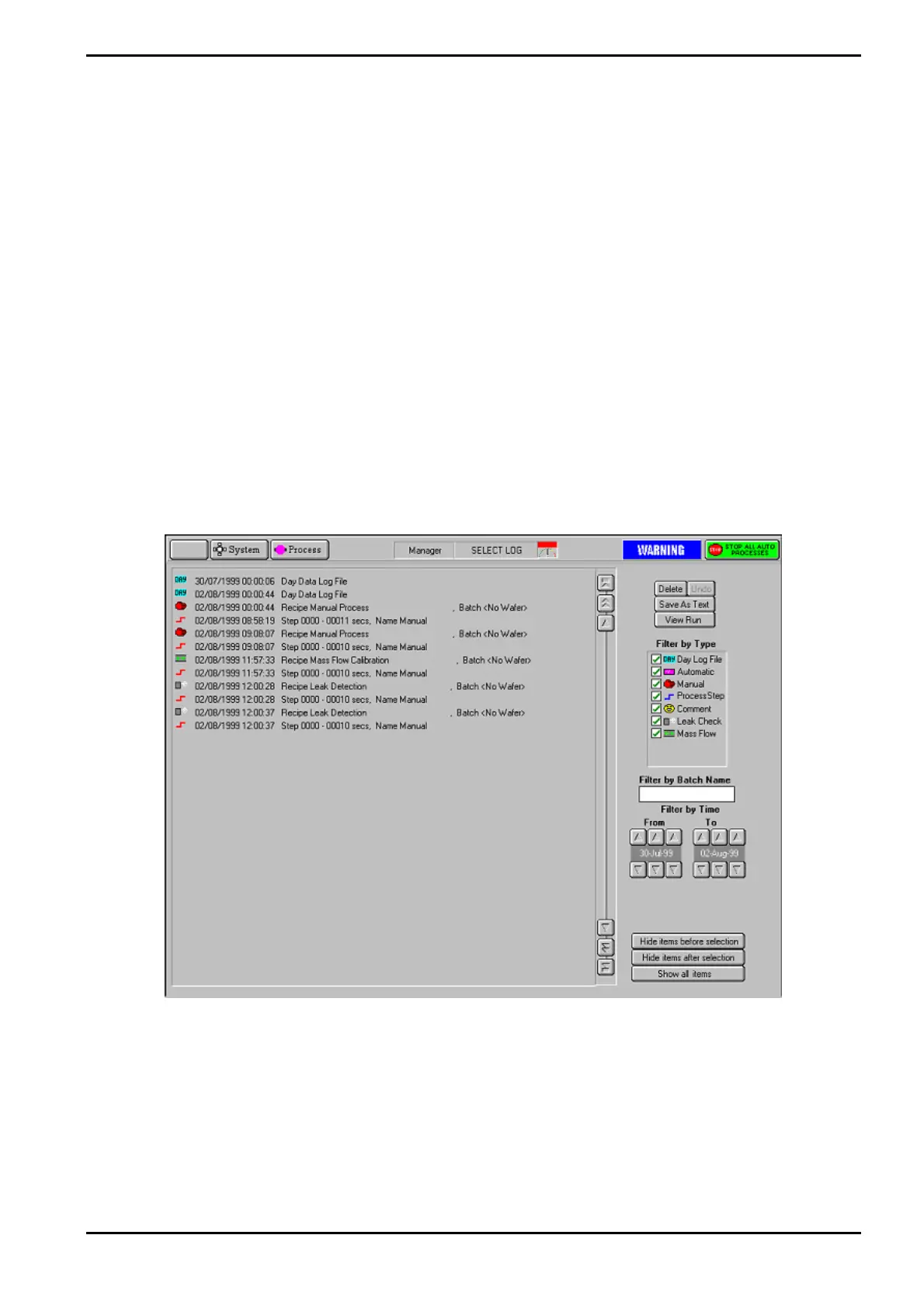
The Select Log page is displayed by selecting the Process button, then the Log View option.
Fig 5-6: Typical select Log page
The page comprises a list of logged events, which can be filtered by type, batch name and
time. When the required events have been selected, they can be viewed on a Log View page.
Operating Instructions
Printed: 06 November 2007 09:42 Page 5-27 of 60 Generic (OpAL Plasma) Issue 1: Oct. 07


 To Next Page