System Manual Oxford Instruments Plasma Technology OpAL
3.5 Controls and indicators
3.5.1 Base unit
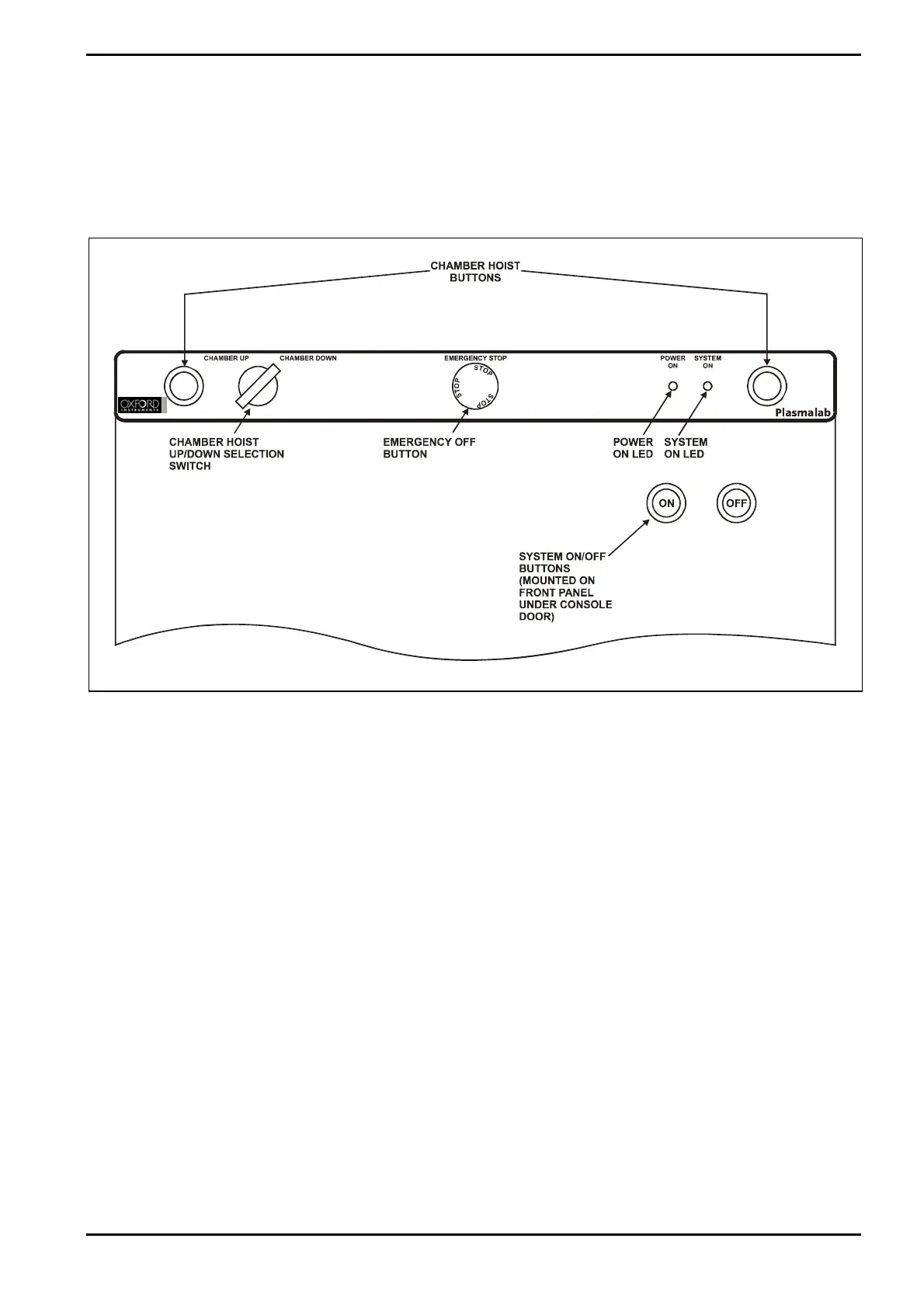
The controls and indicators are mounted on the front of the unit as shown in Fig 3-19.
Fig 3-19: Controls and indicators
The controls and indicators comprise:
Chamber Hoist buttons and
up/down selection switch:
These controls raise and lower the chamber top to
allow access to the chamber interior. To raise or
lower the chamber top, the up/down selection switch
is set to the required position, then both chamber
hoist buttons are pressed.
Emergency Off (EMO) button: When pressed, the system is shut down. See sub-
section 3.6.1 for details.
Power On indicator:
Indicates that 3-phase electrical power is connected
to the machine.
System On indicator: Indicates that the system is powered up.
System On button: Switches the system power on.
System Off button: Switches the system power off.
Description
Printed: 07 August 2009 07:42 Page 3-19 of 46 Issue 1: August 07


 To Next Page