System Manual= lñÑçêÇ=fåëíêìãÉåíë=mä~ëã~=qÉÅÜåçäçÖó= lé^i
RKUKO oìå=äçÖ=é~ÖÉ=
The Run Log page is accessed from the Select Run page by clicking on the View Run button
with any process run other than a leak detection run (
) or MFC calibration run ( )
selected.
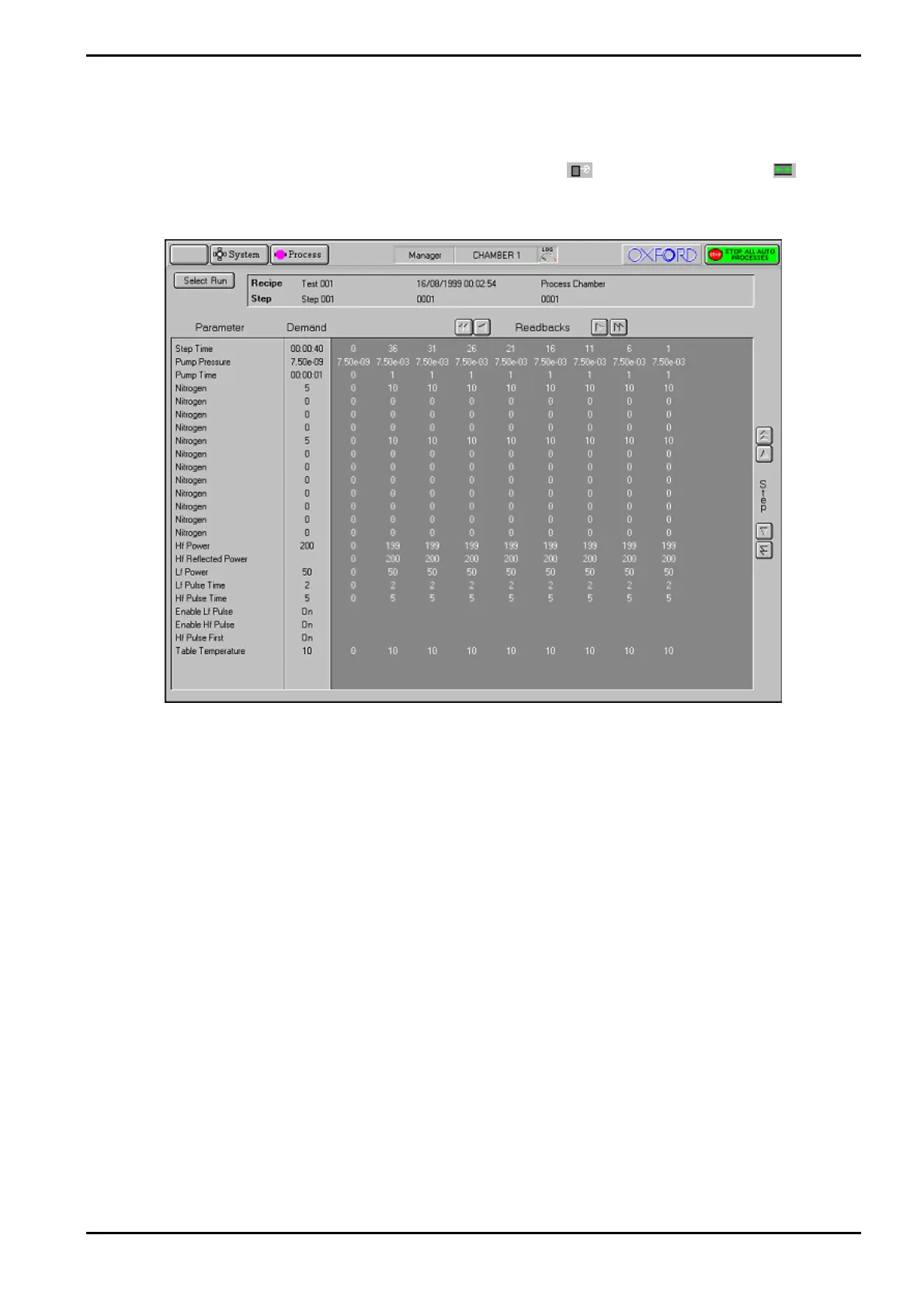
Fig 5-7: Typical run log page
The page displays the Parameters, Demands and Readbacks for the selected log data.
The facilities provided on the page are as follows:
Select Run button
Displays the Select Log page.
Log information panel
Displays details about the selected log data.
Parameter list
Lists the logged parameter names
Demand list
Displays the demanded parameter value
Readbacks list
Displays the logged parameter values with respect to time at the
log intervals specified for the process run. The list can be scrolled
horizontally either by single readbacks or by page. The list can also
be scrolled vertically to display further steps (for multi-step
recipes).
Operating Instructions
Printed: 06 November 2007 09:42 Page 5-31 of 60 Generic (OpAL Plasma) Issue 1: Oct. 07


 To Next Page