ALD Ozone Delivery System Oxford Instruments Plasma Technology
Equipment Manual
WARNING
BEFORE PROCEEDING WITH ANY MAINTENANCE WORK, READ SECTION 1 - HEALTH AND SAFETY.
MAINTENANCE
Printed: 14-Jul-10, 7:16
Page 6-2 of 2 Issue 01: July 10
6.1 Maintenance
Perform the following checks every month.
1) Open the cabinet door.
2) Observe the colour of the granules in the ozone destruction unit. If the crystals
have changed colour, contact Oxford Instruments Plasma Technology for advice.
The crystals change colour when they are contaminated with moisture.
3) Check that all VCR and Swagelok connections with the cabinet are tight.
6.2 Troubleshooting
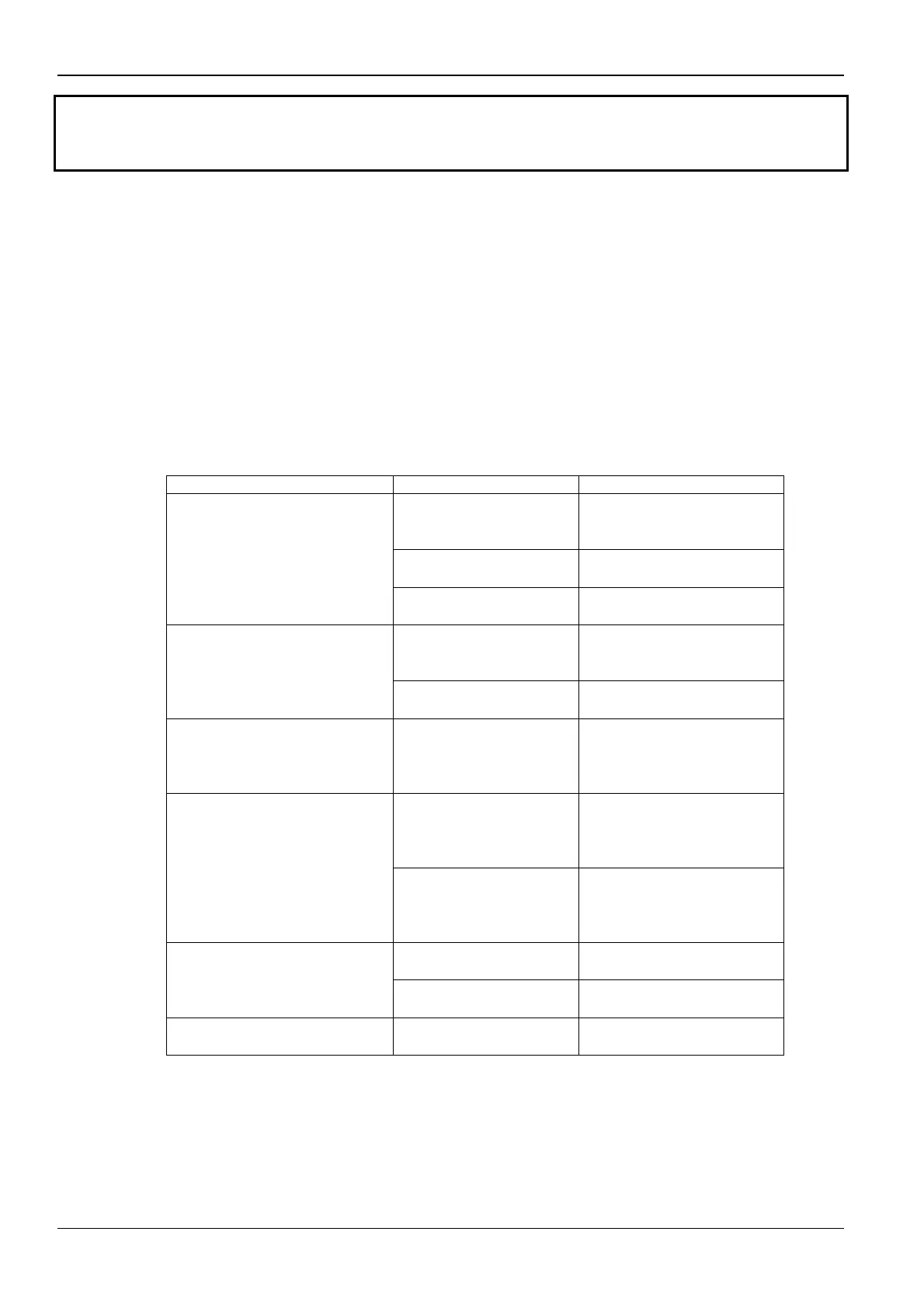
SYMPTOM POSSIBLE CAUSE SOLUTION
Ozone generator is
turned off at the front
panel.
Check the ozone
generator is turned on.
The cabinet door is
open.
Close the cabinet door.
Ozone generator cannot be
turned on from the PC2000
page.
Ozone monitor front-
panel switch is off.
Switch the ozone
monitor on.
Ozone monitor is
displaying a high
reading.
Fault-find the ozone
monitor (see below).
Ozone generator displays a
“FAULT” message on the
PC2000 page.
Exhaust pressure is too
high.
Correct the fault.
System has recently been
powered off and the ozone
monitor is displaying a high
reading.
Ozone monitor is
warming up.
Wait 60 minutes and try
again.
Ozone level inside the
cabinet is high.
Wait for the ozone level
to decay to a safe level.
Then leak-check the
ozone system.
System has been powered
on for more than 60 minutes
and the ozone monitor is
displaying a high reading.
Ozone monitor is
faulty.
Wait for 60 minutes. If
the ozone reading has
not fallen, fault-find the
ozone monitor.
Exhaust pressure is too
high.
Correct the fault. Rotameter is showing zero
flow.
Needle valve is open
too far.
Adjust the needle valve.
Rotameter flow is incorrect
but not zero.
Rotameter is
incorrectly adjusted.
Adjust the rotameter.


 To Previous Page