Operation Guide 500ML Lighting Control Console
142 Programming
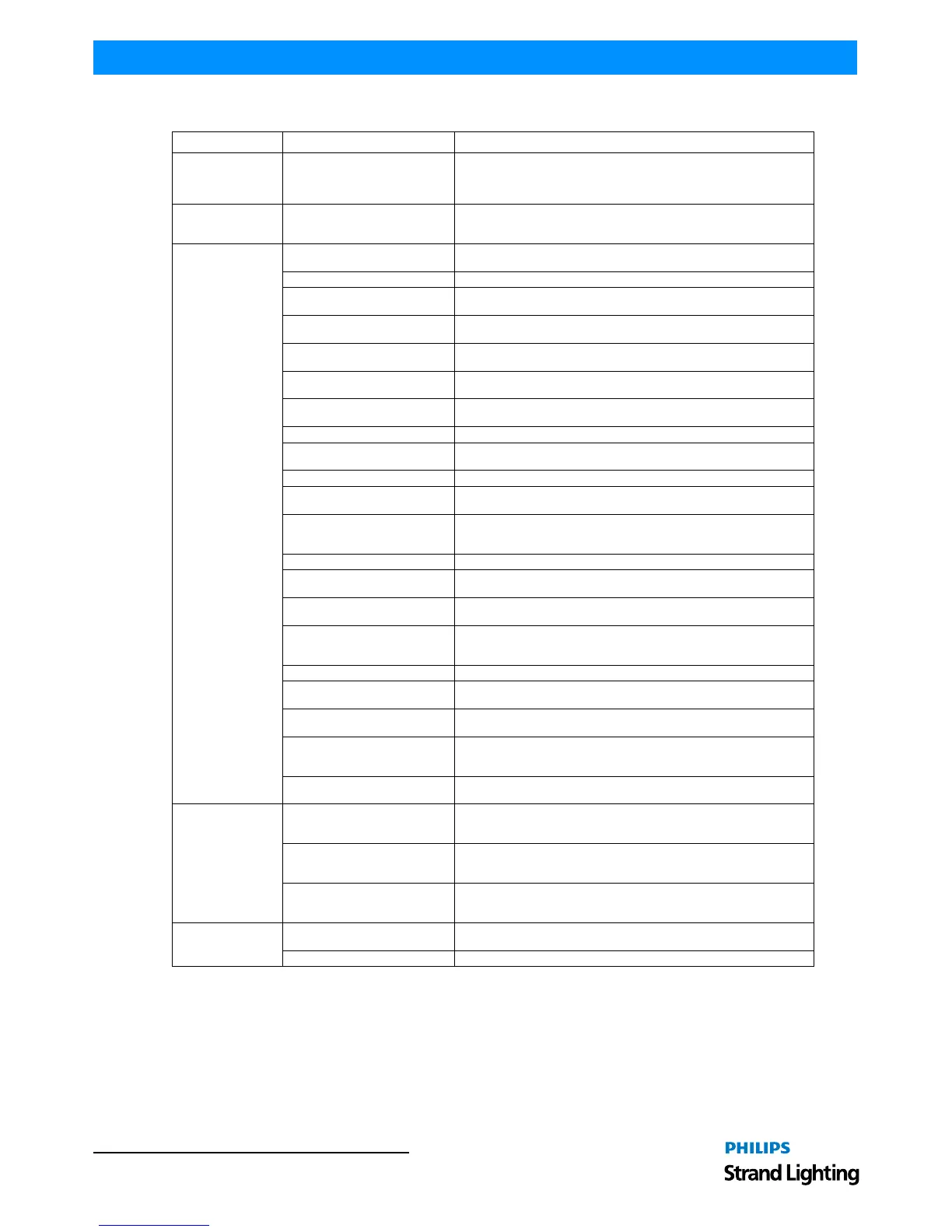
Table 5: On / Off Triggers by Item Type
Item Action Description
Fixture Dimmer Flash
The Fixture-Master Dimmer level will be set to 100% when the Note On
portion of the command is received, and back to the level defined by the
Fixture-Master Dimmers fader when the Off part of the command is
received.
Group Dimmer Flash
The Group-Master Dimmer level will be set to 100% when the Note On
portion of the command is received, and back to the level defined by the
Group-Master Dimmers fader when the Off part of the command is received.
Cuelist
Toggle
The cuelist will be started when the trigger is received. If it is already
running, it will be stopped.
Go A Go command is issued on this cuelist.
Goto
A Goto command is issued on this cuelist. The destination cue needs to be
defined in the Option Group box.
Pause / Back
The issue of the command will pause the cuelist including all ongoing fades.
The second will advance through the cuelist in reversed order
Skip +
Skips to the next cue in the cuelist without switching it on. If the cuelist is
running it will skip to the next cue, ignoring all fade times.
Skip -
Skips to the previous cue in the cuelist without switching it on. If the cuelist
is running it will skip to the previous cue, ignoring all fade times.
Off
Switches off the cuelist using the off time to fade out given in the cuelist
options.
Instant Off Switches off the cuelist ignoring the off time set in the cuelist options.
Assert
Will bring the cuelist "Up Front" in the priority stack but does not advance
through the cuelist.
Dimmer Flash Will temporary flash the dimmer value of the cuelist to the defined value.
Dimmer Flash + Go
Will temporary flash the dimmer value of the cuelist to the defined value.
Issues a Go Command when a Note On Command is received.
Dimmer Flash + Go + Off
Will temporary flash the dimmer value of the cuelist to defined Issues a Go
Command when a Note On Command is received. Issues an Off command
when a Note Off is received.
Speed Flash Will temporary flash the speed value of the cuelist to defined value.
Speed Flash + Go
Will temporary flash the speed value of the cuelist to the defined value.
Issues an On command when a Note On is received.
Speed Flash + Off
Will temporary flash the speed value of the cuelist to the defined value.
Issues an Off command when a Note Off is received.
Speed Flash + Go + Off
Will temporary flash the speed value of the cuelist to the defined value.
Issues an On command when a Note On is received. Issues an Off
command when a Note Off is received.
Infade Flash Will temporary flash the infade value of the cuelist to the defined value.
Infade Flash + Go
Will temporary flash the infade value of the cuelist to the defined value.
Issues an On command when a Note On is received.
Infade Flash + Off
Will temporary flash the infade value of the cuelist to the defined value.
Issues an Off command when a Note Off is received.
Infade Flash + Go + Off
Will temporary flash the infade value of the cuelist to the defined value.
Issues an On command when a Note On is received. Issues an Off
command when a Note Off is received.
Speed Flash + Off
Will temporary flash the speed value of the cuelist to the defined value.
Issues an Off command when a Note Off is received.
Fader
Go Button
Simulates a button pressed command on the Go Button when a Note On is
received. Simulates a button released command when a Note Off is
received.
Pause / Playback Button
Simulates a button pressed command on the Pause / Back Button when a
Note On is received. Simulates a button released command when a Note
Off is received.
Flash Button
Simulates a button pressed command on the Flash Button when a Note On
is received. Simulates a button released command when a Note Off is
received.
Grandmaster
Flash Blackout
Will flash the Blackout button (all fixtures will temporarily be set to their
Blackout Values).
Toggle Blackout Blackout mode will toggle.



 To Next Page