COPIER INSTALLATION
B039/B040/B043 1-6 SM
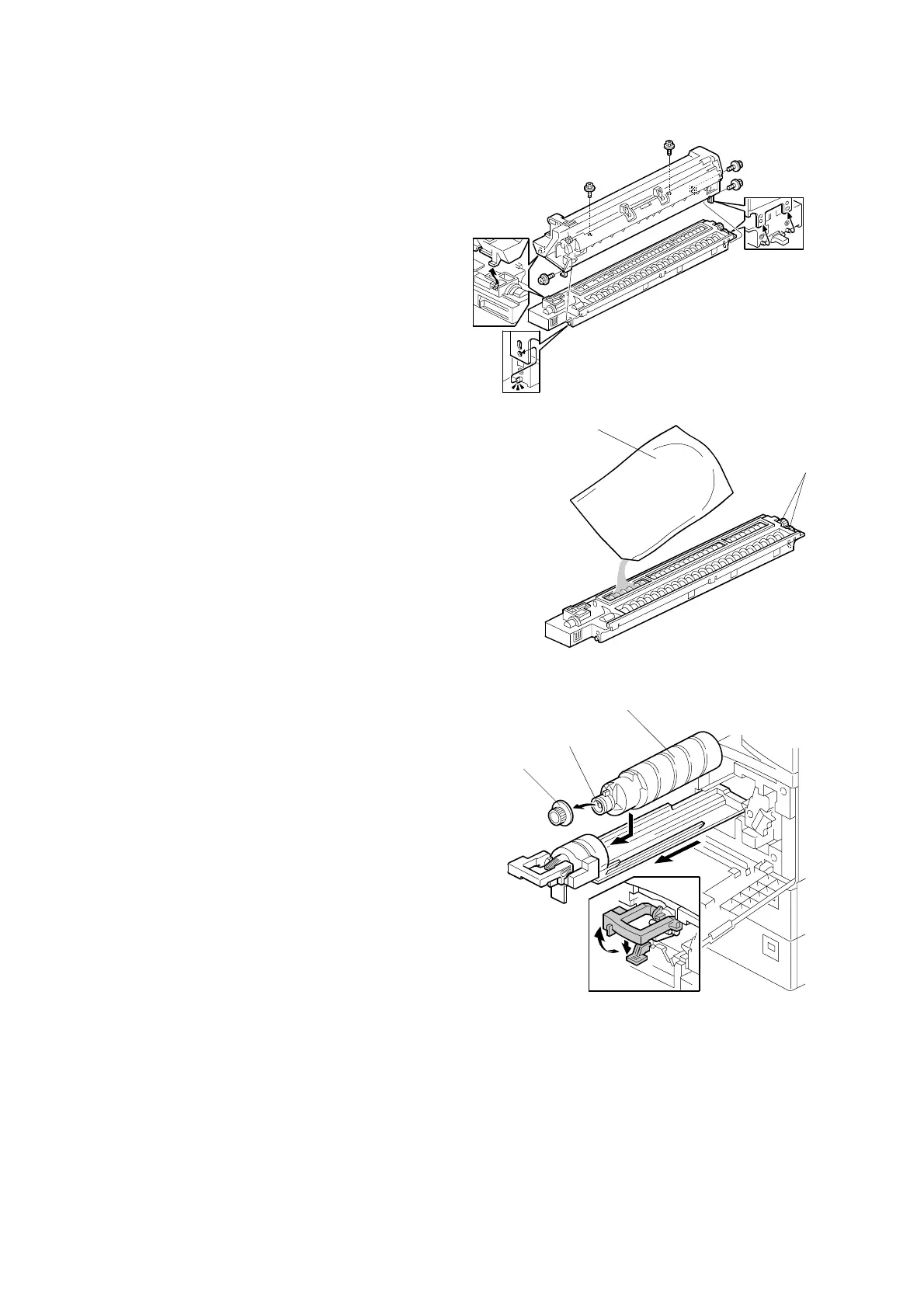
4. Separate the PCU into two sections
as shown (5 screws).
5. Distribute one pack of developer [A]
evenly across the width of the
development unit, into all openings.
NOTE: 1) To prevent foreign material
from getting on the sleeve
rollers, place a sheet of
paper under the
development unit.
2) Make sure not to spill the
developer on the gears [B].
3) If it is necessary to turn the
gear [B] to distribute the
developer, make sure to do
so very minimally, otherwise
the developer may spill.
6. Reassemble and reinstall the PCU.
7. Shake the toner bottle [C] several
times.
NOTE: Be sure not to remove the toner
bottle cap [D] until after
shaking.
8. Unscrew the bottle cap [D] and insert
the bottle into the holder.
NOTE: Do not touch the inner bottle
cap [E].
9. Reposition the holder and press down
the holder lever to secure the bottle.
10. Pull out the paper tray and turn the
paper size dial to the appropriate size. Adjust the end and side guides to match
the paper size.
NOTE: To move the side guides, first release the green lock on the rear side
guide.
B039I114.WMF
B039I115.WMF
B039I504.WMF
[A]
[B]
[C]
[D]
[E]



 To Next Page