fax Unit b404
ERROR CODES
SM 4-7 B404
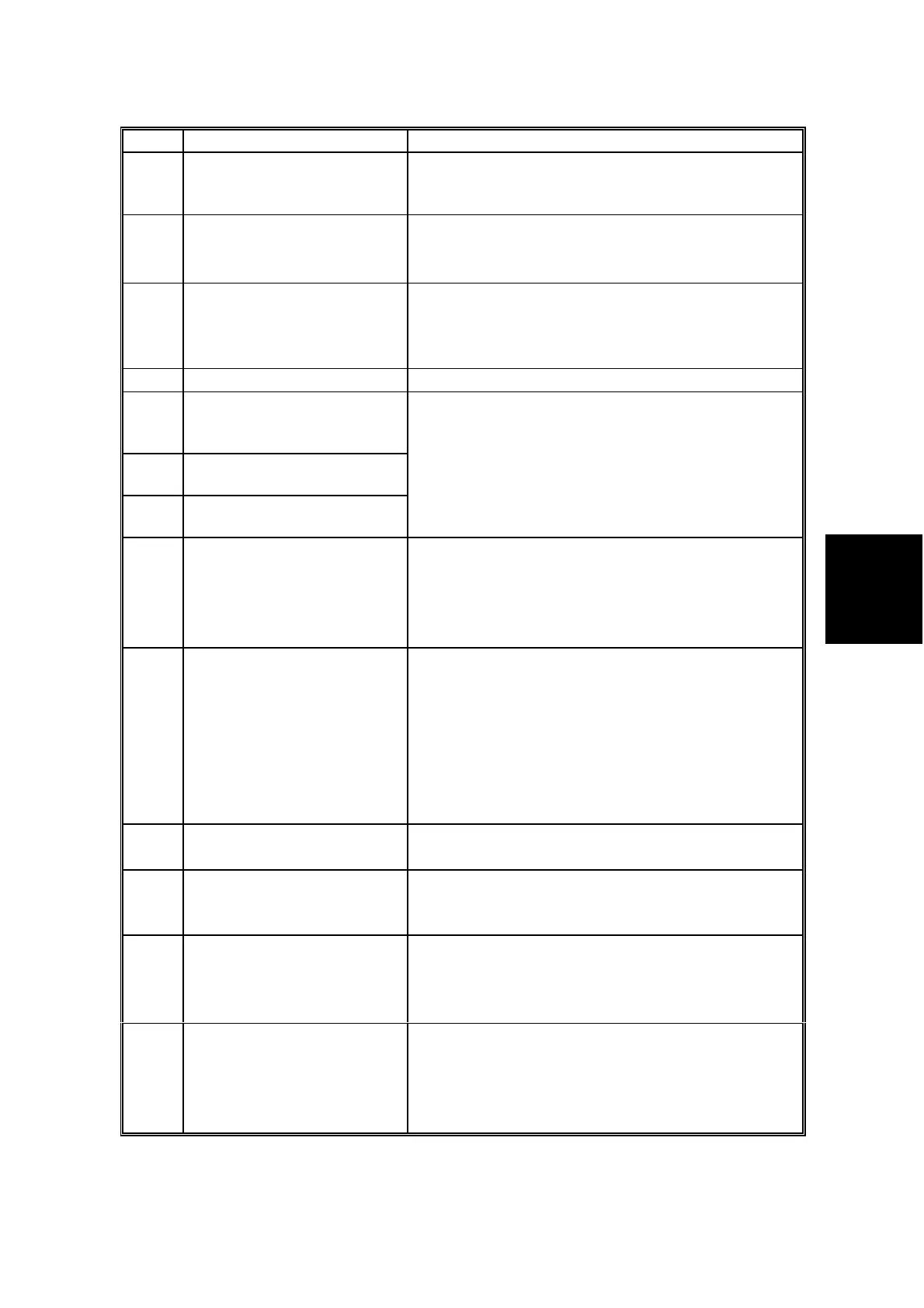
Code Meaning Suggested Cause/Action
5-22
Mode table overflow after
the second page of a
scanned document
• Wait for the messages which are currently in
the memory to be sent or delete some files
from memory.
5-23
Print data error when
printing a substitute rx or
confidential rx message
• Test the SAF memory.
• Ask the other end to resend the message.
• Replace the FCU board.
5-24
Memory overflow after the
second page of a scanned
document
• Try using a lower resolution setting.
• Wait for the messages which are currently in
the memory to be sent or delete some files
from memory.
5-25 SAF file access error
• Replace the FCU board.
6-00
G3 ECM - T1 time out
during reception of
facsimile data
6-01
G3 ECM - no V.21 signal
was received
6-02 G3 ECM - EOR was
received
• Try adjusting the rx cable equalizer.
• Replace the FCU or NCU.
6-04 G3 ECM - RTC not
detected
• Check the line connection.
• Check connections from the NCU to the FCU.
• Check for a bad line or defective remote
terminal.
• Replace the FCU or NCU.
6-05
G3 ECM - facsimile data
frame not received within
18 s of CFR, but there was
no line fail
• Check the line connection.
• Check connections from the NCU to the FCU.
• Check for a bad line or defective remote
terminal.
• Replace the FCU or NCU.
• Try adjusting the rx cable equalizer
Cross reference
• Rx cable equalizer - G3 Switch 07 (PSTN)
6-06
G3 ECM - coding/decoding
error
• Defective FCU.
• The other terminal may be defective.
6-08
G3 ECM - PIP/PIN
received in reply to
PPS.NULL
• The other end pressed Stop during
communication.
• The other terminal may be defective.
6-09 G3 ECM - ERR received
• Check for a noisy line.
• Adjust the tx levels of the communicating
machines.
• See code 6-05.
6-10
G3 ECM - error frames still
received at the other end
after all communication
attempts at 2400 bps
• Check for line noise.
• Adjust the tx level (use NCU parameter 01 or
the dedicated tx parameter for that address).
• Check the line connection.
• Defective remote terminal.



 To Next Page