Fax Unit B404
BIT SWITCHES
SM 5-23 B404
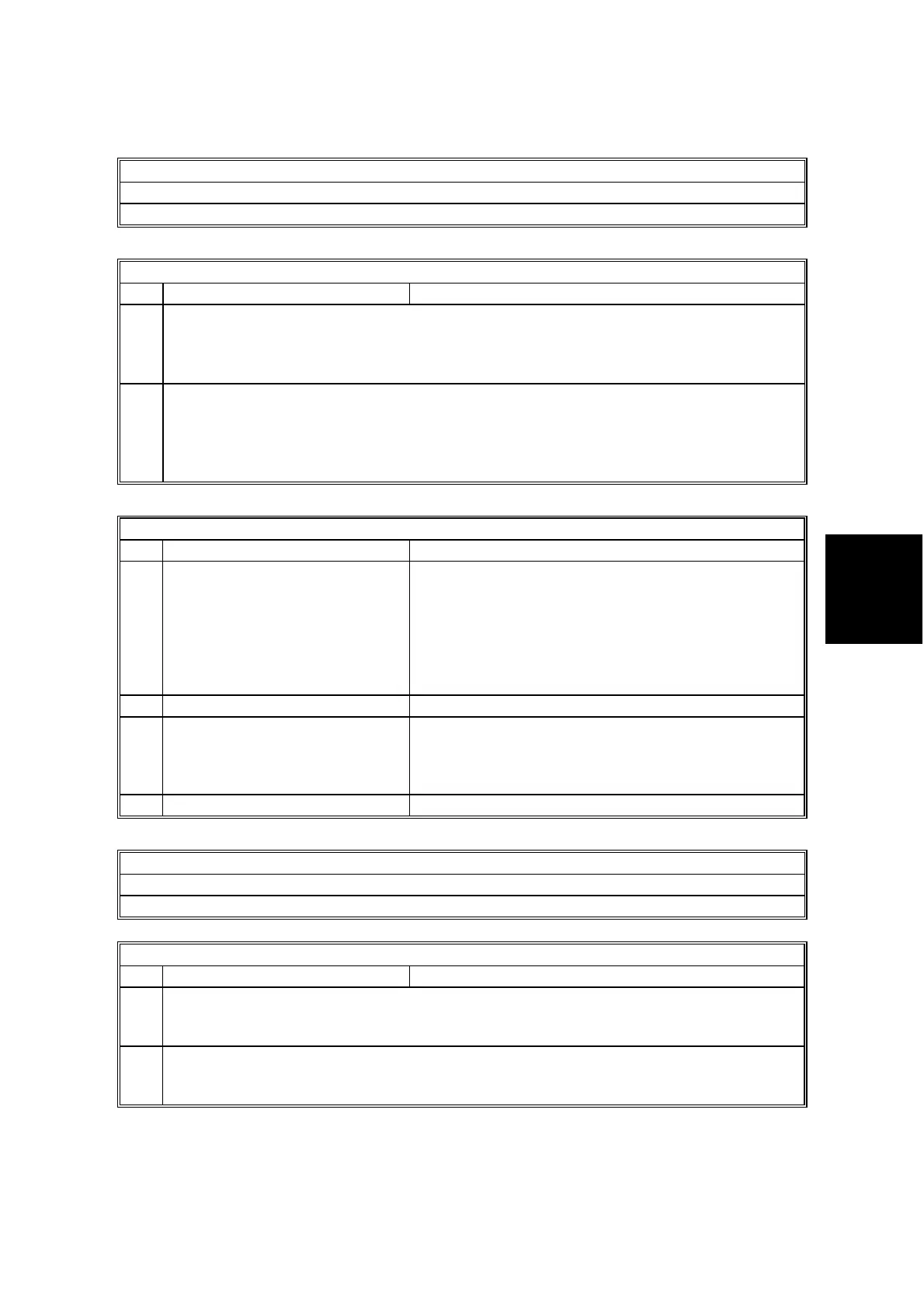
Scanner Switch 03 - Not used (do not change the settings)
Scanner Switch 04 - Not used (do not change the settings)
Scanner Switch 05 - Not used (do not change the settings)
Scanner Switch 06
No FUNCTION COMMENTS
0
to
3
MTF filter level (Text mode)
The value can be between 0 (Off) and F. For a weaker threshold, input a lower value.
Default setting: 7
This setting is independent from the threshold specified by copier SP mode.
4
to
7
MTF filter level (Photo mode)
The value can be between 0 (Off) and F. For a weaker threshold, input a lower value.
Default setting: 7
This setting is independent from the threshold specified by copier SP mode.
This affects only when bit7 = 1 of scanner switch 00 and select the photo mode.
Scanner Switch 07
No FUNCTION COMMENTS
0
to
2
Smoothing filter level (Photo
mode)
The value can be between 0 (Off) and 7. For a
weaker threshold, input a lower value.
Default setting: 2
This setting is independent from the threshold
setting specified by the copier’s SP mode.
This affects only when bit7 = 0 of scanner switch 00
and select the photo mode..
3 Not used Do not change the settings.
4-6 White line erase Select the strength for the white line erase function.
The value can be between 0 (Off) and 5.
For a weaker level, input a lower value.
This affects only when text/photo mode is selected.
7 Not used Do not change the settings.
Scanner Switch 08 - Not used (do not change the settings)
Scanner Switch 09 - Not used (do not change the settings)
Scanner Switch 0A - Not used (do not change the settings)
Scanner Switch 0B
No FUNCTION COMMENTS
0
to
3
Scan margin setting (right and left margin in book scan and in ADF mode)
The setting can be between 0 and F (H) (unit 0.5 mm).
4
to
7
Scan margin setting (Top and bottom margin in book scan and in ADF mode)
The setting can be between 0 and F (H) (unit 0.5 mm).



 To Next Page