Installation
TWO-TRAY PAPER TRAY UNIT INSTALLATION
SM 1-15 B039/B040/B043
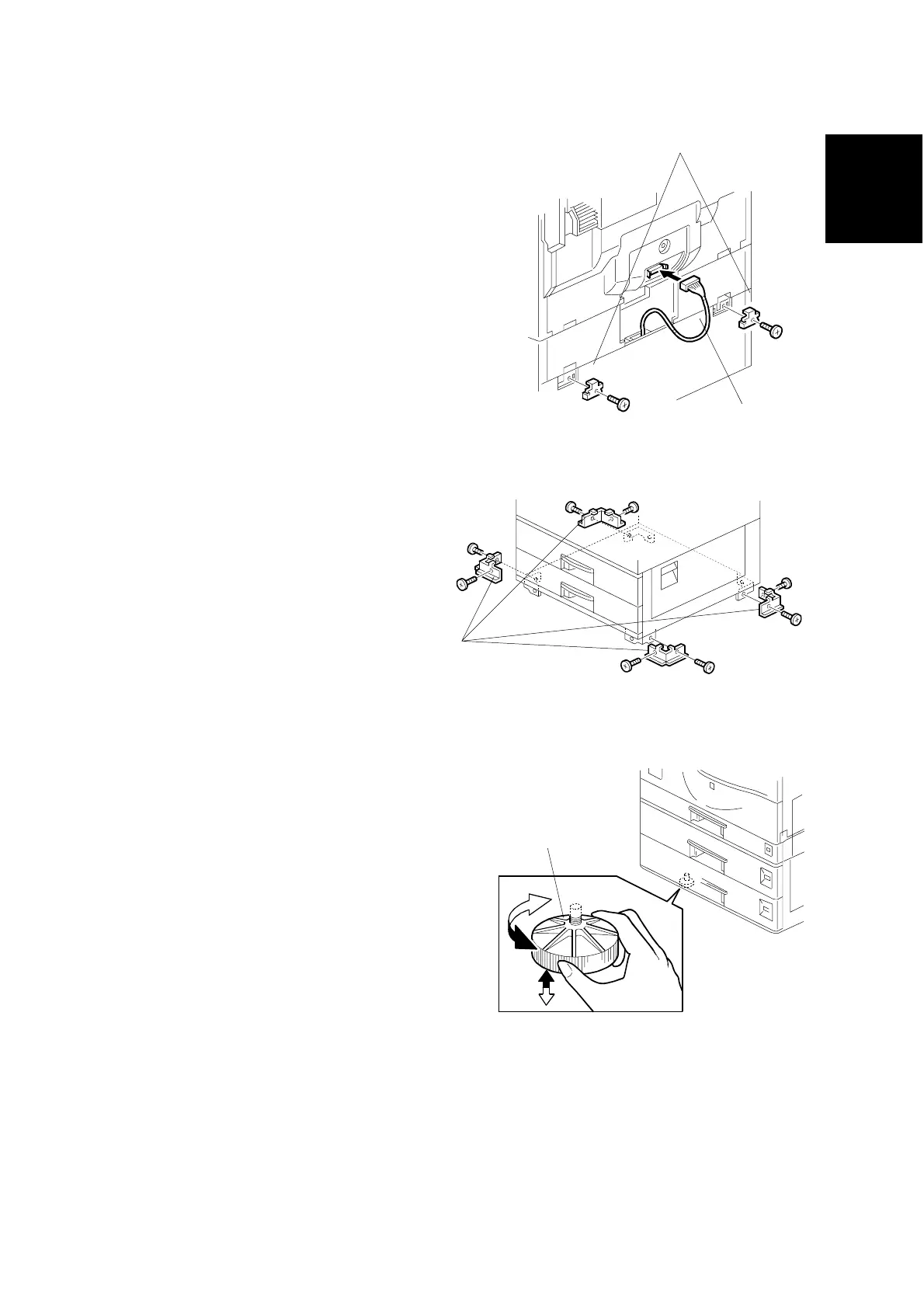
8. Install the two brackets [A] (1
stepped screw each).
9. Connect the connecting harness
[B] to the copier.
NOTE: There are cutouts in the
plug on both sides. The
left side has one cutout,
and the right side has
two.
10. Reinstall the cover removed in
step 3 (1 rivet).
11. Install the four brackets [C] (2
screws each).
NOTE: If a table is installed, this
step is unnecessary.
12. Rotate the adjuster [D] to fix the
machine in place.
NOTE: If a table is installed, this
step is unnecessary.
13. Load the paper in the paper trays
and make full size copies from
each tray. Check if the side-to-
side and leading edge
registrations are correct. If they
are not, adjust the registrations
(☛ 3.13 Copy Adjustments:
Printing/ Scanning).
B384I105.WMF
B384I007.WMF
B384I002.WMF
[C]
[D]
[B]
[A]



 To Next Page