Share
Sharing
a
Folder
You
can share a folder from your
PC
to the
TV.
The maximum number of folders that can be shared is
32.
~ Your
PC
will operate as a server to the
TV.
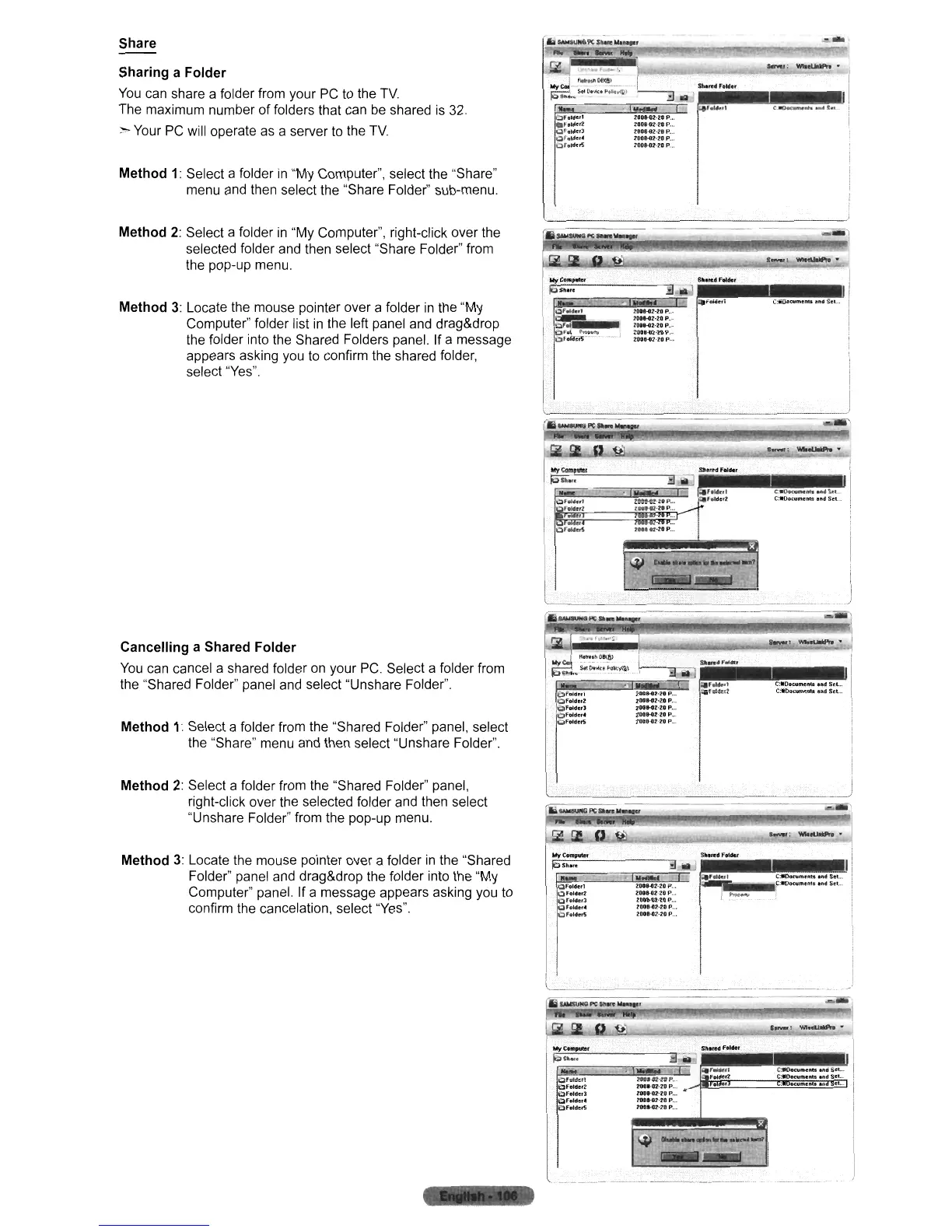
Method
1:
Select a folder
in
"My Computer", select the "Share"
menu and then select the "Share Folder" sub-menu.
Method
2:
Select a folder
in
"My Computer", right-click over the
selected folder and then select "Share Folder" from
the pop-up menu.
Method
3:
Locate the mouse pointer over a folder
in
the "My
Computer" folder list
in
the left panel and drag&drop
the folder into the Shared Folders panel. If a message
appears asking you
to
confirm the shared folder,
select "Yes".
oral.",l
tltoldcrt
~rolde,J
Qf"'de
••
~rDldc:~
(:If"',,'
r.o
200HZ-ZIP.,.
ZQ08-o2·UP
.
20""2'11
P .
20IHZ·20P
.
~OOH7·2IP
.
l:O
..
.aZ-10P
.
lOot.aHOP
.
lON-G2'-2'OP..
ZO
....
NOP
...
Zooe"Z-lOP
..
,
SIMI~FoWc:r
-
';;::::-::":=."'.
_=-
-."fj
~
illl,rd
FeiNt
,'$
r..-...
__
........
1IIIlIIf
-
I...,.,:"""~"
~
...
~StL.
C:WOowmUllil''''dSel
...
Cancelling
a Shared
Folder
You
can cancel a shared folder on your
PC.
Select a folder from
the "Shared Folder" panel and select "Unshare Folder"
Method
1:
Select a folder from the "Shared Folder" panel, select
the "Share" menu and then select "Unshare Folder".
l.J;iiLl
••
~iI'i1"
·.··Ii'
_~~;;.:...;..
.!
......
:
WII~"
Method
2:
Select a folder from the "Shared Folder" panel,
right-click over the selected folder and then select
"Unshare Folder" from the pop-up menu.
Method
3:
Locate the mouse pointer over a folder
in
the "Shared
Folder" panel and drag&drop the folder into the "My
Computer" panel. If a message appears asking you to
confirm the cancelation, select "Yes".
OffMcrl
t:)foldef'2
t:afoiderJ
Qrolder'
~Fol"erS
200HZ-lOP".
ZOI)
..
OZ20P
.
ZOlJHl2-?OP .
211lJl-G1.·20P
..•
2DO.-G2-Z0P
..•
C:tfDllaImc:nts."dSet
...
f:-ol)t:l;tmem.
,,,d
Set".
~==:::::::==
----_.
::-_._--~-
-
Ii
IAWSUM9
PC
I~
.......
'
I.~:
WIIIlJaiIIPN"
)15"
...
or"le,t
~folder2
~fofdet3
QfeIHI'
f:1feldlC~












 To Next Page