EasyManua.ls Logo

Samsung 950 - Page 161

Samsung 950
182 pages
Print Icon
To Next Page IconTo Next Page
To Previous Page IconTo Previous Page
Loading...
Connec·
9 a
VC
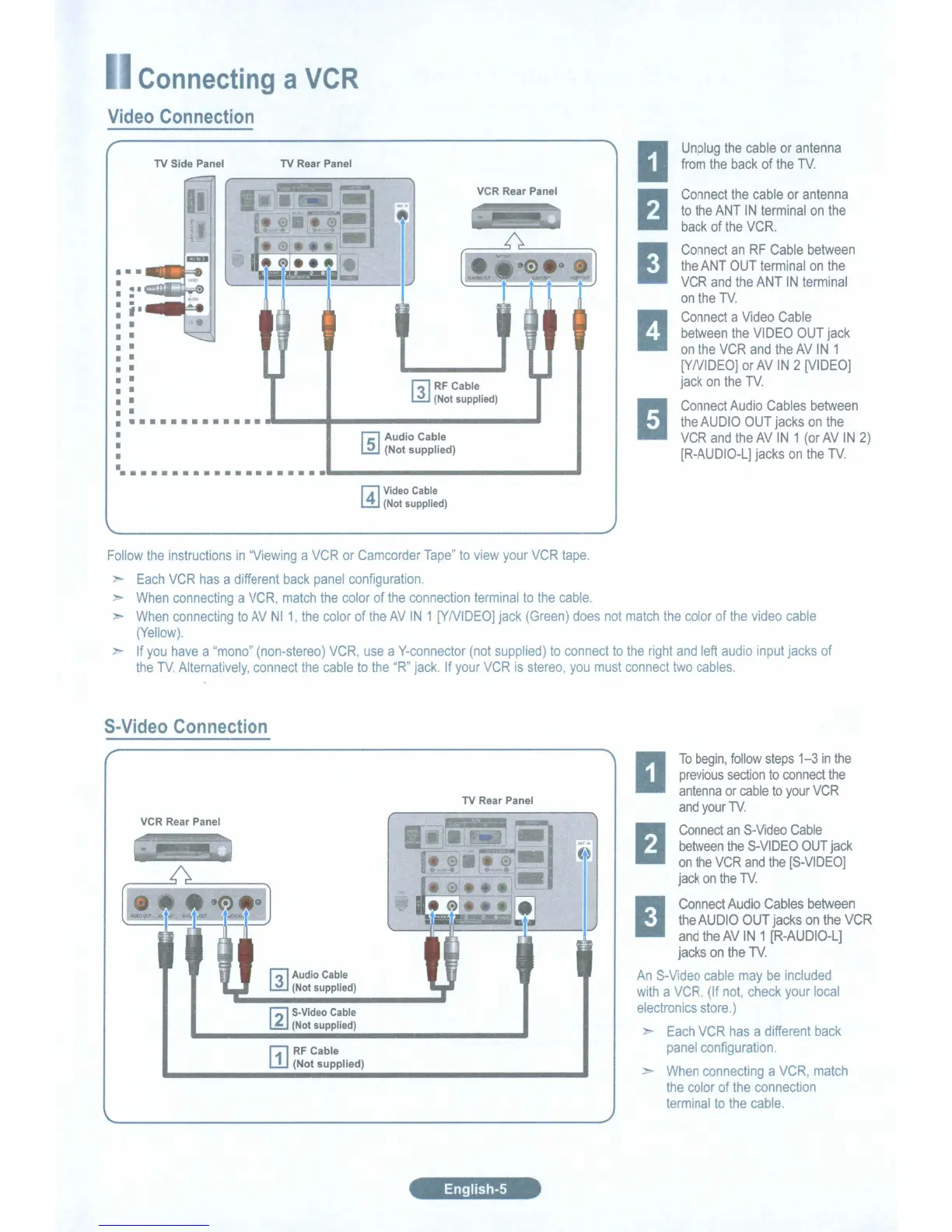
Video Connection
r;-)
Audio
Cable
~
(Not
supplied)
..
..
. _-.----------_.
Connect
the
cable
or
antenna
to
the
ANT
IN
terminal
on
the
back
of
the
VCR.
Connect
an
RF
Cable
between
the
ANT
OUT
terminal
on
the
VCR
and
the
ANT
IN
terminal
on
the
TV.
Connect
a
Video
Cable
between
the
VIDEO
OUT
jack
on
the
VCR
and
the
AV
IN
1
[YNIDEO]
or
AV
IN
2
[VIDEO]
jack
on
the
TV
Connect
Audio
Cables
between
the
AUDIO OUT
jacks
on
the
VCR
and
the
AV
IN
1
(or
AV
IN
2)
[R-AUDIO-L]
jacks
on
the
TV.
Unplug
the
cable
or
antenna
from
the
back
of
the
TV
VCR Rear Panel
fJl
RF
Cable
~
(Not supplied)
TV Rear PanelTV Side Panel
••
_.-..F:a
~
------------------------
..
r;)
Video Cable
L!J
(Not supplied)
Follow
the
instructions
in
"Viewing
a
VCR
or
Camcorder
Tape"
to
view
your
VCR
tape.
Each
VCR
has
a
different
back
panel
configuration.
When
connecting
a
VCR,
match
the
color
of
the
connection
terminal
to
the
cable.
When
connecting
to
AV
NI
1,
the
color
of
the
AV
IN
1
[Y/VIDEO]
jack
(Green)
does
not
match
the
color
of
the
video
cable
(Yellow).
-
If
you
have
a
'mono"
(non-stereo)
VCR,
use
a
V-connector
(not
supplied)
to
connect
to
the
right
and
left
audio
input
jacks
of
the
TV
Alternatively,
connect
the
cable
to
the
"R"
jack.
If
your
VCR
is
stereo,
you
must
connect
two
cables.
S-Video Connection
VCR Rear Panel
fJl
Audio Cable
li!J (Not supplied)
~
S-Video Cable
~
(Not supplied)
(-;11
RF
Cable
W (Not
supplied)
TV Rear Panel
To
begin,
follow
steps
1-3
in
the
previous
section
to
connect
the
antenna
or
cable
to
your
VCR
and
your
1\1.
Connect
an
S-Video
Cable
between
the
S-VIDEO
OUT
jack
on
the
VCR
and
the
[S-VIDEO]
jack
on
the
1\1.
Connect
Audio
Cables
between
the
AUDIO
OUT
jacks
on
the
VCR
and
the
AV
IN
1
[R-AUDIO-L]
jacks
on
the
TV.
An
S-Video
cable
may
be
included
with
a
VCR.
(If
not,
check
your
local
electronics
store.)
Each
VCR
has
a
different
back
panel
configuration.
.-
When
connecting
a
VCR,
match
the
color
of
the
connection
terminal
to
the
cable.
English-S

Table of Contents

Related product manuals