EasyManua.ls Logo

Samsung 950 - Page 162

Samsung 950
182 pages
Print Icon
To Next Page IconTo Next Page
To Previous Page IconTo Previous Page
Loading...
C
nnecti
a
igita
u
y
te
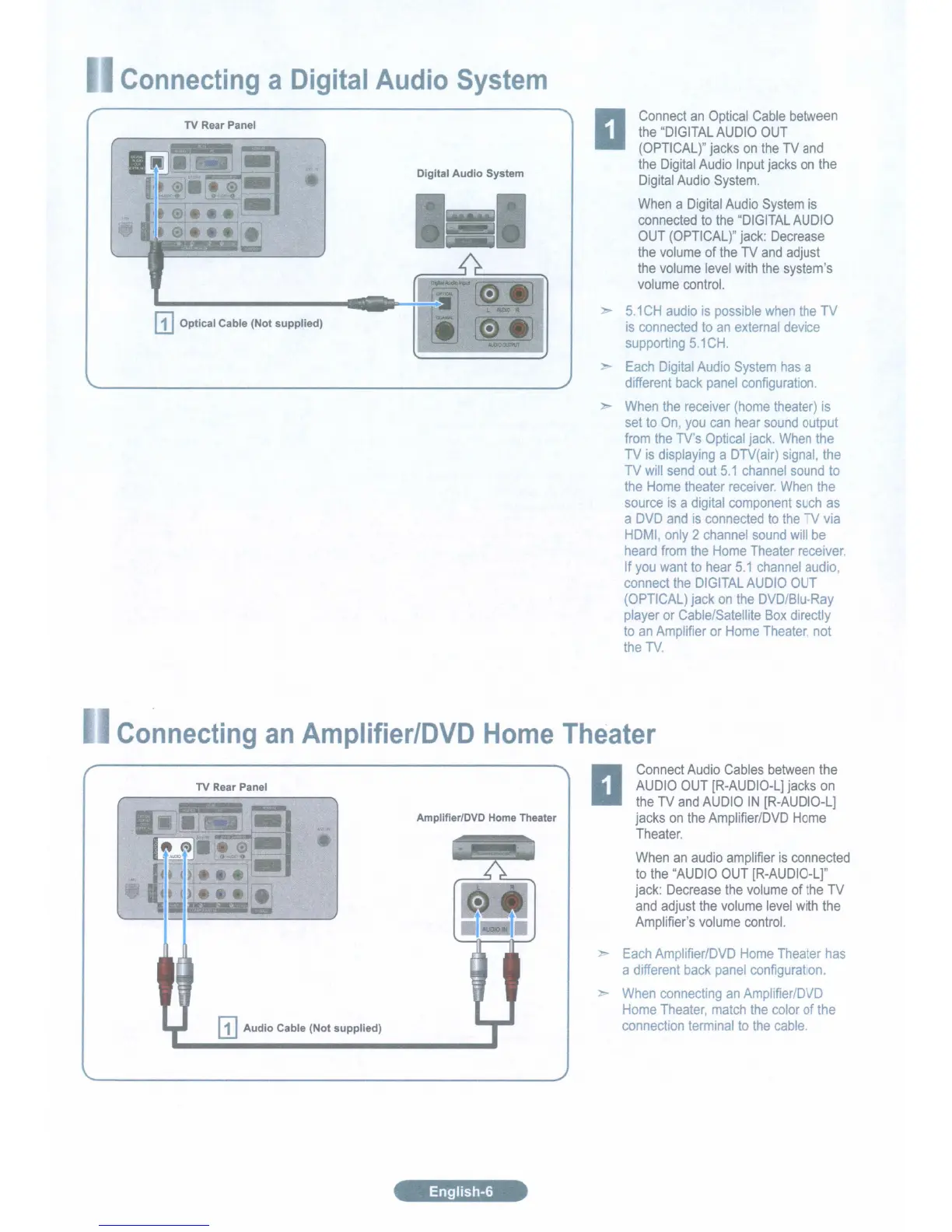
TV Rear Panel
Digital
Audio
System
Connect
an
Optical
Cable
between
the
"DIGITAL
AUDIO
OUT
(OPTICAL)"
jacks
on
the
TV
and
the
Digital
Audio
Input
jacks
on
the
Digital
Audio
System.
When
a
Digital
Audio
System
is
connected
to
the
"DIGITAL
AUDIO
OUT
(OPTICAL)"
jack:
Decrease
the
volume
of
the
TV
and
adjust
the
volume
level
with
the
system's
volume
control.
5.1
CH
audio
is
possible
when
the
TV
is
connected
to
an
external
device
supporting
5.1
CH.
Each
Digital
Audio
System
has
a
different
back
panel
configuration.
When
the
receiver
(home
theater)
is
set
to
On,
you
can
hear
sound
output
from
the
TV's
Optical
jack.
When
the
TV
is
displaying
a
DTV(air)
signal,
the
TV
will
send
out
5.1
channel
sound
to
the
Home
theater
receiver.
When
the
source
is
a
digital
component
such
as
a
DVD
and
is
connected
to
the
TV
via
HDMI
only
2
channel
sound
will
be
heard
from
the
Home
Theater
receiver.
If
you
want
to
hear
5.1
channel
audio,
connect
the
DIGITAL
AUDIO
OUT
(OPTICAL)
jack
on
the
DVD/Blu-Ray
player
or
Cable/Satellite
Box
directly
to
an
Amplifier
or
Home
Theater,
not
the
TV.
Co
c
Home
Thea
er
TV
Rear Panel
[1]
Audio
Cable (Not supplied)
Amplifier/DVD Home Theater
English-6
Connect
Audio
Cables
between
the
AUDIO
OUT
[R-AUDIO-L]
jacks
on
the
TV
and
AUDIO
IN
[R-AUDIO-L]
jacks
on
the
Amplifier/DVD
Home
Theater.
When
an
audio
amplifier
is
connected
to
the
"AUDIO
OUT
[R-AUDIO-L]"
jack:
Decrease
the
volume
of
the
TV
and
adjust
the
volume
level
with
the
Amplifier's
volume
control.
Each
Amplifrer/DVD
Home
Theater
has
a
different
back
panel
configuration.
When
connecting
an
Amplifier/DVD
Home
Theater,
match
the
color
of
the
connection
terminal
to
the
cable.

Table of Contents

Related product manuals