EasyManua.ls Logo

Samsung 950 - Page 163

Samsung 950
182 pages
Print Icon
To Next Page IconTo Next Page
To Previous Page IconTo Previous Page
Loading...
9 a
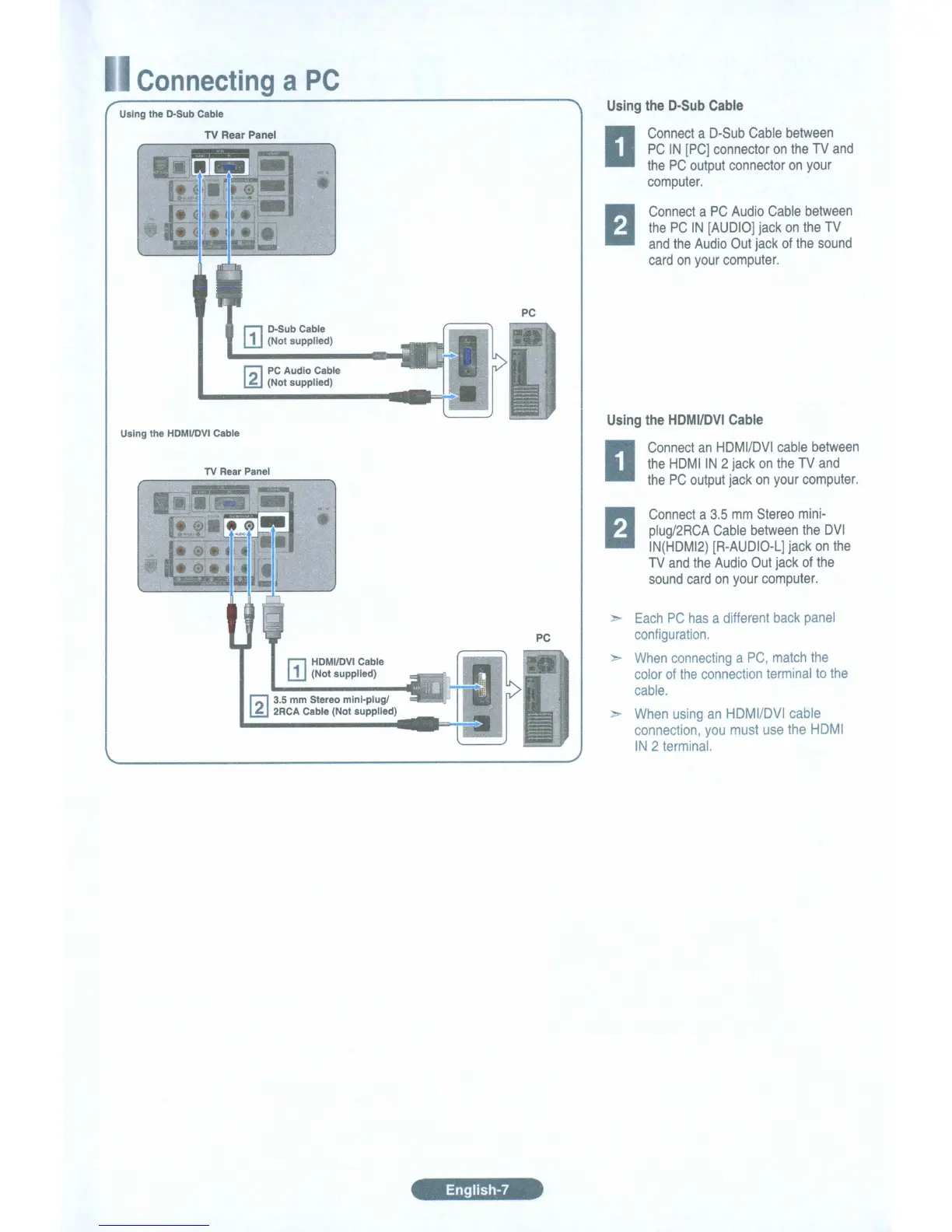
PC
Using the D-Sub Cable
TV Rear Panel
r::l D-Sub Cable
L1J
(Not supplied)
r;;,
PC
Audio Cable
~
(Not supplied)
Using the
HDMVDVI
Cable
TV
Rear Panel
r::l
1
HDMI/DVI Cable
LlJ (Not supplied)
r;;, 3.5 mm Stereo mini-plug!
~
2RCA Cable (Not supplied)
PC
PC
English-7
Using
the
D-Sub
Cable
Connect
a
D-Sub
Cable
between
PC
IN
[PC]
connector
on
the
TV
and
the
PC
output
connector
on
your
computer.
Connect
a
PC
Audio
Cable
between
the
PC
IN
[AUDIO]
jack
on
the
TV
and
the
Audio
Out
jack
of
the
sound
card
on
your
computer.
Using
the
HDMI/DVI
Cable
Connect
an
HDMI/DVI
cable
between
the
HDMIIN
2
jack
on
the
TV
and
the
PC
output
jack
on
your
computer.
Connect
a
3.5
mm
Stereo
mini-
plug/2RCA
Cable
between
the
DVI
IN(HDMI2)
[R-AUDIO-L]
jack
on
the
TV
and
the
Audio
Out
jack
of
the
sound
card
on
your
computer.
Each
PC
has
a
different
back
panel
configuration.
When
connecting
a
PC,
match
the
color
of
the
connection
terminal
to
the
cable.
When
using
an
HDMI/OVI
cable
connection,
you
must
use
the
HOMI
IN
2
terminal.

Table of Contents

Related product manuals